GetAssetPack

Pixel Planet - Godot Shader (Free)
Pixel Planet - Godot Shader (Free)
Price
Free
Type
Sprites
Creator
Francisco Cidade
License
CC0
Dimensions
2D
Style
Pixel art
Setting
Sci-fi, Space
Engine
Godot
Animation
Animated

A Godot shader generates spinning pixel art planets without textures, with six planet types, rings, clouds, and adjustable parameters for space maps, menus, and title screens.

Spinning pixel art planets for Godot: six planet types, rings, clouds and light, no textures.

Available on

Search by image

Upload a reference to find previews with similar colors, contrast, and detail.

Pixel Planet - Godot Shader (Free)

Pixel Planet - Godot Shader (Free)1 / 11
Francisco Cidade · itch.ioFree
2D
Sprites
CC0 · Public domain dedication
  • ✓ Commercial use, edits and redistribution
  • ✓ Attribution is optional
  • i Trademark and privacy rights still apply
Show full terms

Spinning pixel art planets for Godot: six planet types, rings, clouds and light, no textures.

A Godot shader generates spinning pixel art planets without textures, with six planet types, rings, clouds, and adjustable parameters for space maps, menus, and title screens.

View original listing

Description

Pixel Planet draws a spinning pixel art planet inside Godot, with no textures at all.

Put the shader on a square ColorRect, pick a planet type and a seed, and you have a planet for a title screen, a space map, a menu background or a GIF for social media. Change the seed and you get a whole new world.

Show full description...

This exists because of Deep-Fold's Pixel Planet Generator. If you like planets in pixel art, go download it first: https://deep-fold.itch.io/pixel-planet-generator. It is beautiful, free, MIT licensed, and it is what made me want to try this.

Try it in your browser first. The viewer runs the real shader: drag the sliders, switch the planet type, edit the code and watch it recompile, and download the planet as an image. When you like it, grab the project.

What you get

  • The shader file, with no textures and no other dependencies.
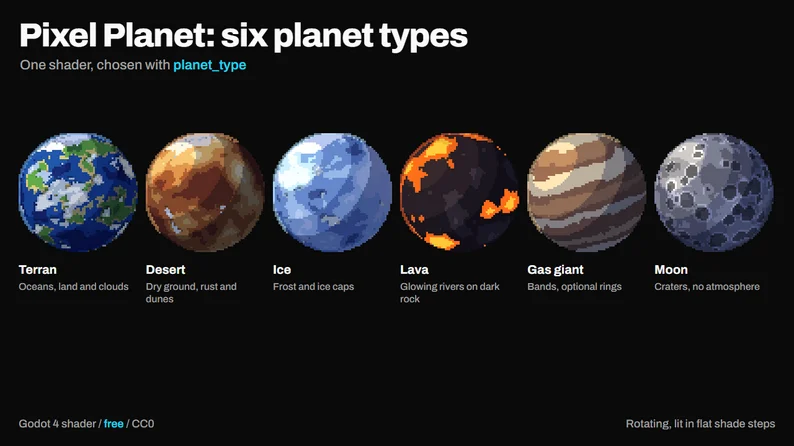
  • 6 planet types: Terran, Desert, Ice, Lava (the rivers keep glowing on the dark side), Gas giant and Moon (craters).
  • Rings, axis tilt, polar caps, clouds that cast shadows and an atmosphere glow.
  • An example project that goes through all six types.
  • Clouds turn exactly twice as fast as the ground, so one full turn of the planet loops cleanly. Handy for GIFs.

How to use it

  • Copy shaders/pixel_planet.gdshader into your project.
  • Add a square ColorRect, create a ShaderMaterial on it and assign the shader.
  • Pick planet_type and play with the parameters in the Inspector.

What each parameter does

  • planet_type: Terran (oceans, land, clouds), Desert (dry ground, rust and dunes), Ice (frost and ice caps), Lava (dark rock with glowing rivers), Gas giant (bands) or Moon (craters, no atmosphere).
  • pixels: how many big pixels wide the planet is. 64 is the default. Lower values look chunkier, like a tiny sprite (32), higher values show more detail (128). With rings the planet only fills about half of the picture, so use 96 or more.
  • seed: any number gives a different world. The same seed always gives the same planet.
  • spin: rotation speed, in turns per second. Negative spins the other way, 0 stops the planet.
  • scale: size of the features: continents, gas bands, craters. Higher means more and smaller ones.
  • sea_level: how much of the surface is low ground. On Terran it is water, on Desert it is canyons, on Lava it is the glowing rivers. Higher means more of it.
  • light_dir: where the light comes from (x to the right, y up, z toward you).
  • shade_steps: how many flat steps the light is cut into, from 2 (hard light and shadow) to 6 (smoother).
  • tilt: how far the north pole leans toward the camera. It is what lets you see the polar caps. At 0 you see the planet from the side.
  • ice_caps: size of the polar ice caps on Terran, Desert and Ice. 0 removes them.
  • cloud_cover: how much of the sky is cloudy on Terran, Desert and Ice. The clouds throw a shadow on the ground. 0 means a clear sky.
  • atmosphere_strength: how bright the glow around the edge of the planet is. Its color depends on the planet type. 0 turns it off.
  • rings: turns the rings on. The planet gets smaller to leave room for them.
  • ring_open: how open the rings look. 1 is seen from above, close to 0 is seen edge-on.
  • ring_angle: turns the rings around on the screen.

Compatibility: Godot 4.x (GL Compatibility, Mobile and Forward+), CanvasItem shader. The node's modulate is not applied.

License: CC0 (public domain). Use it in commercial games, change it, no credit needed (but I'd love to see what you make with it).

More assets by me: https://fcidade.itch.io

More from me

Tags

2DGeneratorGodotPixel ArtplanetsProcedural GenerationSci-fiShadersSpaceVisual Effects (VFX)

Downloads

Name your own price.