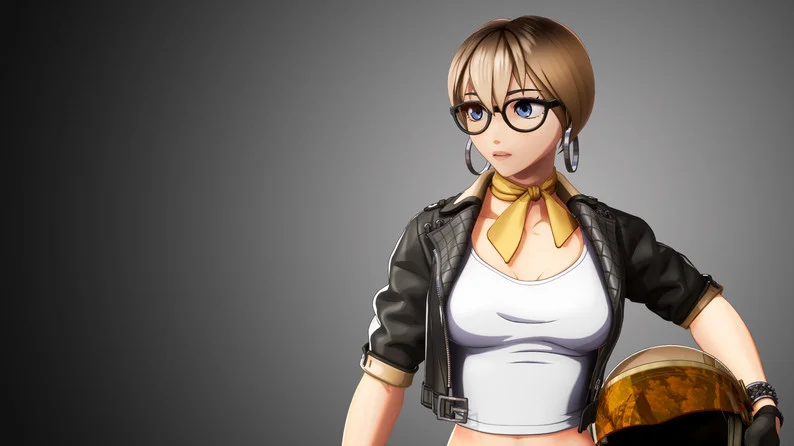
A flexible stylized rendering system for Unreal Engine 5, designed to give artists extensive control over anime-style lighting, materials, colors, shadows, highlights, and surface effects.
What started as a personal project for my own character work has gradually evolved into a much broader shading system through continuous development, experimentation, and user feedback.
Show full description...
The shader is not designed around reproducing one specific anime style. Instead, its different systems can be combined to create a variety of stylized looks while keeping the artist in control of the final result.
The Honest Pitch
I'll be the first to tell you: I'm not a professional shader artist.
I'm primarily a 3D modeler and technical artist, and this shader started as something I made because I needed it myself.
I'm not going to claim that every part of the shader is aggressively optimized for a massive production game. My priorities have been visual quality, flexibility, artistic control, and making the tools useful in actual character work.
The shader has been continuously developed through my own projects, experimentation, and feedback from users. Existing systems are also regularly reorganized and refined as the project grows.
It is particularly suited to character rendering, portfolios, presentation, animations, and other creative projects where visual control is more important than minimizing every possible rendering cost.
Workflow Options
Layered Materials
Combine multiple material types through masks while maintaining independent controls over colors, textures, normals, and other material properties.
Useful for assets where materials such as skin, leather, metal, or other surfaces need to coexist within a single material.
Standard Materials
A more traditional material-per-ID workflow for simpler setups or assets where separate materials are preferable.
You can also combine traditional material inputs with hand-painted masks, vertex colors, procedural controls, UV-based effects, SDF textures, custom maps, and other systems depending on your needs.
Key Features
Stylized Anime Lighting
Create controlled anime-style lighting using SDF-based face shadows, painted shadows, adjustable shadow transitions, shadow bands, lighting steps, and custom shadow colors.
The SDF system provides controls for shadow positioning, texture blur, transition softness, and other aspects of the lighting response.
Advanced Shadow & Penumbra System
Add custom color to the transition between light and shadow.
Penumbra tinting can be used with material shadows, painted shadows, and SDF-based lighting.
An optional World Penumbra system can extend this effect to world lighting.
Stylized Highlights
Create custom highlights that move across the surface according to either the camera or directional light.
Highlights can use procedural shapes or custom textures, with controls for their movement through UV space and masking using textures or vertex colors.
Multiple highlights can also be packed into a single RGBA texture.
Chromatic aberration is available for additional stylization.
Dynamic Anisotropic Highlights
Create directional highlights and reflections that respond dynamically to camera and lighting direction.
Originally developed with hair in mind, the anisotropic system can also be applied to other surfaces.
It can be driven by procedural patterns, custom textures, tangents, and flow-map-style directional data.
MatCap Highlights & Colors
Use MatCap-based effects to create stylized highlights and view-dependent color variations.
MatCaps can be created procedurally or from custom textures, tracked to the camera, masked to selected areas, and combined with existing material shading.
Advanced Detail Maps
The detail system supports both Lit and Unlit materials and provides extensive control over surface detail.
Supported features include:
- Normal maps
- Ambient occlusion
- Opacity
- Specular
- Roughness
- Adjustable normal strength
- Second UV projection
- Triplanar projection
- Surface masking
- RGBA zone masking
- Multiple detail setups on a single material
Stylized Subsurface Scattering
The shader includes multiple approaches for stylized subsurface effects, including Unreal's Subsurface Profile workflow and a simulated backlit method.
These can be used to create controlled light transmission and softer character shading while maintaining a stylized appearance.
View-Based Opacity
Create camera-dependent opacity effects for situations such as fading hair bangs away from the face.
The system includes controls for masked and translucent workflows, screen-space positioning, softness, radius, and distance-based opacity.
Artistic Color Control
Combine diffuse tinting, gradient coloring, shadow tinting, masks, MatCap colors, Fresnel, and other controls to create custom color workflows.
RGBA-based masking allows different settings and colors to be assigned to different parts of the same material.
Lit & Unlit Workflows
The shader supports both Lit and Unlit material approaches.
Use Lit materials when you want stronger interaction with Unreal Engine's scene lighting, or Unlit materials when you want greater control over the final stylized appearance.
Designed for Artists
As the project grew, I repeatedly reorganized the material parameters and underlying shader structure to make the system easier to navigate, maintain, and expand.
The goal isn't just to add as many features as possible. I also want the controls to remain understandable and practical to use.
You can use individual systems for a relatively simple anime look, or combine them to create much more complex character and material shading.
Performance
The shader has been developed with visual quality, flexibility, and artistic control as the primary priorities rather than aggressive optimization.
It was primarily created with rendering, character presentation, portfolios, and creative work in mind.
Some advanced features can have a higher performance cost depending on how they are used and combined, particularly:
- SDF lighting
- Subsurface scattering
- Layered materials
- Complex masking
- Other advanced shading systems
For this reason, the shader is best suited to projects where the final visual result and artistic control are more important than minimizing every possible rendering cost.
Pre-Purchase Checklist ✅
Please review the following before purchasing to make sure the shader fits your project.
Engine: UE 5.7+
Target Hardware: Primarily PC / Console
Mobile & Low-End VR: Some advanced features may be too demanding depending on usage.
Performance: Visual flexibility is prioritized over aggressive optimization.
Other Engines: Not compatible with UE4, Unity, or Godot.
Feature Overview: Please check the shader guide and update videos below for detailed demonstrations of the features and workflow.
Digital Goods Policy: Due to the nature of digital downloads, all sales are final unless the files have not been downloaded.
🎞️ Shader Guide & Updates:
https://youtube.com/playlist?list=PL8P1ecT7MRdHG1wnob5szBCMp0WiaH73S
Included
The package includes:
- Unreal Engine project
- Shader materials
- Example assets
- Textures and masks
- Documentation
- Penumbra patching tool
- Additional project files
- Blender source files, where applicable
The extra files, including World Penumbra, Blender files, and documentation, can be found in the project files under the Extras subfolder.
At the moment, the documentation is primarily provided through YouTube videos.
Unreal Engine Compatibility
Engine Compatibility: UE 5.7+
Created In: UE 5.7.4
Latest Tested Version: UE 5.8.2
The shader is designed specifically for Unreal Engine 5 and is not compatible with UE4, Unity, or Godot.
The shader itself is primarily content-based and may remain compatible with newer Unreal Engine versions without requiring a separate project download.
Compatibility with newer versions will be tested and added as they are verified.
World Penumbra Compatibility
The optional World Penumbra system uses an Unreal Engine shader modification and is therefore more dependent on the engine version.
The included patcher can install and restore this modification.
Because Unreal Engine's internal shader files can change between versions, the patcher may require updates when Epic changes the relevant shader files or implementation.
Please check the supported engine version listed for the World Penumbra patch before enabling it.
Continuous Development
This shader is slowly but surely developed during my free time.
New features have been added over time based on my own work, technical experimentation, and feedback from users.
Existing systems are also regularly refined and reorganized as the project grows.
I don't always know exactly what the next update will contain because many of the features in previous updates were not originally planned.
Usually, I encounter a problem or an idea while working and end up adding a new system around it.
The goal is to keep expanding the shader while maintaining a flexible workflow and keeping the controls understandable for artists.
About the Project
I'll be the first to tell you: I'm not a professional shader artist.
I'm primarily a 3D modeler and technical artist, and this shader started as something I made because I needed it for my own work.
I didn't begin with the goal of creating a commercial shader. I simply kept adding features as I encountered new artistic and technical problems.
Eventually, the project grew far beyond what I originally expected, and I decided to make it available to other artists.
The main idea has remained the same:
Give artists control over the look instead of forcing them into a single predefined rendering style.
Use of AI
AI was used in a limited and specific way during development.
It was used to assist with:
- Creation of some custom shader nodes
- Stylization of a reflection cubemap to better match the project's anime aesthetic
Support
If you encounter a bug or have trouble setting up the shader, please use the Discussion Board. I'm happy to help troubleshoot issues and provide guidance.
You can also join the MeshBites Discord for shader support, community showcases, updates, and tutorials.
Discord:
https://discord.gg/wx6RASWfyu
Please check the pinned message in the verify-purchase channel to complete the required steps for support.
License & Usage
By purchasing this pack, you are granted a non-exclusive license to use the shader and included assets in an unlimited number of personal or commercial projects.
Usage
You may use the shader and included assets in personal and commercial projects, including games, animations, portfolios, and other creative work.
License Type
This is a single-user / small-team license. One purchase covers you and your immediate small project team.
Studio Use
Larger studios should purchase additional seats by increasing the Pay What You Want amount or purchasing multiple copies as appropriate.
Restrictions
You may not resell, redistribute, or share the project files, shader nodes, or included character models as standalone assets.
Community
Join the MeshBites Discord for:
- Shader Support
- Community Showcase
- Updates
- Tutorials
- Development Discussion
I'm not always active in every channel, but I regularly share work in progress and try my best to help when someone needs support.
And I'd absolutely love to see what you build with the shader, so feel free to share your work!
 GetAssetPack