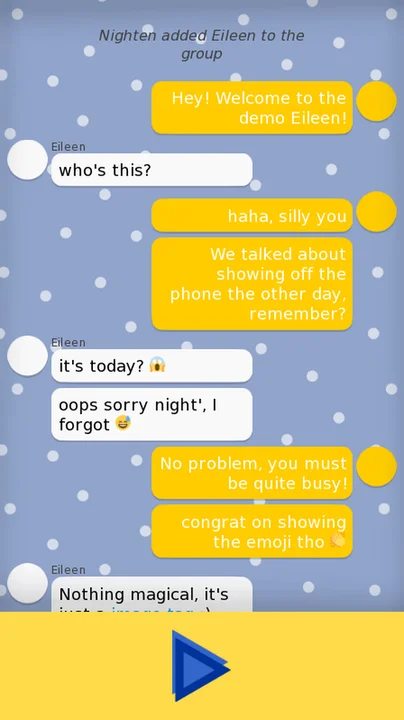
A simple messaging system for texting-based mobile game, such as "LifeLine" or "Bury me, my Love"; it's based on the NVL mode and it's really easy to use!
It's a follow up of my previous phone system, but with a vertical layout and some other improvements, such as choices directly available in the phone interface.
Show full description...
It's made for a 1080x1920 portrait game, but it also works in landscape. See the FAQ below.
- First things first, you need both the code and the assets! Copy PhoneTexting.rpy into your game/ folder, along with the files below. Feel free to replace or edit them later.
- In game/images/: phone_background.png, phone_foreground.png, phone_send_frame.png, phone_received_frame.png, phone_send_icon.png, phone_received_icon.png, continue_btn.png.
- In game/audio/: SendText.ogg and ReceiveText.ogg, only if you use the sound callbacks. Those are iPhone sounds, so I recommend making your own.
- In screens.rpy, edit the nvl screen like this. Indent the rest of your existing screen under else:: screen nvl(dialogue, items=None): if nvl_mode == "phone": use PhoneDialogue(dialogue, items) else: # Indent the rest of the screen window: style "nvl_window" # ...
- In gui.rpy: define gui.nvl_list_length = None. This keeps every message.
- Set your MC's name in PhoneTexting.rpy: default MC_Name = "Nighten".
- Now make a kind=nvl character speak! Use the send sound for the MC and the receive sound for the other characters: define n_nvl = Character("Nighten", kind=nvl, callback=Phone_SendSound) define e_nvl = Character("Eileen", kind=nvl, callback=Phone_ReceiveSound)
Emojis and pictures: use an {image=...} tag, sized for the phone screen. Look at the sample conversation to see how to use it.
To get the regular NVL screen back, set nvl_mode to anything else, like "classic".
Only the phone is made for portrait. Menus and save screens use the default Ren'Py UI with some bigger text.
FAQ
My MC's messages show on the wrong side / I use a player-entered name
MC_Name must match the displayed name. It can be a list, and you can use a variable like [player_name]. Ren'Py takes care of substituting:
default MC_Name = ["[player_name]", "Nighten"]
Or mark any character as the MC:
Character("[player_name]", kind=nvl, who_style="phone_mc")
Dialogue appears in the normal textbox, not the phone
The character probably isn't an NVL character. Add kind=nvl.
The phone disappears :(
The phone is the NVL screen, so it hides while a normal ADV character speaks. It comes back, with its history, on the next NVL line.
Text is invisible or uses the wrong font
Set the phone styles explicitly if your game's default text style is leaking in, like white text on a white bubble. See the next question!
How do I change fonts, colours, bubble width or background?
We have predefined styles you can edit to suit your needs: phone_narrator_text, phone_name_text, phone_mc_text and phone_other_text. Bubble styles: phone_mc_bubble and phone_other_bubble.
style phone_mc_text: font "myfont.ttf" color "#fff" style phone_other_bubble: background Frame("my_bubble.png", 23, 23) padding (20, 20) xsize 700
The phone itself is phone_background.png / phone_foreground.png: replace the images if you need to!
Per-character avatars?
You can configure this with the phone_icons variable. The key is the character's displayed name. If the character isn't in it, they use the default icon:
define phone_icons = {"Eileen": "eileen_icon.png"}
Choices inside the phone?
Use menu (nvl=True):. If you use a plain menu:, it will show the normal choice overlay.
How do I clear messages / have separate conversations?
nvl clear empties the phone. For a separate history per contact you can hack it this way, but I don't generally recommend it:
default phone_threads = {} init python: def phone_open(name): store.nvl_list = store.phone_threads.setdefault(name, [])
Call $ phone_open("Eileen") before that conversation. Call it again after any nvl clear.
Can I use it in a landscape / PC game?
Yes! Not super recommended, but you can set phone_width and the phone is centered on the screen. Don't go below 700, the bubbles have a fixed width:
define phone_width = 800
Original post on Lemmasoft
Mirror download on my website
Full source code on Github
If you have any issue or question, please let me know! I hope this will help you!!
Have a nice day!
 GetAssetPack