150 retro anime & manga effect stamps for Procreate - plus the same 150 shapes as transparent PNG for any other drawing app.
Give your comic, webtoon or fan art that classic 80s anime look in seconds: tap once, and the effect is there. Every stamp paints in your current colour; set the size with the brush size slider (shapes are 2048 px, so very large sizes may look softer).
Show full description...
- 3 Procreate .brushset files = 150 stamps
1) Focus lines 10, Speed lines 10, Sweat & tears 15, Emotion marks 30
2) Sparkles & stars 20, Screentones 20
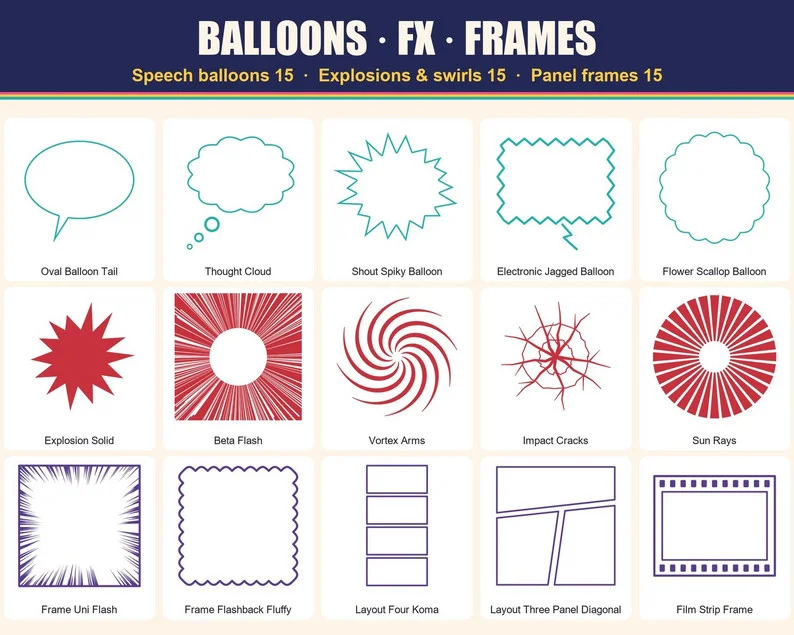
3) Speech balloons 15, Explosions & swirls 15, Panel frames 15
- 150 transparent PNG files, 2048 x 2048 px (ZIP)
- PDF guide: install steps, tips and the full index of all 150
INSIDE THE SET
- Focus lines: dense, bold, wide-open, off-centre, oval, clustered "uni" lines
- Speed lines: horizontal, diagonal, falling, swoosh arcs, perspective, dash streaks
- Sweat & tears: sweat drops, panic sweat, waterfall tears, cold-sweat drips, teary eyes
- Emotion marks: anger veins, ! ? !? marks, hearts, broken heart, music notes, sigh puff, Zzz, idea bulb, gloom lines, blush lines, dizzy spiral
- Sparkles: classic 4-point sparkles, glints, stars, shooting star, shoujo bubbles, star dust
- Screentones: halftone dots (fine / medium / coarse), dot gradients, line tones, cross hatch, concentric, wave, sand, check, star and heart tones
- Speech balloons: oval, round, box, thought cloud, shout, trembling, whisper, electronic, flower, black, linked, phone, vertical
- Explosions & swirls: explosions, impact star, beta flash, swirls, vortex, whoosh, dust cloud, shockwave, cracks, splash, electric bolts, sun rays
- Panel frames: thick, double, rounded, round & oval panels, flash frame, hand-drawn, dashed, flashback, 4-koma, 3-panel and 2-panel layouts, corner brackets, ribbon, film strip
WORKS WITH
- .brushset: Procreate (iPad) and Procreate Pocket (iPhone)
- PNG: Clip Studio Paint, Photoshop, Krita, ibisPaint, Affinity, GIMP, Canva and more
HOW TO INSTALL (a few steps)
1. Download the files to your iPad (Files app).
2. Tap a .brushset file - Procreate opens and adds the set.
3. Choose a stamp, set the size, tap once on the canvas.
HOW THESE WERE MADE
Every shape was drawn with our own program code from mathematical formulas (lines, curves, polygons, halftone math). No generative AI was used to create the stamps.
LICENSE
- OK: personal and commercial artwork made with the stamps (comics, webtoons, illustrations, prints, merch, print-on-demand, client work, social media). No credit needed.
- Not OK: reselling or sharing the stamp / PNG files themselves, or making them into another brush, stamp or clipart pack.
PLEASE NOTE
- This is a digital download. No physical item will be shipped.
- Stamps are single-colour shapes. Colours in the preview images are only examples.
- Speech balloons are outlines - fill the inside on a layer below if you want white.
- If anything does not open, please message us first - we will help or send a new file.
AI disclosure: no generative AI was used. Every shape was drawn by our own program code from mathematical formulas.
 GetAssetPack