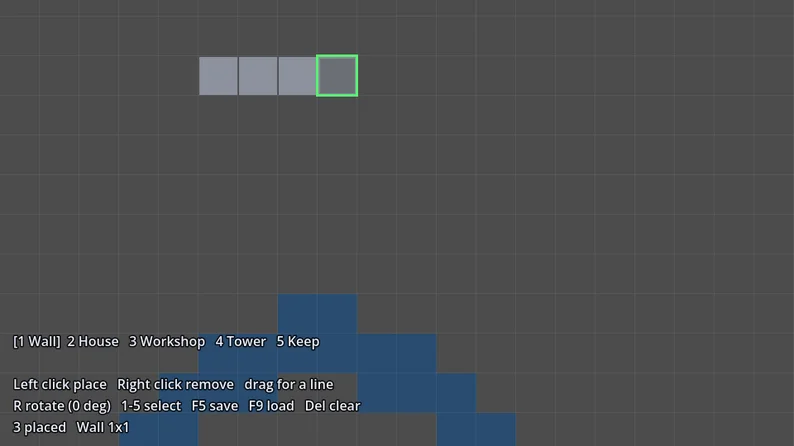
Pick a building, move the mouse, watch it snap to the grid. Green means it fits. Red means it doesn't — and it tells you which squares are the problem instead of turning the whole thing red.
Left click places. Right click removes. Hold either and drag to do a whole row. R rotates. F5 / F9 save and load.
Show full description...
- Ghost preview that keeps the building's own colour, so you can see what you are holding as well as whether it fits
- Per-cell refusal. The two squares caught on a wall get marked. The other seven stay clear. Marked with a cross as well as red, because red-on-green is exactly the signal colour-blind players cannot read
- Rotation with a footprint that actually swaps — a 1x3 tower fits a one-wide corridor upright and refuses on its side
- Drag to place a line of walls or fences in one gesture
- Remove from any cell of a multi-cell building
- Blocked terrain you fill from your own TileMap
- Your own rules. One callable: func(cell, def_id) -> bool. "Docks must touch water" is three lines, and it feeds the same per-cell highlighting
- Save and load — a versioned dictionary that survives a trip through JSON
- Your art or none. Give a Buildable a texture and it draws that; give it nothing and it draws a coloured block, so it works before you have art
Five minutes
var house := Buildable.new() house.id = &"house" house.size = Vector2i(2, 2) var placer := PlacementController.new() placer.cell_size = Vector2(48, 48) placer.buildables = [house] add_child(placer)
That runs. Then turn off draw_placed and connect placed / removed to spawn your own scenes — the addon stays the source of truth for what occupies which cell.
Tested, not just written
PlacementGrid has no dependency on the scene tree, so the parts that are actually easy to get wrong are unit tested from the command line:
Godot --headless --script tests/run_tests.gd --quit 17 tests, 81 checks passed
Including the ones that bite: cells left of the origin (integer truncation puts them one square out), rotated footprints, removing a 3x2 from its far corner, and a save that still lines up after JSON has turned every integer into a float.
Run it yourself. It ships in the download.
What this is not
A base-building game template. No resources, no build costs, no tech tree, no roads, no terrain painting, no isometric projection, no multiplayer. This is the placement layer those sit on top of.
If you need road networks or terrain painting, buy something bigger — and there is something bigger on itch for about $34.
Requirements
Godot 4.2 or newer. Pure GDScript — no C#, no GDExtension, no compile step, no other addons.
 GetAssetPack