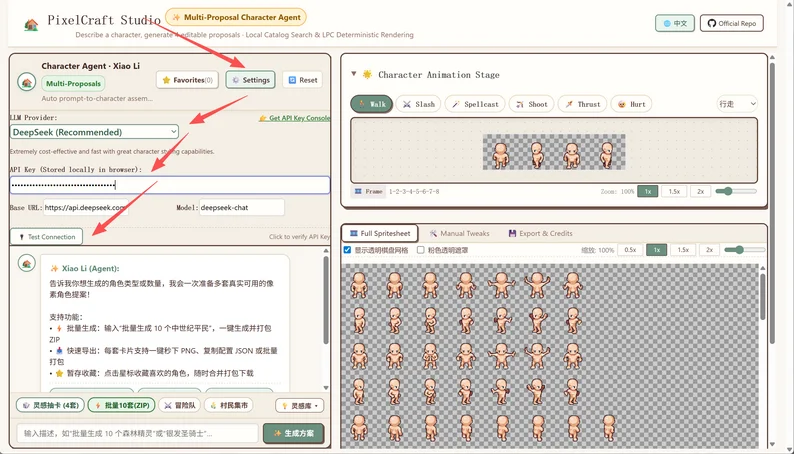
PixelCraft Studio is an independent, AI-assisted 2D pixel character creator, featuring over 88,000 customizable LPC (Liberated Pixel Cup) sprite resources.
Show full description...
Whether you are developing an independent role-playing game, platform game, roguelike game, or tabletop game, PixelCraft Studio enables you to design, customize, preview, and export animated character sprites in just a few steps!
🛡️Why do independent developers prefer PixelCraft Studio
- ✅ 100% Commercial Use Allowed: You are free to use the generated sprite images in commercial games on platforms like Steam/itch, but please credit the source.
- ✅ One-time purchase, lifetime offline tool: No monthly fees required. 100% runs locally on your computer.
- ✅ Engine ready: Clean and transparent PNG sprites, suitable for Unity, Godot, Unreal, RPG Maker, and GameMaker.
---
✨ Main features
🤖 AI Multi-scheme Assistant: Describe any character concept in natural language (e.g., "a silver-haired holy knight clad in shining armor") and instantly receive 4 customizable design schemes.
- ⚡ Multiple LLM creation support: Native support for DeepSeek, OpenAI (GPT-4o / o3-mini), Google Gemini (2.0 Flash / Pro), Anthropic Claude, GLM, Qwen, Moonshot, or locally customized LLMs.
- 🎨 88,000+ high-quality customizable assets: compatible with the fully classic universal LPC character format: body, hairstyle, armor, weapon, armor, and color.
- 🎞️Real-time animation stage: Previews are presented at 1x, 1.5x, and 2x speeds, encompassing various animations (walking, swinging, casting spells, shooting, stabbing, and damage).
- 💾 One-click export: Export complete standard sprite images (PNG), frame-by-frame PNG sequences, and JSON configuration defaults.
- 🌐Seamless bilingual user interface: One-click switching between English and Simplified Chinese.
- 💻Offline standalone operation: A green portable application for Windows x64. No need for complex system environment setup!
🎮 Supports animation
Each generated character comes with a complete standard LPC animation cycle:
1. Walking cycle (4 directions, 9 frames)
2. Slash/Melee Attack (4 directions, 6 frames)
3. Spell casting/Magic casting (4 directions, 7 frames)
4. Shooting/Bow and Arrow (4 directions, 13 frames)
5. Stab/Spear Stab (4 directions, 8 frames)
6. Injury/fainting (4 directions, 6 frames)
🚀 How to get started
1. Download and unzip 'PixelCraft-Studio-Win-x64.zip'.
2. Run `PixelCraft Studio.exe` (or `Side Launch PixelCraft Workshop.bat`).
3. (Optional AI function): Click **Settings (⚙️)** in the AI panel, select your preferred LLM project, enter your API shortcut key, and then click **Test Connection (🔌)**.
4. Export your pixel character and directly drag and drop it into Unity, Godot, Unreal Engine, RPG Maker, GameMaker, or Phaser!
---
📜 License and Copyright Information
- All generated pixel resources are based on the Universal LPC Spritesheet Character Generator project, which is licensed under **CC-BY-SA 3.0 / GPL 3.0 / OGA-BY 3.0**.
- Can be used for commercial and non-commercial independent games, with appropriate attribution (the application fully includes a one-click acknowledgment export function).
2026.10.23 V1.1.0
What’s New
- Offline Theme Library: Preview and apply character presets without an API key.
- Fully Editable Characters: Customize clothing, hairstyles, equipment, and supported colors after applying a theme.
- Quick Export: Save character configurations as JSON or export PNG/ZIP files with asset credits.
- AI Prompt Shortcuts: Use a theme to fill the description box. AI generation starts only when you click Generate.
- Updated Documentation: Added a tool overview and release highlights inside the client, plus Chinese and English documentation in the release package.
 GetAssetPack