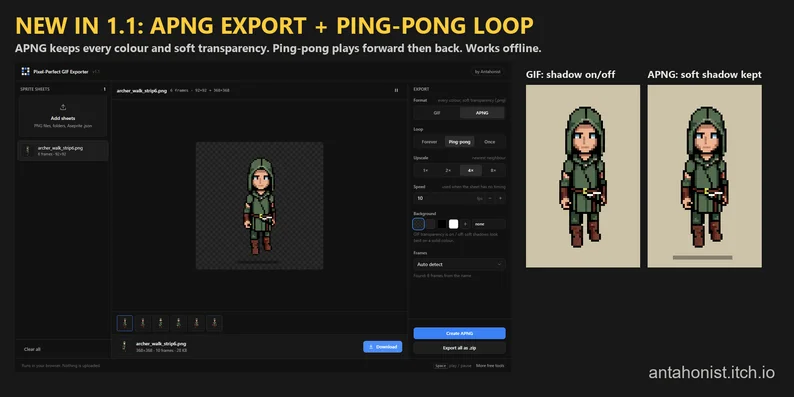
Drop your sprite sheets in, get crisp looping GIFs out. Made for posting pixel art on itch.io, Reddit, X/Twitter and Discord without the blurry, colour-flickering mess that normal converters make.
Show full description...
- Loop: forever, ping-pong (forward then back), or play once.
- Works offline now (no web fonts) and comes as a Windows app too.
THE PROBLEM
Most GIF converters scale with smoothing (blurry pixels), build a new palette for every frame (colours flicker) and make you set the frame size by hand for every sheet. This tool fixes all three.
FEATURES
- Pixel-perfect upscale 1x / 2x / 4x / 8x, nearest neighbour only, zero blur
- One shared palette for the whole animation, no colour flicker between frames
- Batch: drop many sheets or a whole folder, export everything as one .zip
- Aseprite JSON support (hash and array): frames, per-frame durations and tags (forward, reverse, ping-pong), trimmed frames
- Auto frame detection: square strips, names like hero_32x48.png, walk_8f.png, run_strip6.png, or set width / height / columns x rows yourself
- Background: any colour, or keep transparency (1-bit)
- Live preview with the real frame timing, FPS control, Space = play / pause
- Private: everything runs in your browser, your files are never uploaded
HOW TO USE
- Drag PNG sprite sheets (and their Aseprite .json, if you have them) into the window
- Check the frame size, pick the upscale, FPS and background
- Click Create GIF for one sheet, or Export all as .zip for the whole batch
MORE FREE TOOLS
All free, all in your browser unless noted: see the whole collection.
Make pixel art: Pixel Art Converter · Pixel VFX Maker · Pixel Loot Forge · Pixel Logo Maker · PSX Dither Converter · Seamless Texture Maker · Palette Extractor
Game UI: Dialogue Box Maker · Book Page Turn Maker · Bar Maker · Item Tooltip Maker · 9-Slice Panel Maker · Icon Frame Maker
Characters, maps & worlds: Isometric Character Generator (free demo) · Map Scribe · Isometric Town Builder · Tilemap Painter · VN Scene Previewer
Tabletop & print: Paper Standee Maker · Fantasy Card Maker · VTT Token Maker
Sprites & export: Sprite Sheet Animator · Sprite Outline Maker · Sprite Recolor Maker · Pixel-Perfect GIF Exporter · Atlas Packer · Pixel BG Remover
Aseprite & Godot: Title Forge · Corner Pin · Rarity Forge · PixelLight 2D
MORE LIKE THIS
Want the whole series? See the Pixel RPG Bundle.
LICENSE
- Everything you make with the tool is yours: use it in free and commercial games, edit it, sell the game. No credit required.
- The tool itself: free to use as much as you want, in the browser or with the Windows version. Please don't re-host, re-upload or resell the tool or its code.
- Art that ships inside the tool (samples, frames, stamps) is for use through the tool and in your own projects, not for resale as an asset pack.
FAQ
- Is it free? Yes. You can leave a tip if it saves you time.
- Windows / Mac / Linux? Any modern browser (Chrome, Edge, Firefox, Safari). Nothing to install. A Windows app is included too (not code-signed, so SmartScreen may ask: More info, Run anyway).
- Offline? Download the .zip and open index.html. It works fully offline (1.1 has no web fonts).
- Why do semi-transparent pixels look hard-edged? GIF supports only 1-bit transparency (a pixel is fully visible or fully hidden). Pick a background colour, or export APNG: it keeps soft shadows and glows exactly.
- Max colours? 256 per GIF (255 + transparency). Pixel art almost always fits, so colours stay exact.
- Can I use the GIFs commercially? Yes, the GIFs are yours.
If the tool helped you, a quick rating on this page helps other devs find it. Missing a feature? Tell me in the comments.
MORE FROM ANTAHONIST
- Greatest Bundle of All - everything from the store in one purchase
- Pixel RPG Bundle - pixel icons, characters, monsters, VFX
- Complete UI & Icons Bundle - HUD and UI kits
- Free tools collection - Pixel Loot Forge, Pixel Art Converter, Sprite Sheet Animator and more
 GetAssetPack