GetAssetPack

Pixel Dither - Godot Shader (Free)
Pixel Dither - Godot Shader (Free)
Price
Free
Type
Sprites
Creator
Francisco Cidade
License
CC0
Dimensions
2D
Style
Pixel art
Engine
Godot

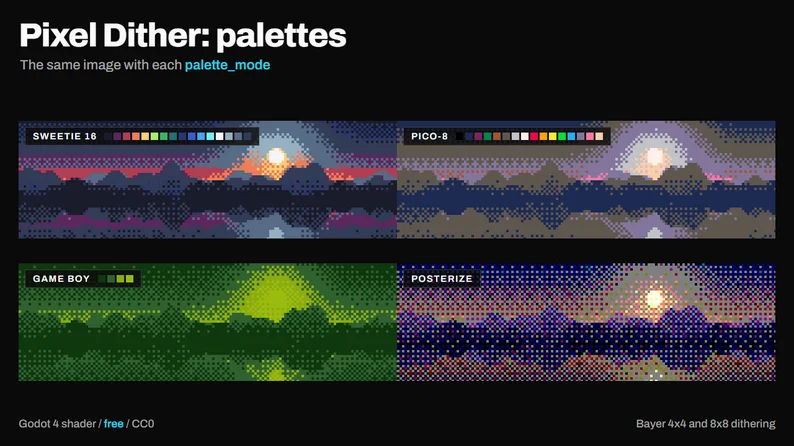
A Godot shader for pixelation, ordered dithering, and palette swapping, with PICO-8, Game Boy, and Sweetie 16 palettes plus an example project.

Turn any sprite or image into chunky retro pixel art: bigger pixels, dithering and palettes in one shader.

Available on

Search by image

Upload a reference to find previews with similar colors, contrast, and detail.

Pixel Dither - Godot Shader (Free)

Pixel Dither - Godot Shader (Free)1 / 10
Francisco Cidade · itch.ioFree
2D
Sprites
CC0 · Public domain dedication
  • ✓ Commercial use, edits and redistribution
  • ✓ Attribution is optional
  • i Trademark and privacy rights still apply
Show full terms

Turn any sprite or image into chunky retro pixel art: bigger pixels, dithering and palettes in one shader.

A Godot shader for pixelation, ordered dithering, and palette swapping, with PICO-8, Game Boy, and Sweetie 16 palettes plus an example project.

View original listing

Description

Pixelate, dither and palette-swap anything in Godot.

Pixel Dither takes a sprite, a portrait or a whole background and makes it look like it was drawn for a retro console: bigger pixels, a dithering pattern to fake the missing shades, and a palette that snaps every color to a fixed set.

Show full description...

Try it in your browser first. The HTML5 viewer runs the real shader: drag the sliders, switch palettes, edit the code live, load your own image and compare it with the original. When you like it, download the project.

What you get

  • One .gdshader file, no dependencies.
  • 3 ready palettes: PICO-8, Game Boy and Sweetie 16. Or "Posterize" to keep your own colors with fewer shades.
  • Bayer 4x4 (chunky) and Bayer 8x8 (fine) ordered dithering.
  • Brightness and contrast, so dark or washed-out images still look good.
  • An example project that cycles through four looks, to see what each parameter does.

How to use it

  • Copy shaders/pixel_dither.gdshader into your project.
  • Create a ShaderMaterial on your Sprite2D, TextureRect or any node with a texture, and assign the shader.
  • Tweak the parameters in the Inspector.

Compatibility: Godot 4.x (GL Compatibility, Mobile and Forward+), CanvasItem shader. Works on desktop, mobile and web exports. The node's modulate is not applied.

License: CC0 (public domain). Use it in commercial games, change it, no credit needed (but I'd love to see what you make with it).

More assets by me: https://fcidade.itch.io

More from me

Tags

2DditheringGodotpalettePICO-8Pixel Artpost-processingRetroShadersVisual Effects (VFX)

Downloads

Name your own price.