GetAssetPack

PicoCAD GameBoy Cartridge

PicoCAD GameBoy Cartridge
Price
Free
Type
3D Models
Creator
Jonathan Zuñiga
Formats
OBJ
Dimensions
3D
Style
Low poly, Pixel art

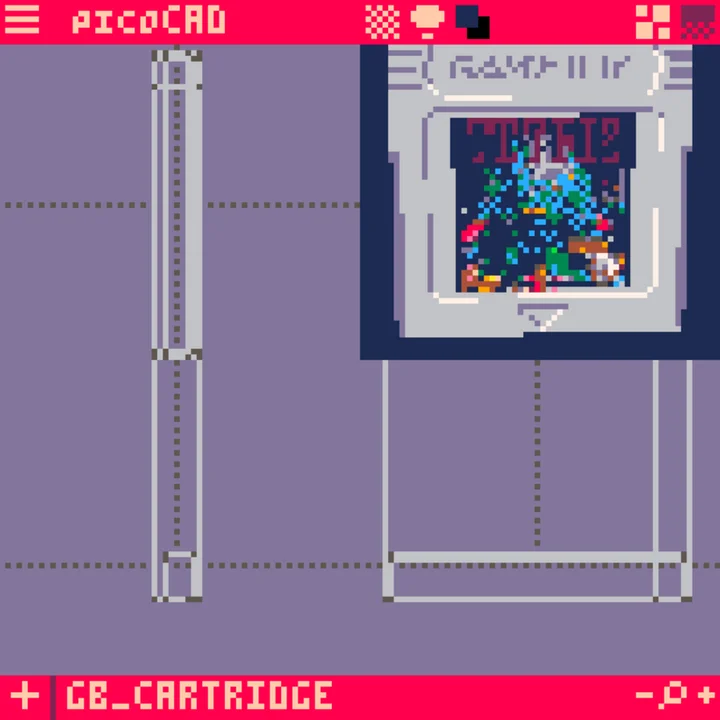
A customizable low-poly GameBoy cartridge model with a 128x128 pixel art texture, plus OBJ, P8L, and MTL files for 3D projects.

A downloadable picoCAD 3D model

Available on

Search by image

Upload a reference to find previews with similar colors, contrast, and detail.

PicoCAD GameBoy Cartridge

PicoCAD GameBoy Cartridge1 / 4
Jonathan Zuñiga · itch.ioFree
3D Models
License not indexed
  • i Check the terms on the original listing.
Show full terms
FormatOBJ

A downloadable picoCAD 3D model

A customizable low-poly GameBoy cartridge model with a 128x128 pixel art texture, plus OBJ, P8L, and MTL files for 3D projects.

View original listing

Description

PicoCAD GameBoy Cartridge is out! Available on Gumroad and itch.io!

A Downloadable picoCAD 3D Model

Have you ever wanted to create your own GameBoy cartridge model but didn’t know where to begin? Look no further! This versatile template is here to kickstart your creativity.

Show full description...

With this GameBoy cartridge template, you can dive right into creating stunning 3D renderings and animations for your projects. Whether you’re a seasoned artist or just starting out, this template is perfect for game developers, hobbyists, or anyone looking to explore 3D modeling in a simple and fun way.

What’s Included:

  • picoCAD Model: Pre-built, ready-to-use GameBoy cartridge.
  • Pixel Art Texture (128x128px): Customizable and retro-inspired.
  • OBJ File: For seamless use in other 3D software.
  • Also P8L and MTL Files.

Why You’ll Love This Template:

  • Beginner-Friendly: No prior experience? No problem! This template is easy to use and provides a great foundation.
  • Customizable: Tweak the model, textures, and more to make it truly yours.
  • Inspiring Design: Perfect for creating nostalgic visuals or even prototyping for your next game.

How to Install:

  • Make sure you have picoCAD installed.
  • Open picoCAD and drag the included texture and model files directly into the window.
  • That’s it! You’re ready to start designing your own GameBoy cartridge.

A Friendly Reminder:

If you decide to use this model in your game or other projects, giving credit would be greatly appreciated. Supporting creators helps inspire more amazing content like this!

A Few Tips for Success:

  • picoCAD is built on the PICO-8 fantasy console, which comes with its own unique set of constraints. Embrace these limitations to unlock your creativity!
  • Explore the community for tutorials and examples to enhance your workflow. Experimentation is the key to success!

Turn your ideas into reality with this fun and engaging GameBoy cartridge template. Download now and start creating today!

Tags

3DassetcartridgeGame BoyLow-polymodelpicoCADPixel ArtRetroTextures

Downloads

Name your own price.