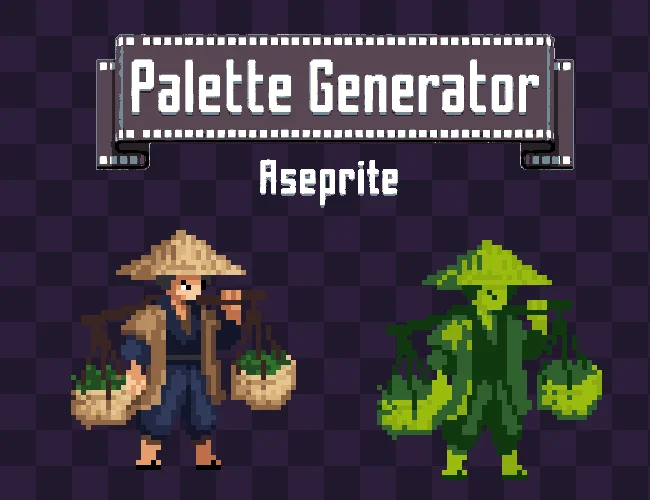
Create new color variations of your sprites in seconds — without recoloring every pixel by hand.
Palette Variation Generator is an Aseprite extension for quickly creating palette swaps and color variations from existing artwork.
Show full description...
Adjust Hue, Saturation, Brightness, and Contrast, preview the result, fine-tune individual colors, and generate the final variation directly in Aseprite.
It also works with animated sprites, applying the same color mapping consistently across the entire animation.
Perfect for creating character skins, enemy variants, alternate outfits, weapons, items, seasonal palettes, elemental variations, and more.
🆕 Latest update: Added a full Retro Hardware stage — quantize to ~28 real console & computer palettes (NES, SNES, Game Boy, Mega Drive, PlayStation and more), with Bayer/Floyd–Steinberg/Atkinson dithering, authentic per-tile color limits, Indexed sprite + .gpl export, and a resizable pan/zoom preview window with a before/after split.
✨ Key Features
🌈 Global Color Controls
Quickly transform the entire palette using:
- Hue — Rotate colors around the color wheel
- Saturation — Make colors more muted or more vibrant
- Brightness — Lighten or darken the palette
- Contrast — Increase or reduce separation between colors
All four controls can be combined to create completely different color themes while preserving the structure of your original artwork.
💡 Preserve Luminance
Keep the original light and dark relationships while changing the colors.
Preserve Luminance is especially useful when you want to create a new palette without changing the existing shading structure of your sprite.
Ideal for:
- Character recolors
- Enemy variants
- Alternate skins
- Palette swaps
The setting keeps Hue and Saturation changes while preventing Brightness and Contrast adjustments from changing the original lightness structure.
🎯 Individual Color Overrides
- Need precise control over one specific color?
- Open the Colors editor to see the colors captured from your artwork.
- Select a color and choose its replacement manually.
Individual color overrides always take priority over the global Hue, Saturation, Brightness, and Contrast settings, while the remaining colors continue following the global adjustments.
This gives you both:
Global adjustments for speed
- +
- Individual overrides for precision
Palette method
Preserve Distinct (default) keeps every one of your character's own colors, snapped to the console's color grid, and only merges the closest pair once you're over budget — so shading detail survives inside the hardware limit. Median-cut gives a more even, traditional reduction instead.
Dithering
Bayer 2×2 / 4×4 / 8×8, Floyd–Steinberg (with serpentine), and Atkinson, each with an adjustable amount — plus a luminance-only mode for monochrome targets like Game Boy or Virtual Boy.
Authentic per-block color limits
Enforce the real hardware rule, not just a flat color cap: NES backgrounds (16×16 attribute blocks, 3 local + 1 shared color, 4 shared sub-palettes across the image), NES sprites (8×8, 3+1), SNES/Mega Drive BG tiles, Commodore 64 color clash, ZX Spectrum attribute clash and more — or dial in your own block size, local/shared counts and cluster count for a fully custom system.
Output
Convert the sprite to a real Indexed-mode sprite with the resolved hardware palette, and export the palette as a .gpl file ready to drop straight into your engine.
👁️ Resizable Preview Window
The live preview now opens in its own resizable window with pan and zoom. Compare the original and the result with a draggable Split wipe, or switch to Before, After, or Side-by-side view.
📉 Palette Size
Want to simplify your palette?
Set a target Palette Size and the plugin can merge nearby colors until the artwork reaches the desired number of colors.
This can be useful for:
- Reducing color count
- Simplifying busy palettes
- Creating limited-color styles
- Cleaning up unnecessary color variations
The reduction process merges the closest colors while preserving manually overridden colors.
👁️ Live Preview
See the original artwork and the generated color variation before applying anything.
Adjust the controls and immediately inspect the result.
This makes it easy to experiment with different palettes without repeatedly undoing and reapplying changes.
♻️ Apply or Create a New Layer
Choose how you want to use the generated variation:
Apply to Sprite
Recolor the current layer directly.
New Layer
Create the variation on a copy while keeping the original artwork untouched.
The New Layer option is particularly useful when creating several variations from the same sprite.
🔄 Reload Artwork
Changed the active layer or sprite?
Use Reload to rescan the artwork and rebuild the captured color list.
This also clears existing individual color overrides, allowing you to start a fresh variation from the newly selected artwork.
🎮 Perfect for Pixel-Art Variations
Create alternate versions of existing artwork for:
- 🧍 Character skins
- 👾 Enemy variants
- 🧥 Alternate outfits
- ⚔️ Weapon variations
- 🪙 Item variations
- 🔥 Elemental palettes
- ❄️ Seasonal palettes
- 🌙 Dark versions
- ☀️ Alternate themes
- 🎮 Game sprites and animations
🔧 How to Use
- Open your sprite in Aseprite
- Select the layer you want to recolor
- Go to Edit → FX → Palette Variation Generator
- Adjust Hue
- Adjust Saturation
- Adjust Brightness
- Adjust Contrast
- Enable Preserve Luminance if needed
- Open 🎨 Colors for individual color adjustments
- Set the desired Palette Size
- Preview the result
- Choose Apply to Sprite or New Layer
- Generate the variation
🎨 Pixel Art Friendly
Palette Variation Generator is designed for pixel-art workflows.
The plugin works with the actual colors used by the artwork and creates color mappings rather than applying a generic image filter.
This allows palette changes while keeping the original pixel structure intact.
📋 Features at a Glance
- 🌈 Hue adjustment
- 🎨 Saturation adjustment
- ☀️ Brightness adjustment
- ◐ Contrast adjustment
- 💡 Preserve Luminance
- 🎯 Individual color overrides
- 📉 Palette size reduction
- 👁️ Live preview
- 🎞️ Animation support
- 🔄 Consistent color mapping across frames
- ♻️ Apply directly to sprite
- 📄 Generate on a new layer
- 🔄 Reload active artwork
- 🧩 Pixel-perfect color replacement
- 🛡️ Indexed-color support
- 🎮 Retro hardware palette conversion (~28 systems)
- 🎛️ Bayer / Floyd–Steinberg / Atkinson dithering
- 🧱 Authentic per-tile / per-block color limits
- 🖼️ Indexed sprite + .gpl palette export
- 🔎 Resizable pan/zoom preview with split, before/after & side-by-side views
💻 Compatibility
Requires Aseprite 1.3 or newer.
Recommended: Latest stable version of Aseprite.
Note: Grayscale sprites are not supported because the Hue/Saturation workflow requires color information.
⭐ Enjoying Palette Variation Generator?
If the plugin saves you time in your pixel-art workflow, consider leaving a rating on itch.io.
It really helps support future updates and development.
🎨 Recolor faster. Create more variations. Keep your original artwork.
🎮 Perfect For
- Pixel artists who work in Aseprite
- Indie developers and game jams
- Fast effects without frame-by-frame animation
- Any 2D engine, including Unity, Godot and GameMaker
📜 License
You may use these assets in personal and commercial projects. Modification is allowed. You may NOT resell, redistribute, or include these assets in other asset packs or marketplaces. Credit is appreciated but not required.
🎞️ Animation Support
Palette Variation Generator works with animated sprites.
Instead of recoloring each frame separately, the plugin builds a consistent color mapping and applies it across the active animation.
This is useful for creating alternate versions of:
- Character animations
- Enemy animations
- Effects
- Items
- Weapons
- Game sprites
The color transformation is applied directly to the pixels without resampling or blurring the artwork.
🎮 Retro Hardware Palettes
Turn your color variation into an authentic retro palette, ready for NES, SNES, Game Boy, Mega Drive, PlayStation and more — all in one pass.
After the Hue/Saturation/Brightness/Contrast re-tune, the Retro stage quantizes the artwork to a real hardware palette, applies optional dithering, and can enforce the same per-tile color limits the original hardware used — so a recolor doesn't just look retro, it fits the console's real constraints.
- Game Boy (DMG),
- Game Boy Color,
- Game Boy Advance,
- Virtual Boy,
- NES (Background & Sprite),
- SNES (+ BG tiles),
- Nintendo 64,
- Nintendo DS,
- Sega Master System,
- Mega Drive/Genesis (+ BG tiles),
- Game Gear,
- Sega Saturn,
- PC Engine/TurboGrafx-16,
- Neo Geo,
- PlayStation,
- Atari Lynx,
- PICO-8,
- Commodore 64,
- ZX Spectrum,
- Amstrad CPC,
- MSX1,
- Amiga (OCS/ECS),
- PC-98,
- EGA,
- CGA (16 & 4-color) — plus a fully custom/auto palette target.
If you create an interesting palette variation with Palette Variation Generator, I'd love to see it!
Feel free to share your work, suggestions, feedback, or bug reports.
Your feedback helps improve future updates.
🔥 Want the whole set? Get all the Aseprite tools and generators in one bundle and save more than buying them one by one.
Enjoying this pack? Follow me for new releases, add this pack to your collection, and leave a rating if it was useful — it really helps a small studio like mine. 💛
 GetAssetPack