GetAssetPack

CEL Robox transport Packing clip
CEL Robox transport Packing clip
Type
3D Models
Dimensions
3D

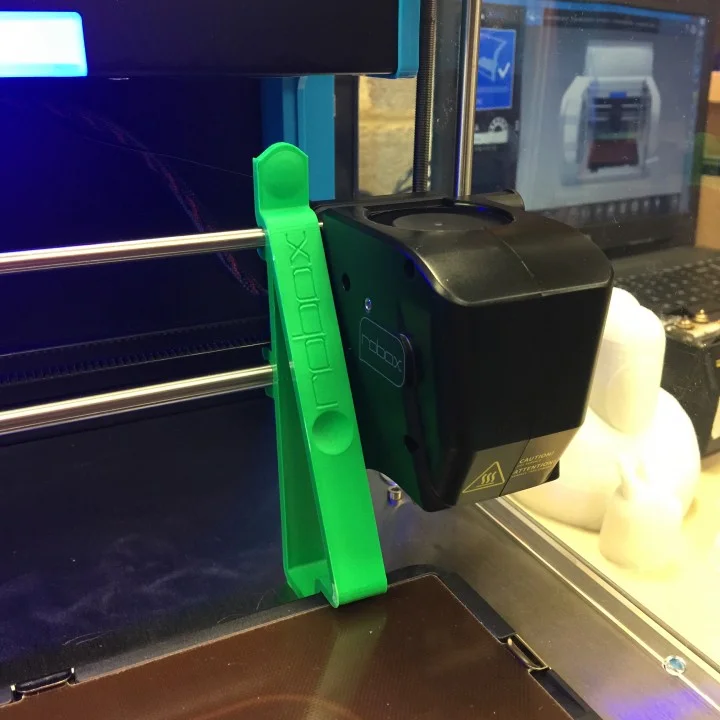
A transport clip for a CEL Robox 3D printer holds the bed down, print head to the right, and X rails up.

Its best to insert this part into your CEL Robox printer when its traviling. It holds the bed down, the head to the right and the X rails up. To fit it into place, simply press the 'Remove Head' button in Automaker, you dont want to remove the head but it will put the gantry at the right height to fit it. Switch off the power open the door and push the head all the way to the right. The clip goes into the hole in the lower stainless steel part (just visiable behind the bed) and then snaps over the two X rails. | Download free and paid 3D printable STL files

Available on

Search by image

Upload a reference to find previews with similar colors, contrast, and detail.

CEL Robox transport Packing clip

CEL Robox transport Packing clip
MyMiniFactory
3D Models
License not indexed
  • i Check the terms on the original listing.
Show full terms

Its best to insert this part into your CEL Robox printer when its traviling. It holds the bed down, the head to the right and the X rails up. To fit it into place, simply press the 'Remove Head' button in Automaker, you dont want to remove the head but it will put the gantry at the right height to fit it. Switch off the power open the door and push the head all the way to the right. The clip goes into the hole in the lower stainless steel part (just visiable behind the bed) and then snaps over the two X rails. | Download free and paid 3D printable STL files

A transport clip for a CEL Robox 3D printer holds the bed down, print head to the right, and X rails up.

View original listing