GetAssetPack

Raspberry Pi Zero Clock

Raspberry Pi Zero Clock
Type
3D Models
Dimensions
3D

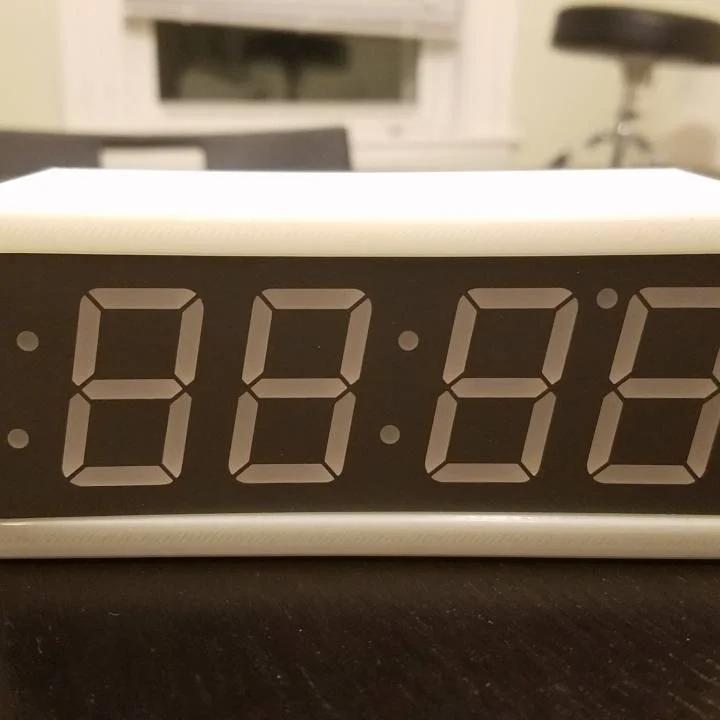
A Pi Zero Clock? I know what you're thinking, "Isn't a Zero a bit overkill for a clock?" For a normal clock, probably, but with the internet it can be so much more than a normal clock! You could make a clock that automatically adjusts across time zones based on it's IP address, or perhaps a clock to track your latest amazon order. For me, the clock tells me when the next subway train is coming at my stop. This is a relatively simple build that requires some soldering, but all off-the-shelf components. BOM: a 1.2" 7-segment display from Adafruit in whatever color you want a Raspberry Pi Zero and supported power chord some female to female jumper wires a small wifi dongle, preferably one that you don't have to compile the module for (ahem) (for the non press-fit version) 4 M2.5 screws and 3mm spacers There are two versions of the clock included: the original design features a removable backplate and requires some M2.5 screws and spacers, but results in a slightly more visually appealing clock as the seam is hidden at the back and on the corners and the layers are vertical. The press-fit clock requires no screws and features a bezel on the front of the clock, but the clock has to be split horizontally instead of vertically. If you are a better EE than I you could certainly buy just the display and some resistors and skip the I2c backpack altogether, opting for some protoboard or even posterboard to hold the clock in. If you're going that far you could also snag a cheap display off Ebay or Alibaba and change the dimensions in the SCAD to fit. Setting up a pi zero with wifi is a task in itself; I recommend snagging a starter kit if you don't have the requisite parts already and doing a NOOBS graphical installation. Doing a regular Raspbian installation over serial is also doable. I used wpa_supplicant for my Wifi configuration. The pi zero can't support the amount of power a Wifi dongle draws over USB so you'll have to do this wifi patch hack to get it to run off the…

Available on

Search by image

Upload a reference to find previews with similar colors, contrast, and detail.

Raspberry Pi Zero Clock

Raspberry Pi Zero Clock
MyMiniFactory
3D Models
License not indexed
  • i Check the terms on the original listing.
Show full terms

A Pi Zero Clock? I know what you're thinking, "Isn't a Zero a bit overkill for a clock?" For a normal clock, probably, but with the internet it can be so much more than a normal clock! You could make a clock that automatically adjusts across time zones based on it's IP address, or perhaps a clock to track your latest amazon order. For me, the clock tells me when the next subway train is coming at my stop. This is a relatively simple build that requires some soldering, but all off-the-shelf components. BOM: a 1.2" 7-segment display from Adafruit in whatever color you want a Raspberry Pi Zero and supported power chord some female to female jumper wires a small wifi dongle, preferably one that you don't have to compile the module for (ahem) (for the non press-fit version) 4 M2.5 screws and 3mm spacers   There are two versions of the clock included: the original design features a removable backplate and requires some M2.5 screws and spacers, but results in a slightly more visually appealing clock as the seam is hidden at the back and on the corners and the layers are vertical. The press-fit clock requires no screws and features a bezel on the front of the clock, but the clock has to be split horizontally instead of vertically.   If you are a better EE than I you could certainly buy just the display and some resistors and skip the I2c backpack altogether, opting for some protoboard or even posterboard to hold the clock in. If you're going that far you could also snag a cheap display off Ebay or Alibaba and change the dimensions in the SCAD to fit. Setting up a pi zero with wifi is a task in itself; I recommend snagging a starter kit if you don't have the requisite parts already and doing a NOOBS graphical installation. Doing a regular Raspbian installation over serial is also doable. I used wpa_supplicant for my Wifi configuration. The pi zero can't support the amount of power a Wifi dongle draws over USB so you'll have to do this wifi patch hack to get it to run off the main USB power. This means you can't plug anything else into that USB port so be warned!   Construction: As tight tolerance designs are wont to do, my setup might not work on your machine. I highly recommend measuring your display and seeing how close the values are to the ones at the top of the SCAD file, regenerating as necessary, and if all else fails breaking out the X-acto knife and sandpaper and going to town. You can follow this guide for a genera

View original listing