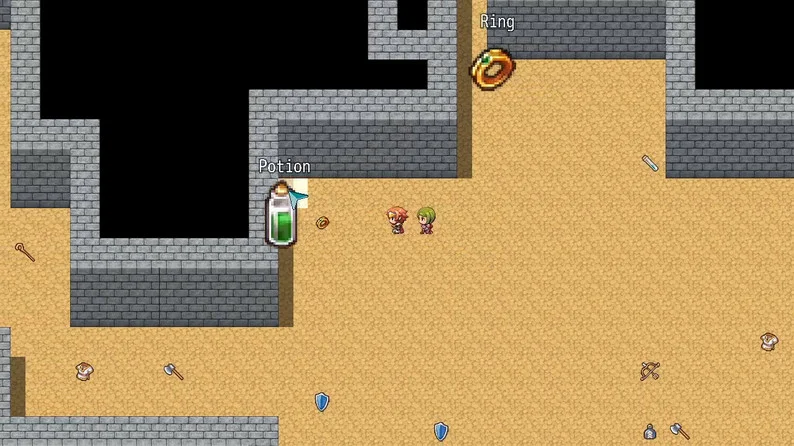
Show full description...
Fully Compatible with Yanfly Item Core, Yanfly Discard will drop items nearby, Yanfly Picture Item Images will be displayed on the map in the place of the icon if used. If item is renamed with Yanfly Item Rename, it will retain its name if dropped, and picked up later. If you are using <Text Color: ID> from item core, the drop name displayed will inherit the color.
Allows one to have tier based loot drops, or level scaling loot drops all based on your preferences. Each drop table has a weight for rolls, and each table can have configured lists of items that also each have their own weight, for optimal loot drop configuration.
- Scroll all the way down if you use Item Discard for notes to control dropped items settings -
Plugin Command: KoTCAddMapLoot ITEMTYPE ITEMID X Y AUDIO PITCH VOLUME PITCHVARIATION
Script Call: KoTCAddMapLoot(ITEMTYPE, ITEMID, X, Y, AUDIO, PITCH, VOLUME, PITCHVARIATION);
Adds loot to the current map.
Itemtypes are "item", "weapon", "armor".
Item ID is the id of the item in the RPG Maker database.
X and Y are the coordinates for where you want the item.
Audio is the sound you wish to play when the item is picked up. Set to undefined if you do not wish audio to play.
Pitch is the pitch of the audio to play when picked up.
Volume is the volume of the audio to play when picked up.
Variation is the variation of the pitch of the audio that is played when picked up. If variation is set to 20, and the pitch is 100, then the variation range is 80-120.
Plugin Command: KoTCDataPoolLootDropRoll TABLENAME
Plugin Command: KoTCDataPoolLootDropRoll TABLENAME EVENTID
Plugin Command: KoTCDataPoolLootDropRoll TABLENAME SCREENX SCREENY
Script Call: KoTCDataPoolLootDropRoll(TABLENAME);
Script Call: KoTCDataPoolLootDropRoll(TABLENAME, EVENTID);
Script Call: KoTCDataPoolLootDropRoll(TABLENAME, SCREENX, SCREENY);
Triggers a drop roll straight from a particular drop table.
Required
TABLENAME : Name of the drop table you wish to trigger a drop from.
Optional
EVENTID : Set to the ID of the event you wish the visual drop to start from.
SCREENX / SCREENY : Set the display X and Y coordinates you wish to start the drop from.
Plugin Command: KoTCLevelScalingLootDropRoll
Plugin Command: KoTCLevelScalingLootDropRoll EVENTID
Plugin Command: KoTCLevelScalingLootDropRoll SCREENX SCREENY
Script Call: KoTCLevelScalingLootDropRoll();
Script Call: KoTCLevelScalingLootDropRoll(EVENTID);
Script Call: KoTCLevelScalingLootDropRoll(SCREENX, SCREENY);
Triggers a level scaling loot drop based on your tables configurations.
You can configure the minimum and maximum level of each table, if the average party level is within the range, then it will be part of the drop roll.
Optional
EVENTID : Set to the ID of the event you wish the visual drop to start from.
SCREENX / SCREENY : Set the display X and Y coordinates you wish to start the drop from.
Plugin Command: KoTCTieredPoolLootDropRoll TIERNAME
Plugin Command: KoTCTieredPoolLootDropRoll TIERNAME EVENTID
Plugin Command: KoTCTieredPoolLootDropRoll TIERNAME SCREENX SCREENY
Script Call: KoTCTieredPoolLootDropRoll(TIERNAME);
Script Call: KoTCTieredPoolLootDropRoll(TIERNAME, EVENTID);
Script Call: KoTCTieredPoolLootDropRoll(TIERNAME, SCREENX, SCREENY);
Triggers a drop roll of the given tier, rolling every table that has the tier set as an availiable loot tier.
Required
TIERNAME : Name of the Tier you wish to trigger a drop from.
Case sensitive.
Optional
EVENTID : Set to the ID of the event you wish the visual drop to start from.
SCREENX / SCREENY : Set the display X and Y coordinates you wish to start the drop from.
--- Yanfly Item Discard Only ---
These notes are for if you wish to use Item Discard to drop items on the map for picking up later on. With these notes you can determine the audio and display scale of such items. If such an item were picked up previously before being discarded, this will override the original pickup values.
<KoTC Display Scale: SCALE> Example: 1 is 100%, 0.5 is 50%, 1.5 is 150%, 2 is 200%
<KoTC Pickup Audio: AUDIO> Name of audio without extension. Example: Damage1
<KoTC Pickup Audio Pitch: NUMBER> Pitch of audio to play.
<KoTC Pickup Audio Volume: NUMBER> Volume of audio to play.
<KoTC Pickup Audio Pitch Variance: NUMBER>
Variance of the pitch.
Example: if this is 20, and pitch is 100, pitch will vary from 80 to 120.
<KoTC Common Event: COMMONEVENTID>
ID of common event you wish to run whenever this particular item
is picked up. If set to 0 or not included, is disabled.
Change Log:
V1.07 Fixed many bugs.
V1.06 Fixed Audio issues and a few other bugs.
V1.05 Added ability to run common event on item pickup. More Bug Fixes. Fixed documentation Typos.
V.1.04 Bug Fixes, more Control over Discarded/Dropped Items
V1 Released
Terms of Usage: Paid to use for commercial and non commercial use as long as you credit me. If you were to make a game commercially with my script id appreciate it if you messaged me about it.
 GetAssetPack