GetAssetPack

JUNK TITAN – Chat Builds a Giant Robot (Twitch Overlay for OBS)
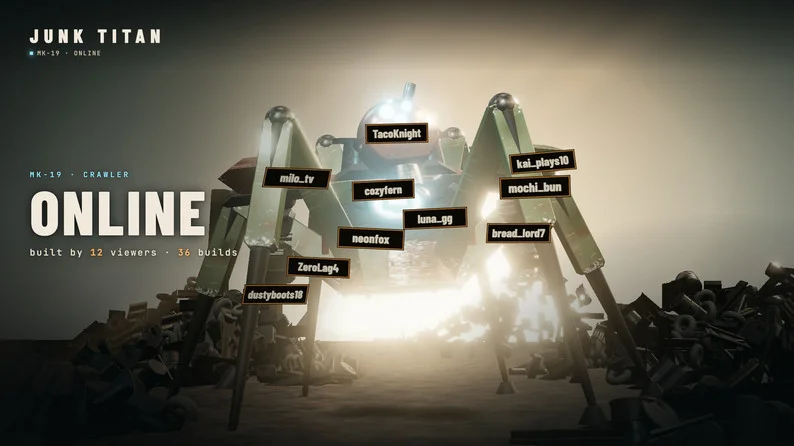
JUNK TITAN – Chat Builds a Giant Robot (Twitch Overlay for OBS)
Price
$9
Type
3D Models
Creator
Momo0320
Dimensions
3D

Your chat types !build. Scrap parts drop in, every part gets a viewer's name, and at 100% the robot powers up.

Available on

Search by image

Upload a reference to find previews with similar colors, contrast, and detail.

JUNK TITAN – Chat Builds a Giant Robot (Twitch Overlay for OBS)

JUNK TITAN – Chat Builds a Giant Robot (Twitch Overlay for OBS)
Momo0320 · itch.io$9
3D Models
License not indexed
  • i Check the terms on the original listing.
Show full terms

Your chat types !build. Scrap parts drop in, every part gets a viewer's name, and at 100% the robot powers up.

View original listing

Description

JUNK TITAN turns your chat into a construction crew.

Viewers type !build. Scrap parts fall from the sky and bolt onto a giant robot – and every part gets a riveted name plate with the name of the viewer who built it. At 100% the robot powers up, goes ONLINE, and the names of everyone who helped roll by as credits.

4 robots

Show full description...
  • or rotate all four: a new robot after each build

What it does

  • Real-time 3D, made for 1920×1080
  • Every part carries the name of the viewer who built it
  • Progress is saved in the browser source, so a half-built robot can carry over to your next stream
  • Power-up finale with a credits roll of all builders
  • Per-viewer cooldown, so one person can't spam it
  • Mod commands: !titanfinish, !titanreset, !titannext
  • Setup page with live preview – type your channel, pick a robot, copy the URL

Setup

  • Open settings.html, type your Twitch channel, pick a robot
  • Copy the URL
  • OBS → Browser source → uncheck "Local file" → paste → 1920×1080

Good to know

  • Reads chat anonymously and read-only. No login, no tokens, never posts in your chat.
  • Needs an internet connection. Uses your GPU (3D).
  • Twitch only for now.
  • No gambling, no channel points.

The code was written with help from an AI tool (Claude Code). I tested it in Chrome with live Twitch chat. Please run a quick test in your own OBS before going live (right-click the source → Interact → press B to drop a test part, then press R to reset before you go live).

The robots are built from code – no stock models. Want your own robot, colors or logo? Message me.

Tags

3Dbrowser-sourcechat-gameinteractiveobsRobotsstreamerstream-overlaytwitchtwitch-overlay

Downloads