✅ Shared white sprites customizable in size and color, sliced sprites for flexible layouts
✅ Godot 4.3+ version included (separate zip): 104 ready-to-use UI panels as plain .tscn scenes
Show full description...
✅ 116 read-only PSD files for layout reference
❌ Editable source files (PSD, etc.) are NOT included
❌ Unity package is NOT included
❌ Game logic and animation are NOT included
ㅤ
WHAT YOU GET (2 files)
📦 GUI Pro-MinimalGameDark.zip
📦 GUI Pro - Minimal Game Dark_Godot.zip
ㅤ
WHAT'S INSIDE
📁 Icons (652 Total)
• 300 Pictogram Icons (64 / 128 / 256 / 512)
• 314 Unique Icons (128 / 256 / 512)
• 12 Shop Items (1x, 2x)
• 7 League Icons (128 / 256 / 512)
• 6 Chest Icons
∘ Closed and Open states
• Character Parts
∘ 6 characters
∘ Body, Head, Weapon separated
∘ Small, Medium, Large
📁 Common (400+ PNG Files)
• Buttons
• Flags
• Frames
• Labels
• Popups
• Sliders
∘ White sprites shared across all themes in Minimal Game
∘ Easily customizable with color and size adjustments
📁 DARK THEME Colored (860+ PNG Files)
• Buttons
• Control
• Flags
• Frames(Basic / Bubble / Card / Item / List / Profile / Pass / Shop / Skill / Trait)
• HUD
• Labels
• Popups
• Sliders
• Title
• Illustration / Icon / Character
∘ Theme-specific UI elements (excluding shared resources)
📁 Screen UI (104 Total)
Title Login, Tutorial, Lobby, Play Type, Play Matching, Play Perk Selection, Play Result, Sleep Mode, World Dungeon, Inventory, Artifact, Companion, Gear, Character, Equipment, Skill, Talent, Trait, Mission, Collections, Mailbox, Progression Pass, Shop, Shop Package, Summon, Chat, Friend, Guild, Ranking, Daily Login Bonus, Profile, Level Up, Lucky Spin, Settings, Common Popup,....
⚠️ Layout reference only
• No Unity package, code, prefabs, or animations included
📁 Read-Only PSD (116 Total)
• Non-editable PSD files for reference
⛔ Editable source files (PSD, etc.) are not included
Godot (4.3+): 104 UI panels
Plain .tscn scenes grouped by category: Character, Common, Gacha, General, Inventory, Lobby, Play, Progression, Rewards, Settings, Shop, Social, Title, World. Includes a PanelGallery demo scene to browse every panel.
ㅤ
UI NOTES
◼ UI Element Description
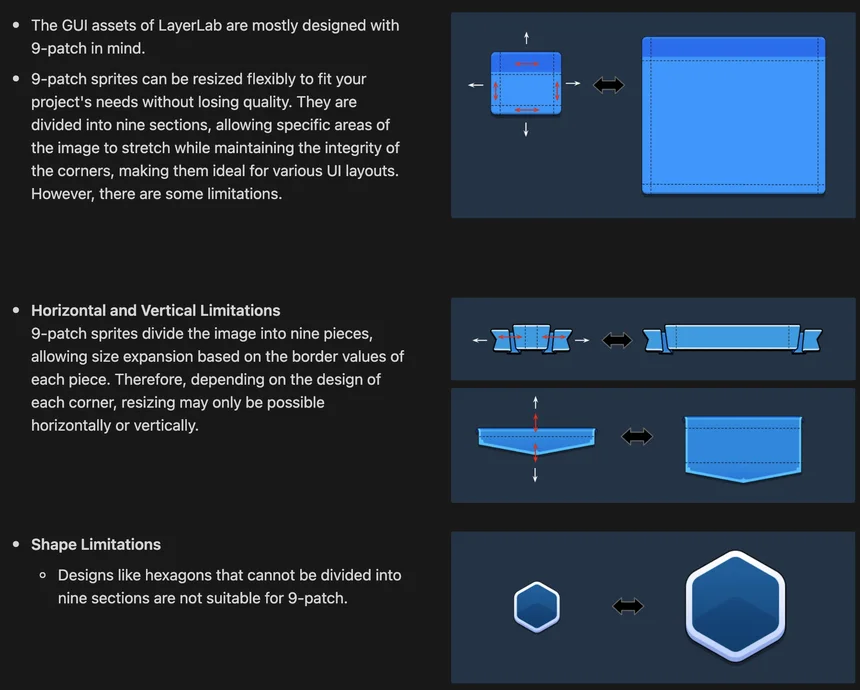
‼️ PNG sprites require manual 9-patch implementation (no automatic application included).
<9-patch slicing UI elements>
UI PNG is designed with 9-patch slicing in mind, offering flexible UI scaling. Each developer’s implementation may differ, so we recommend exploring how your specific engine handles 9-patch images for optimal results.
<White UI elements>
The UI provided as white sprites allows for color customization in the engine. However, some UI designed with non-flat, three-dimensional, or complex effects may be difficult to represent in white. For these designs, the UI will be provided as sprites in specified colors.
• Single White PNG
• Layered White PNG ∘ Should be implemented by layering different elements such as backgrounds, gradients, and lighting effects. allowing you to apply individual colors to each layer for a comprehensive and customizable UI design.
ㅤ
LICENSE
• One-time purchase license: use in commercial and non-commercial projects, up to 5 team members per project
• Do not redistribute or resell the files as standalone assets
• NFT, blockchain, metaverse and AI/ML training use requires prior written approval from LayerLab
Full terms: LayerLab License Agreement
🚫 Assets may be AI-modified or used to generate images for a single project only. AI model training and redistribution or resale of original or derivative assets are prohibited.
 GetAssetPack