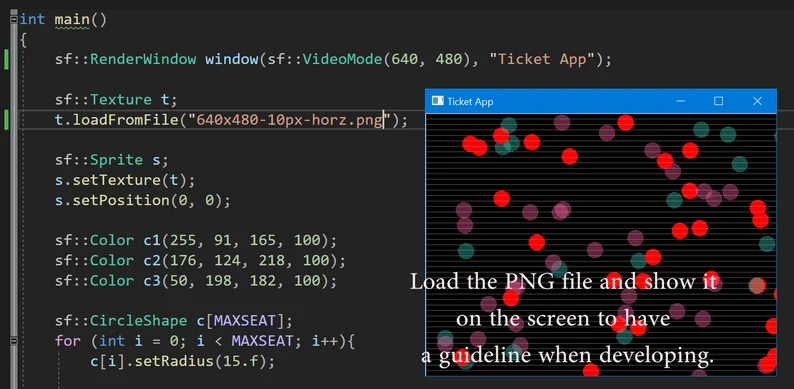
I am Ahturin, a game developer. In my game dev, guiding lines or grids on the screen are good to see how far the sprites move. I used to draw lines and it wasn’t much flexible. So this project is made for this.
Show full description...
This project contains transparent PNG files for loading as your game background when you’re writing the game. Load and show the grid background with the resolution and type you want, then load the sprites over it.
There are 4 types of background:
Type 1 - Grid background 10, 20, 30, 40, 50 and 100 pixels wide
Type 2 - Horizontal lines at 10, 20, 30, 40, 50 and 100 pixels wide
Type 3 - Vertical lines at 10, 20, 30, 40, 50 and 100 pixels wide
Type 4 - a horizontal and a vertical line splitting half of the screen
(Please see the sample thumbnails on the right hand)
Each type comes with various resolutions:
[4:3]
640 x 480
800 x 600
960 x 720
1024 x 768
1280 x 960
1400 x 1050
1440 x 1080
1600 x 1200
1856 x 1392
1920 x 1440
2048 x 1536
[16:9]
1024 x 576
1152 x 648
1280 x 720
1366 x 768
1600 x 900
1920 x 1080
2560 x 1440
3840 x 2160
I grouped the files into 2 main folders: [4-3] and [16-9].
Each folder above contains the folders named by each resolution: [640x480], [800x600], [960x720], [1024x768].....
Inside each folder, you will see PNG files like this:
640x480-half.png <---- splitting screen in half
640x480-10px-horz.png <---- 10 pixels, horizontal lines only
640x480-10px-vert.png <---- 10 pixels, vertical lines only
640x480-10px.png <---- 10 pixels, grid lines
640x480-20px-horz.png
640x480-20px-vert.png
640x480-20px.png
640x480-30px-horz.png
640x480-30px-vert.png
640x480-30px.png
640x480-40px-horz.png
640x480-40px-vert.png
640x480-40px.png
640x480-50px-horz.png
640x480-50px-vert.png
640x480-50px.png
640x480-100px-horz.png
640x480-100px-vert.png
640x480-100px.png
(Please see the sample thumbnails on the right hand)
You can download “SAMPLE.ZIP” which contains a sample folder of [640x480] to see and test the PNG file.
<< Source code >>
Source code .cpp is available with purchase. Tools and Library to use to compile: Visual Studio 2022 and SFML (install through VCPKG). Skill in C++/SFML and in using programming tools are necessary to modify the code.
<< LIMITATION >>
1. Resell and distribute are not allowed.
2. You can use the PNG files for your commercial or personal project.
Feel free to ask me anything.
Donate me some coffee will wake me up and happy please. :D :D :D
Enjoy
Ahutrin
 GetAssetPack