Pixor Black Week sale: −40% until 1 December: $11.99 instead of $19.99.
🧊 Made with Pixor: every sprite here was rendered from a 3D model, in every size and angle. Turn your own models into pixel art: try Pixor free in your browser or get it on itch.
Show full description...
- 2 animations: Open (10 frames: the lid rattles, flies open and settles) & Close (6 frames: it slams shut)
- 4 sides in top-down: front, back, left and right!
- 4 sizes: 16px, 32px, 48px & 64px!
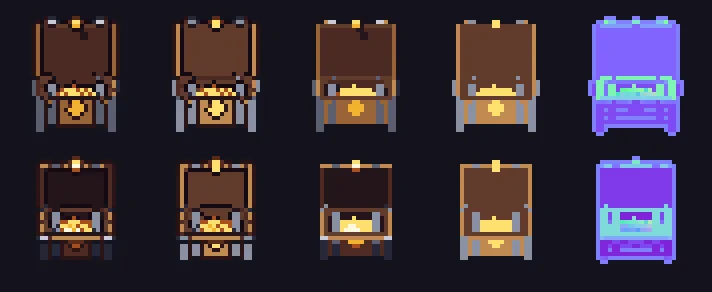
- 2 angles, for scroller & top-down games!
- 2 variants: with & without outline, to match more art styles!
- 2 shades: lit & unlit + 1 normal map, to use your own shading technique!
Need iron, royal, cursed and frost chests, a mimic and loot in the same style? Get the Treasure Chests Pack: https://frakassets.itch.io/treasure-chests-pack
Made with Pixor
The sprites in this pack were made with Pixor, my tool that turns 3D models into animated pixel-art sprite sheets: every side, frame by frame, the same pixels every time. Pay once, offline.
Pixor Black Week sale: −40% until 1 December: $11.99 instead of $19.99.
Free browser demo, manual and 1,000+ free CC0 models: https://pixor.art/
How to use
1. Download the zip with the button above and unzip it.
2. Pick a sheet: <item>_<size>_<angle>_<outline>_<shade>.png, for example wooden-chest_32px_top-down_outline_lit.png. Every frame is a square of its size (16, 32, 48 or 64 px). Play them at 12 frames per second.
Each sheet has one row per animation and side: in top-down, Close South, East, North, West, then Open South, East, North, West (South is the front); in scroller, Close then Open. Open's last frame is the open chest and Close's last the closed one: hold either as a still. The .json beside each sheet lists every frame, animation and side.
3. Import it into your engine:
- Godot 4: import with Filter: Nearest (Project Settings → Rendering → Textures → Default Texture Filter). Add an AnimatedSprite2D, create SpriteFrames, click Add frames from sprite sheet, set Horizontal to 10 and Vertical to the rows (8, or 2 for scroller), and pick one row per animation; 12 FPS, no loop.
- Unity: Texture Type: Sprite (2D and UI), Sprite Mode: Multiple, Filter Mode: Point (no filter), Compression: None, Pixels Per Unit = the sheet's size. In the Sprite Editor: Slice → Grid By Cell Size (16, 32, 48 or 64). Drag one row's slices into the scene to make an animation; set it to 12 samples.
- GameMaker: Create Sprite → Import Strip Image, one row at a time (10 frames for Open, 6 for Close), size = the sheet's size, then set the sprite's speed to 12 frames per second.
- Aseprite: open the PNG with its .json beside it, or File → Import → Import Sprite Sheet, type By Rows, width and height = the sheet's size.
The normal maps (_normal.png) line up frame for frame with the sheets, for 2D lights (Godot CanvasTexture, Unity Secondary Textures → _NormalMap).
License: https://creativecommons.org/licenses/by/4.0/
You can directly include it in your game or use it as a framework to create new sprites!
More pixel-art packs
Please rate and comment if you like it! <3
Check out my other assets:
https://frakassets.itch.io/
 GetAssetPack