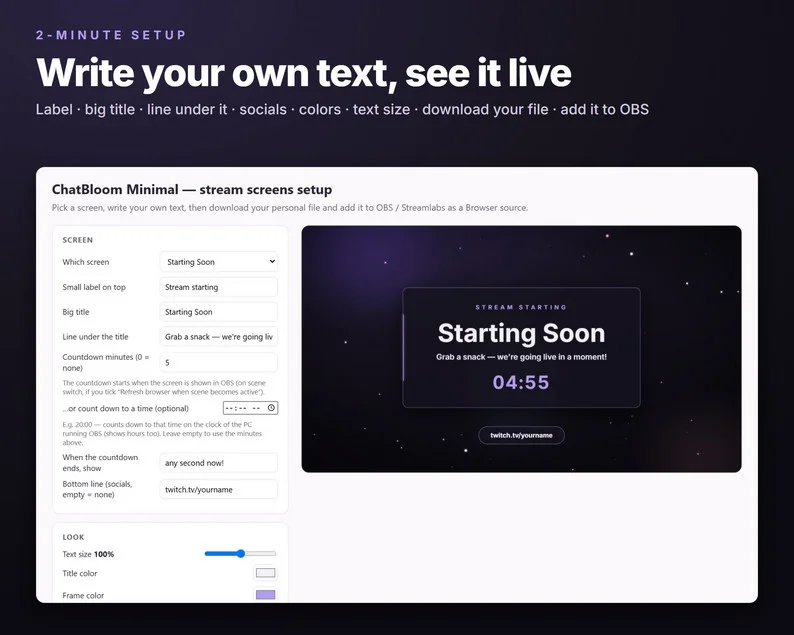
Free animated stream screens for Twitch: Starting Soon, Be Right Back and Stream Ending. A clean dark glass card with a thin lilac line, over a slowly drifting glow with twinkling dots. They match our free ChatBloom Minimal chat widget, webcam frame, goal bar and Twitch panels.
Show full description...
★ Like it? These screens also come in 8 animated themes — 50% off. Or get a theme's whole Full Stream Package for just $4.05. The list is below.
★ Starting Soon with a countdown — in minutes, or to your start time (e.g. 20:00 on your PC clock), or no countdown at all
★ Write your own text: the small label, the big title, the line under it and your socials — change the colors and the text size too
★ Animated browser source files for OBS Studio and Streamlabs Desktop, plus 3 seamless MP4 loops (1920×1080) for a Media Source
★ Free setup help + video guides — we help you until it works on your stream
HOW IT WORKS
Open configure.html, pick a screen, write your text while watching the live preview, click Download and add the file as a Browser source in OBS or Streamlabs (1920 × 1080). Do it once for each screen. START-HERE.pdf walks you through it in about 2 minutes.
HELP & VIDEO GUIDES
• Step-by-step setup videos on our YouTube channel: youtube.com/@chatbloomstudio — webcam frames, alerts, chat, goal bars, screens, panels, full overlays
• Need a video for something else? Ask in the comments — we'll make one for you
• Stuck at any step? Leave a comment below — we'll help you until it works on your stream
GOOD TO KNOW
• Free for your own channel(s). Please don't resell or re-share the files — share this page instead.
• Your PC needs internet while streaming (the font loads online). The MP4 loops work offline.
• Designed and built by us with the help of AI tools.
ALSO FREE
The matching ChatBloom Minimal chat widget, webcam frame, goal bar and 42 Twitch panels are free on our page: https://chatbloomstudio.itch.io
GET A THEMED LOOK — 50% OFF
Animated Starting Soon / BRB / Ending / Offline screens in 8 themes, $3.24 each:
Fireside Christmas · Winter Cabin · Celestial Night · Lavender Lofi · Neon Nights · Pixel Quest · Y2K Desktop
Best value — the Full Stream Package, $4.05: 4 gaming overlays, a Just Chatting scene, 4 animated screens, 6 alerts + a stinger, chat, goal bars, 9 webcam frames and 42 Twitch panels, all in one theme:
Fireside Christmas · Winter Cabin · Celestial Night · Lavender Lofi · Neon Nights · Pixel Quest · Y2K Desktop
Everything in one place: chatbloomstudio.itch.io · also on Etsy: ChatBloomStudio
 GetAssetPack