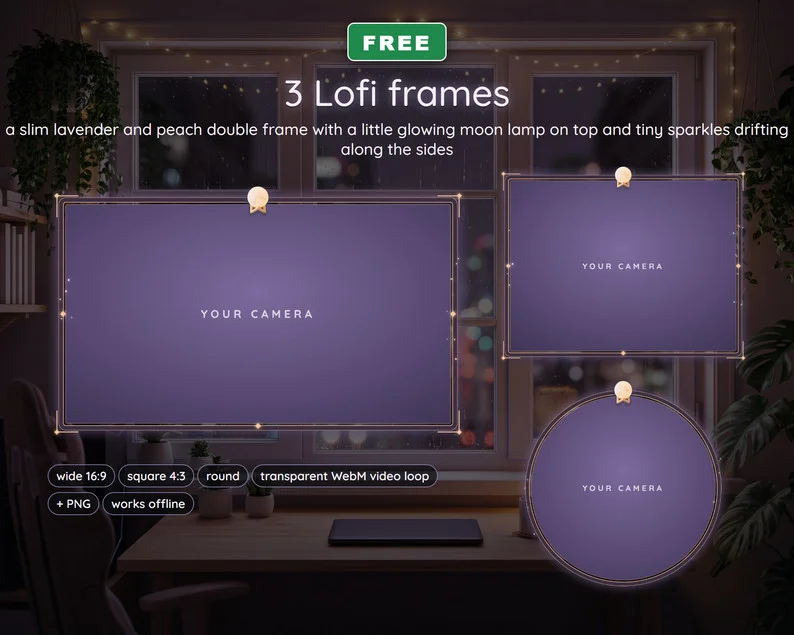
A free animated Lofi webcam frame for Twitch: a slim lavender and peach double frame with a little glowing moon lamp on top and tiny sparkles drifting along the sides. It sits over your camera like a picture frame.
★ Want the whole Lavender Lofi look? The Lavender Lofi Full Stream Package is 50% off — $4.05 for everything. Details below.
Show full description...
WHAT YOU GET
• 3 shapes: wide 16:9, square 4:3 and round
• Each one as a transparent video (WebM, a 4-second seamless loop) and as a still picture (PNG)
• Works offline · no login · no code
HOW IT WORKS
OBS Studio: Sources → + → Media Source → pick a .webm → tick "Loop". Streamlabs Desktop: Add Source → Media File. Put the frame above your camera and resize it so the opening fits your camera. START-HERE.txt has the steps.
GET THE FULL LAVENDER LOFI LOOK — 50% OFF
• Lavender Lofi Full Stream Package — $4.05: 4 gaming overlays, a Just Chatting scene, 4 animated screens, 6 alerts + a stinger, chat, goal bars, 9 webcam frames and 42 Twitch panels
• Lavender Lofi Stream Set — $3.65: the same without the 4 animated screens
• Lavender Lofi webcam frame — $2.59: all 9 frames (the main frame, this slim one and a name-bar style, each wide, square and round)
HELP & VIDEO GUIDES
• Step-by-step setup videos on our YouTube channel: youtube.com/@chatbloomstudio — webcam frames, alerts, chat, goal bars, screens, panels, full overlays
• Need a video for something else? Ask in the comments — we'll make one for you
• Stuck at any step? Leave a comment below — we'll help you until it works on your stream
GOOD TO KNOW
• Moving your camera during the stream? Put your camera and this frame in their own scene (for example “Cam”) and add that scene to your main scene as a source — then they move and resize together.
• Free for your own channel(s). Please don't resell or re-share the files — share this page instead.
• Designed and built by us with the help of AI tools.
 GetAssetPack