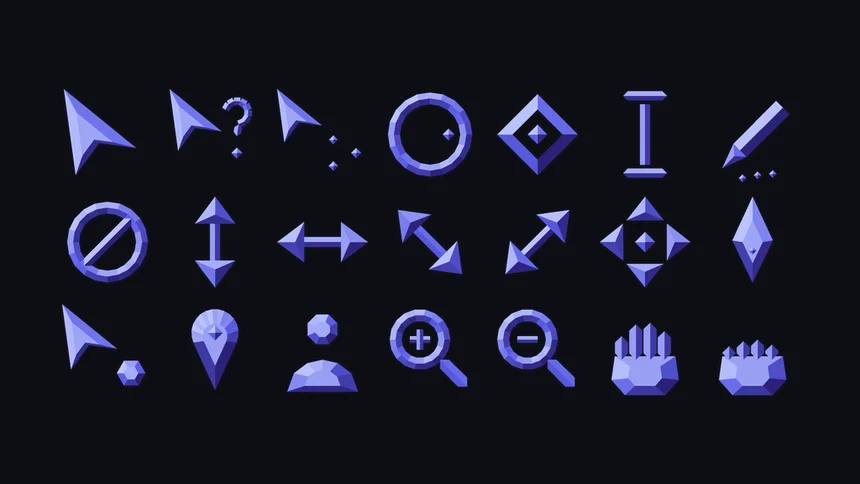
Facet is an animated Windows cursor pack where every cursor is a cut gemstone, with a table and crown facets in clean, flat tones. A light travels across the facets one by one and twinkles where it passes, so the cursors feel alive without ever being distracting.
Show full description...
The pointer is a faceted gem arrow. Help is a gem question mark over a bouncing stone, Working is an arrow with three orbiting gems, and Busy is a cut-gem ring with a light running around it and a stone orbiting inside. Precision is a rhombus frame with a pulsing gem, Text is a gem I-beam, Handwriting is a gem pen over three bouncing stones, and Unavailable is a gem ring with a slash. The four Resize cursors are double arrows with gem heads, Move is four gem heads around a stone, Alternate is an upright kite-cut gem, Link adds a hexagon gem, Location Select is a brilliant-cut pin, and Person Select is a gem bust. Zoom In, Zoom Out, Grab and Grabbing come as bonus cursors.
All 17 cursors are animated, including the normal pointer. The hotspot never moves, so clicking stays exactly precise. There is no black or white outline around the shapes, only the cut stone, so they look clean on dark, light and busy wallpapers.
WHAT YOU GET
- 17 custom Windows cursors: the complete pointer set (Normal, Help, Working, Busy, Precision, Text, Handwriting, Unavailable, 4 Resize, Move, Alternate, Link, Location Select, Person Select)
- 4 BONUS cursors: Zoom In, Zoom Out, Grab and Grabbing (for browser cursor extensions, design tools and web projects)
- 6 colors: Sapphire, Amethyst, Aquamarine, Emerald, Tanzanite, Moonstone
- All 17 cursors animated (.ANI, 24 frames each), plus a static .CUR of each for apps that cannot use .ANI
- Multi-size .CUR files (32, 48, 64, 96 and 128 px)
- One-click Install.bat and Uninstall.bat: no admin rights, no restart needed
- Transparent PNG files of every cursor
- README and license included
COMPATIBILITY
- Windows (.CUR / .ANI cursor format), installer is a Windows .bat file
- Works with the Windows pointer size setting (Settings > Accessibility > Mouse pointer)
- PNG files are included for Mac, Linux and web use
HOW TO INSTALL (30 seconds)
- Download and extract the ZIP.
- Double-click Install.bat.
- Pick your color number. Done.
To go back to the default cursors, run Uninstall.bat.
PERFECT FOR
Desktop customization, modern and minimalist setups, streamers and YouTubers (commercial use in videos and streams is allowed), designers, developers and anyone who wants a premium custom mouse cursor.
LICENSE
Personal use plus commercial use in your own videos, streams and projects. Reselling, redistributing or including the files in another pack is not allowed. Full terms are in LICENSE.txt.
JOIN THE ZEN THREE X COMMUNITY.
Get support, share your setup, request your own designs, and be the first to see new packs. Join us on Discord: ↪ Join Zen Three X community
Designed by Sabbir,Zen Three X.
 GetAssetPack