GetAssetPack

Custom UI System (CUIS V4)
Custom UI System (CUIS V4)
Price
€31.89
Animation
Animated

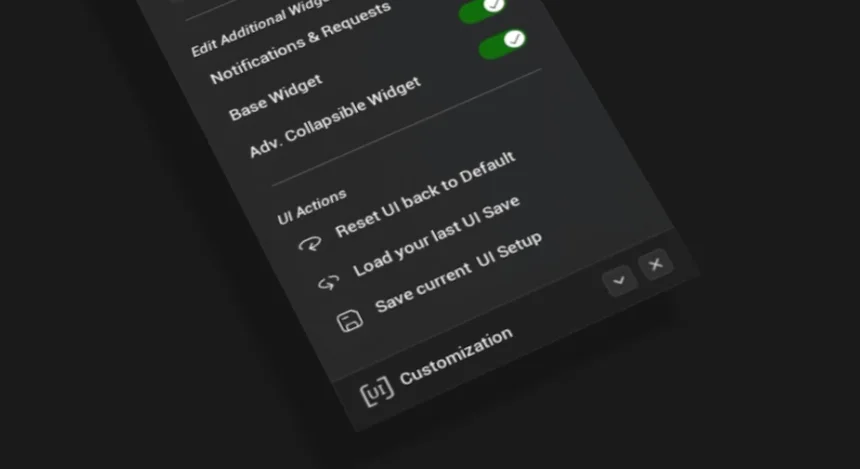
A customizable UI system with a grid, widget scaling and repositioning, opacity controls, and options to save, load, or reset layouts.

[ Quick Showcase ] [ Custom UI System Tutorial Series ] [ Support Discord ]What's included? (in short)Grid System ¦ UI & Widget Scaling ¦ Never Offscreen (no widget 'drag' out of viewport) ¦ Widget Reposition, Resize, Opacity Change, Collapsing & Switch Header Position ¦ Automatic Setup of your Widget Values as Default ¦ Save, Load, Reset + Exit Menu Function ¦ Auto Load Custom Setup ¦ Simplified Usage ¦ and more--------------------------------------------------------------------------------------------------------------------------Update History:Version 4 Update:Grid System (incl. Adjustable Size & Snap to Grid)UI / Widget Scaling (works for any of your widgets)Workflow Improvements (Integration/Usage/Code)Version 3 Update:Modern & Modular Look & DesignIntegrated Notification & Request System (NRS)Integrated Advanced Collapsible Widget System (ACWS)Custom UI System Menu integrated as Sub Menu of a Ingame Menu System--------------------------------------------------------------------------------------------------------------------------Custom UI System Feature Overview:Player Customization per Widget in 'Edit Mode' (on Runtime):Size Adjustment (Drag to Resize)Set Location on Screen (Drag & Drop)Set 'SeeThrough' Strength (Opacity Selector)Header Switch (Top / Bottom)Player CUIS Menu Actions in 'Edit Mode' (on Runtime):Adjust Grid Size (New in Version 4)Adjust Widget Scale (New in Version 4)Can Toggle 'Temporary Widgets' for Editing (f.e. Notification Widgets, Guild Menu, etc.)Exit (Close 'Edit Mode' / Menu)Reset (Delete all Changes & return to Initial Setup)Save (Secure Current UI Setup)Reload (Load Last Saved Setup - useful when changes are made but the player doesn't want to keep/save them)Player Convenience:Auto Load Custom UI Setup on BeginPlay/ClientInitPrevents Widget Placements out of Screen by AccidentModern Menu & Intuitive HandlingDev Default Setup per Widget Blueprint:Normal UE Widget Workflow (No Search Nor Time Loss)Designer: Set Default Size, Opacity…

Available on

Search by image

Upload a reference to find previews with similar colors, contrast, and detail.

Custom UI System (CUIS V4)

Custom UI System (CUIS V4)
Fab (Epic)€31.89
License not indexed
  • i Check the terms on the original listing.
Show full terms

[ Quick Showcase ] [ Custom UI System Tutorial Series ] [ Support Discord ]What's included? (in short)Grid System ¦ UI & Widget Scaling ¦ Never Offscreen (no widget 'drag' out of viewport) ¦ Widget Reposition, Resize, Opacity Change, Collapsing & Switch Header Position ¦ Automatic Setup of your Widget Values as Default ¦ Save, Load, Reset + Exit Menu Function ¦ Auto Load Custom Setup ¦ Simplified Usage ¦ and more--------------------------------------------------------------------------------------------------------------------------Update History:Version 4 Update:Grid System (incl. Adjustable Size & Snap to Grid)UI / Widget Scaling (works for any of your widgets)Workflow Improvements (Integration/Usage/Code)Version 3 Update:Modern & Modular Look & DesignIntegrated Notification & Request System (NRS)Integrated Advanced Collapsible Widget System (ACWS)Custom UI System Menu integrated as Sub Menu of a Ingame Menu System--------------------------------------------------------------------------------------------------------------------------Custom UI System Feature Overview:Player Customization per Widget in 'Edit Mode' (on Runtime):Size Adjustment (Drag to Resize)Set Location on Screen (Drag & Drop)Set 'SeeThrough' Strength (Opacity Selector)Header Switch (Top / Bottom)Player CUIS Menu Actions in 'Edit Mode' (on Runtime):Adjust Grid Size (New in Version 4)Adjust Widget Scale (New in Version 4)Can Toggle 'Temporary Widgets' for Editing (f.e. Notification Widgets, Guild Menu, etc.)Exit (Close 'Edit Mode' / Menu)Reset (Delete all Changes & return to Initial Setup)Save (Secure Current UI Setup)Reload (Load Last Saved Setup - useful when changes are made but the player doesn't want to keep/save them)Player Convenience:Auto Load Custom UI Setup on BeginPlay/ClientInitPrevents Widget Placements out of Screen by AccidentModern Menu & Intuitive HandlingDev Default Setup per Widget Blueprint:Normal UE Widget Workflow (No Search Nor Time Loss)Designer: Set Default Size, Opacity, Position & Anchor, Switch Header to Bottom (if needed), Set Widget Min-Max Size in % or overwrite with exact valuesDev Additions:Add New Customizable Widgets Quick & EasyFrontend System fully Customizable (Menu, Widget Look & Content, Notifications, Buttons, etc.)BP_MainHUD: Setup MainUMG, Manage Widgets to Load on Begin Play & Control NRS Button WorkflowWBP_IngameMenu: Create & Load new SubMenus (One-Node / Button)WBP_SubMenu_CustomUISystem: Add new Customizable Widget Buttons (One-Node / Button

A customizable UI system with a grid, widget scaling and repositioning, opacity controls, and options to save, load, or reset layouts.

View original listing