GetAssetPack

Bulk Image Generator

Bulk Image Generator
Price
€36.44

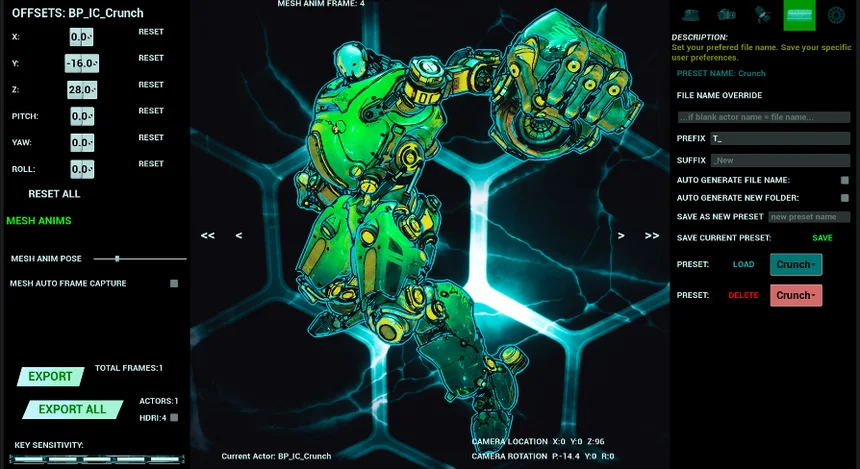
A bulk image capture tool for skeletal and static meshes, with transparent backgrounds, high-resolution export, runtime controls and animation frame capture.

Version 2.0 Now AvailableWe’re excited to announce the release of Version 2.0, packed with powerful new features and significant improvements to enhance your experience. Be sure to check out our new videos to familiarize yourself with all the updates!Important Notice (Version 2.0)Please avoid filling in any materials in the post-process volume.Essential Videos:Quick Overview of Version 2.0: Watch NowDetailed Feature Breakdown for Version 2.0: Watch NowQuick Overview of Version 1.0: Watch HereKey Features in Version 2.0:Mesh SupportFully supports both skeletal and static mesh actors.Attach multiple static or skeletal mesh components to any actor, with all combinations supported seamlessly.Transparent CapturesTwo distinct techniques for transparent background captures.Customizable background colors with real-time selection via a color picker, including precise numerical values (rounded to two decimals).High-Resolution Image ExportCapture high-resolution images with custom HDRI or background options.Bulk export functionality for all HDRIs stored.Runtime ControlsFull control over directional light, skylight, camera FOV, and camera zoom during runtime.Flexible resolution options, from predefined presets (32x32 to 4096x4096) to fully custom resolutions.Customizable File ManagementOverride file names with custom prefixes or suffixes.Automatically generate file names and organize them into folders.Advanced Actor CustomizationToggle actor and attachment shadow casting.Independent or synchronized control for FOV, offsets, and zoom—ideal for handling actors with similar shapes.Rotate actors around their original pivot point or center of mass.Animation and Frame ControlSkeletal Animation Slider: Control poses at runtime and export frames individually or in bulk, with custom frame ranges.Fine-tune frame selection using keyboard shortcuts (1 = next frame, 2 = previous frame).Added face animation controls for greater flexibility.On-screen visual representation of the current…

Available on

Search by image

Upload a reference to find previews with similar colors, contrast, and detail.

Bulk Image Generator

Bulk Image Generator
Fab (Epic)€36.44
License not indexed
  • i Check the terms on the original listing.
Show full terms

Version 2.0 Now AvailableWe’re excited to announce the release of Version 2.0, packed with powerful new features and significant improvements to enhance your experience. Be sure to check out our new videos to familiarize yourself with all the updates!Important Notice (Version 2.0)Please avoid filling in any materials in the post-process volume.Essential Videos:Quick Overview of Version 2.0: Watch NowDetailed Feature Breakdown for Version 2.0: Watch NowQuick Overview of Version 1.0: Watch HereKey Features in Version 2.0:Mesh SupportFully supports both skeletal and static mesh actors.Attach multiple static or skeletal mesh components to any actor, with all combinations supported seamlessly.Transparent CapturesTwo distinct techniques for transparent background captures.Customizable background colors with real-time selection via a color picker, including precise numerical values (rounded to two decimals).High-Resolution Image ExportCapture high-resolution images with custom HDRI or background options.Bulk export functionality for all HDRIs stored.Runtime ControlsFull control over directional light, skylight, camera FOV, and camera zoom during runtime.Flexible resolution options, from predefined presets (32x32 to 4096x4096) to fully custom resolutions.Customizable File ManagementOverride file names with custom prefixes or suffixes.Automatically generate file names and organize them into folders.Advanced Actor CustomizationToggle actor and attachment shadow casting.Independent or synchronized control for FOV, offsets, and zoom—ideal for handling actors with similar shapes.Rotate actors around their original pivot point or center of mass.Animation and Frame ControlSkeletal Animation Slider: Control poses at runtime and export frames individually or in bulk, with custom frame ranges.Fine-tune frame selection using keyboard shortcuts (1 = next frame, 2 = previous frame).Added face animation controls for greater flexibility.On-screen visual representation of the current frame number and additional information.Keyboard Shortcuts and Sensitivity ControlsComprehensive keyboard shortcuts for movement, rotation, zoom, and menu toggling.Sensitivity adjustments available via the spacebar, with visual feedback displayed on-screen.Lighting and LUTsAdjust lighting and experiment with various LUT presets directly at runtime.Permanently save your preferred settings in custom presets.Setup and Documentation:Version 1.0 ResourcesHow to Set Up Everything: Watch HereDocumentation P

A bulk image capture tool for skeletal and static meshes, with transparent backgrounds, high-resolution export, runtime controls and animation frame capture.

View original listing