GetAssetPack

Viewport Widget

Viewport Widget
Price
Free

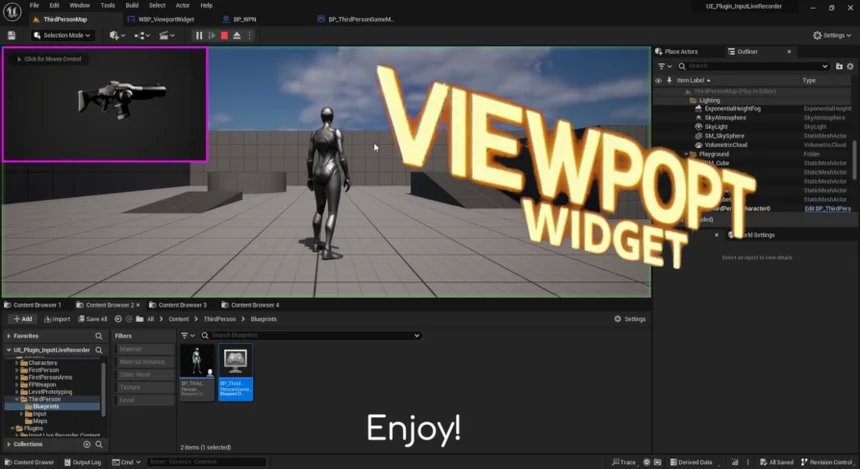
A widget for rendering a separate 3D world as a UI element, useful for displaying inventory items or equipped characters in a different scene.

VIEWPORT WIDGET2 MIN TUTORIALEXAMPLE/SOURCE CODEDONATE👍EASY TO USE AND INTEGRATE IN ANY PROJECT!Viewport Widget allows user to create a separate Widget World and render it as UI element while still playing game in Main World. Simple properties are used to setup view position and fill Widget World with Actors. This can be very useful for 3D Scene with light and environment setup that is totally different from Main 3D Scene (i.e. Inventory Items, Character with Equipment, etc).ENJOY![ABOUT]Initially this plugin was a part of more complex INPUT LIVE RECORDER plugin that is created to easily setup Input Combos for action games (cheat codes, combo actions, input recording).SUPPORT/FEEDBACKCHECK OTHER PLUGINS BY US[FOR YOUR INFORMATION]There are already two classes for same reason SAutoRefreshViewport and UViewport in UMG module. However, they cant be easily added from widget palette of Widget Blueprint Editor and as for now are marked as Experimental._____________________________________________________________________________________________TECHNICAL NOTESCLASSES:SViewportWidget (Slate)UViewportWidget (UMG)Both classes can be used in the very same way as any other Slate or UMG widget. EACH INSTANCE OF SViewportWidget CREATES NEW World.PROPERTIES:[ViewTransform] - view position (i.e. Camera position)[Entries] - collection of data used to spawn Actors in Widget World. Every item of collection has ActorClassPtr property to setup class to spawn and SpawnTransform property to setup spawn position.After Actors are spawned, you can access any of them via [GetSpawnedActor] method of UViewportWidget.

Available on

Search by image

Upload a reference to find previews with similar colors, contrast, and detail.

Viewport Widget

Viewport Widget
Fab (Epic)Free
License not indexed
  • i Check the terms on the original listing.
Show full terms

VIEWPORT WIDGET2 MIN TUTORIALEXAMPLE/SOURCE CODEDONATE👍EASY TO USE AND INTEGRATE IN ANY PROJECT!Viewport Widget allows user to create a separate Widget World and render it as UI element while still playing game in Main World. Simple properties are used to setup view position and fill Widget World with Actors. This can be very useful for 3D Scene with light and environment setup that is totally different from Main 3D Scene (i.e. Inventory Items, Character with Equipment, etc).ENJOY![ABOUT]Initially this plugin was a part of more complex INPUT LIVE RECORDER plugin that is created to easily setup Input Combos for action games (cheat codes, combo actions, input recording).SUPPORT/FEEDBACKCHECK OTHER PLUGINS BY US[FOR YOUR INFORMATION]There are already two classes for same reason SAutoRefreshViewport and UViewport in UMG module. However, they cant be easily added from widget palette of Widget Blueprint Editor and as for now are marked as Experimental._____________________________________________________________________________________________TECHNICAL NOTESCLASSES:SViewportWidget (Slate)UViewportWidget (UMG)Both classes can be used in the very same way as any other Slate or UMG widget. EACH INSTANCE OF SViewportWidget CREATES NEW World.PROPERTIES:[ViewTransform] - view position (i.e. Camera position)[Entries] - collection of data used to spawn Actors in Widget World. Every item of collection has ActorClassPtr property to setup class to spawn and SpawnTransform property to setup spawn position.After Actors are spawned, you can access any of them via [GetSpawnedActor] method of UViewportWidget.

A widget for rendering a separate 3D world as a UI element, useful for displaying inventory items or equipped characters in a different scene.

View original listing