GetAssetPack

A Krojyn Kit - Twin Blade Swords
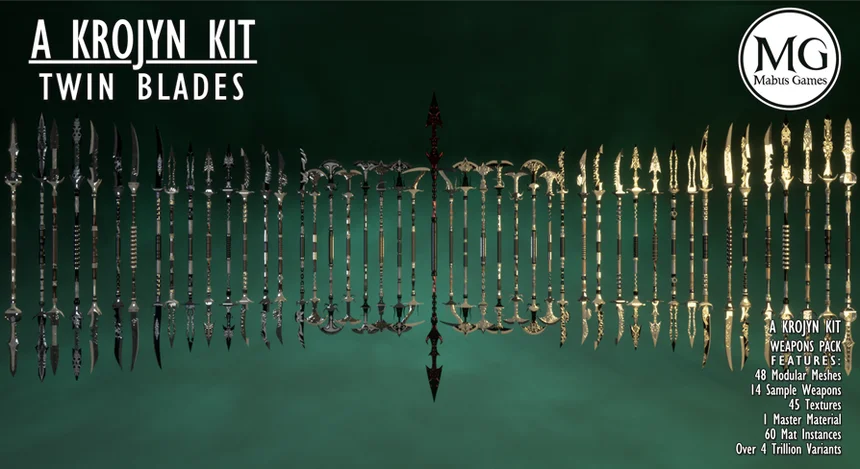
A Krojyn Kit - Twin Blade Swords
Price
€41
Type
3D Models
Dimensions
3D

How to Use: https://www.youtube.com/watch?v=7UfMt2TuPgk48 Modular Meshes-12 Blades-12 Cross Guards -12 Shafts-12 Grips14 Sample Twin Blades45 Textures1 Master Material60 Material Instances Applied toBlades (15 Material Options)Cross Guards (15 Material Options)Shafts (15 Material OptionsGrips (15 Material Options)Material Global Parameters Open for:AmbientSpecularMetallicRoughnessNormalBase ColorTo get what you like from the kit.181,872 Total Tris for the kit (variant construction will alter the number of tris per twin blade created).Highest tri-count for a single twin blade: 53,472Lowest tri-count for a single twin blade: 8,360Nanite is applied to the individual pieces (UE5.0+) but will need re-applied after creating a merged variant.Every Blade, Cross Guard, Shaft, and Grip is interchangeable. Pivot point for each piece is in the grip for easy socket implementation. All material options can be used per piece with the merged twin blades. Global material parameters are enabled for tweaking to your needs for lighting and general use. For any assistance on using the kit, feel free to contact me directly in my discord: https://discord.gg/RQQY6sbkj2 or email mabusgames@gmail.com (discord is the better option as I check it far more frequently).Select 1 blade, 1 cross guard, 1 grip, and 1 shaft from the content browser and drag them all into the scene at the same time. Once in the scene, de-select the grip, and rotate the shaft, cross guard, and blade 180 degrees to the opposite end of the grip. The longer grips can accommodate a 5cm shift of the shaft, cross guard, and blade combination out of the shaft to create a longer twin blade. Once you have assembled your preferred twin blade, select the grip, then the rest of the part and merge the objects into a single mesh. (Either choose to replace the source objects or uncheck the box and delete the source objects.) Save the merged object to a folder of your choice preferably a new folder of your naming (i.e…

Available on

Search by image

Upload a reference to find previews with similar colors, contrast, and detail.

A Krojyn Kit - Twin Blade Swords

A Krojyn Kit - Twin Blade Swords
Fab (Epic)€41
3D Models
License not indexed
  • i Check the terms on the original listing.
Show full terms

How to Use: https://www.youtube.com/watch?v=7UfMt2TuPgk48 Modular Meshes-12 Blades-12 Cross Guards -12 Shafts-12 Grips14 Sample Twin Blades45 Textures1 Master Material60 Material Instances Applied toBlades (15 Material Options)Cross Guards (15 Material Options)Shafts (15 Material OptionsGrips (15 Material Options)Material Global Parameters Open for:AmbientSpecularMetallicRoughnessNormalBase ColorTo get what you like from the kit.181,872 Total Tris for the kit (variant construction will alter the number of tris per twin blade created).Highest tri-count for a single twin blade: 53,472Lowest tri-count for a single twin blade: 8,360Nanite is applied to the individual pieces (UE5.0+) but will need re-applied after creating a merged variant.Every Blade, Cross Guard, Shaft, and Grip is interchangeable. Pivot point for each piece is in the grip for easy socket implementation. All material options can be used per piece with the merged twin blades. Global material parameters are enabled for tweaking to your needs for lighting and general use. For any assistance on using the kit, feel free to contact me directly in my discord: https://discord.gg/RQQY6sbkj2 or email mabusgames@gmail.com (discord is the better option as I check it far more frequently).Select 1 blade, 1 cross guard, 1 grip, and 1 shaft from the content browser and drag them all into the scene at the same time. Once in the scene, de-select the grip, and rotate the shaft, cross guard, and blade 180 degrees to the opposite end of the grip. The longer grips can accommodate a 5cm shift of the shaft, cross guard, and blade combination out of the shaft to create a longer twin blade. Once you have assembled your preferred twin blade, select the grip, then the rest of the part and merge the objects into a single mesh. (Either choose to replace the source objects or uncheck the box and delete the source objects.) Save the merged object to a folder of your choice preferably a new folder of your naming (i.e. Merged_Twinblades). Open the merged object from the content browser Enable Nanite (if wanted) and apply, or apply LODs. Choose any material instance option you like from the materials folder for each of the pieces. If these steps were followed exactly there will be 4 material slots on the merged twin blade. Material Options are named for the pieces they go with and have 15 total options Black and Blue, Black and Gold, Black and Green, Black and Red, Black and Silver, Gold and Black, Gold and Blue, Gold and Gree

View original listing