GetAssetPack

2D to 3D Planks Procedural Generator Blender Geometry Node
2D to 3D Planks Procedural Generator Blender Geometry Node
Price
€3.64
Engine
Blender

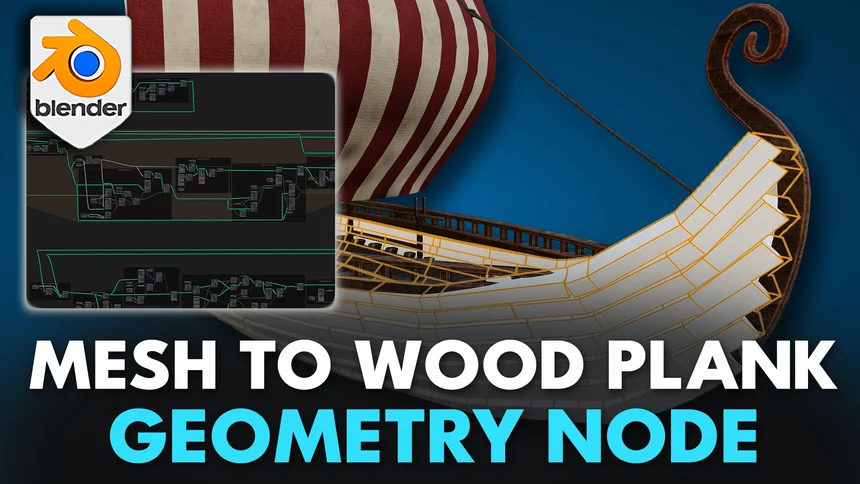
A Blender Geometry Node setup that generates customizable wooden planks across mesh surfaces, with controls for direction, spacing, thickness, and variation.

✨ Introducing the 'Blender 4 Mesh to Wooden Planks Geometry Node'! ✨🎥 Watch VideoTransform any surface into beautifully arranged wooden planks with unparalleled ease and flexibility. Designed for artists, architects, and 3D enthusiasts, the 'Blender 4 Mesh to Wooden Planks Geometry Node' streamlines your workflow, allowing you to add complex wooden textures to your scenes in minutes.This advanced node setup is a must-have for 3D modeling artists!🌟 Key Features of the 'Blender 4 Mesh to Wooden Planks Geometry Node':🔧 Versatile Plank Generation: Apply planks to any surface, adapting seamlessly to the contours of your mesh. Whether it’s a simple floor or a complex curved surface, the node ensures perfect placement every time.🔧 Intuitive Control: Adjust plank placement along the face normals of your mesh. The quantity of planks dynamically responds to the mesh's density, giving you the flexibility to achieve the exact look you want.🔧 Directional Flexibility: Easily change the direction of plank placement to align with the X, Y, or Z axis of your object, giving you creative control over the final appearance.🔧 Advanced Customization: Fine-tune your wooden planks with control over shade smoothness, smoothing angle, and even a seed value to randomize plank distribution for a more natural look.🔧 Dynamic Plank Options: Create continuous planks along mesh faces or opt for a segmented approach. Adjust gap and thickness offsets, control plank end offsets, and introduce randomness to mimic real-world imperfections.🔧 Natural Displacement: Elevate realism with displacement options that bend and offset vertices, adding a natural, weathered effect to your wooden planks.🌟 Project Ideas for the 'Blender 4 Mesh to Wooden Planks Geometry Node':✅ Historical Village Recreation: Meticulously design wooden structures for historical villages in documentaries or educational software. Showcase various styles and aging effects on wood, creating immersive, authentic historical environments.✅…

Available on

Search by image

Upload a reference to find previews with similar colors, contrast, and detail.

2D to 3D Planks Procedural Generator Blender Geometry Node

2D to 3D Planks Procedural Generator Blender Geometry Node
Fab (Epic)€3.64
License not indexed
  • i Check the terms on the original listing.
Show full terms

✨ Introducing the 'Blender 4 Mesh to Wooden Planks Geometry Node'! ✨🎥 Watch VideoTransform any surface into beautifully arranged wooden planks with unparalleled ease and flexibility. Designed for artists, architects, and 3D enthusiasts, the 'Blender 4 Mesh to Wooden Planks Geometry Node' streamlines your workflow, allowing you to add complex wooden textures to your scenes in minutes.This advanced node setup is a must-have for 3D modeling artists!🌟 Key Features of the 'Blender 4 Mesh to Wooden Planks Geometry Node':🔧 Versatile Plank Generation: Apply planks to any surface, adapting seamlessly to the contours of your mesh. Whether it’s a simple floor or a complex curved surface, the node ensures perfect placement every time.🔧 Intuitive Control: Adjust plank placement along the face normals of your mesh. The quantity of planks dynamically responds to the mesh's density, giving you the flexibility to achieve the exact look you want.🔧 Directional Flexibility: Easily change the direction of plank placement to align with the X, Y, or Z axis of your object, giving you creative control over the final appearance.🔧 Advanced Customization: Fine-tune your wooden planks with control over shade smoothness, smoothing angle, and even a seed value to randomize plank distribution for a more natural look.🔧 Dynamic Plank Options: Create continuous planks along mesh faces or opt for a segmented approach. Adjust gap and thickness offsets, control plank end offsets, and introduce randomness to mimic real-world imperfections.🔧 Natural Displacement: Elevate realism with displacement options that bend and offset vertices, adding a natural, weathered effect to your wooden planks.🌟 Project Ideas for the 'Blender 4 Mesh to Wooden Planks Geometry Node':✅ Historical Village Recreation: Meticulously design wooden structures for historical villages in documentaries or educational software. Showcase various styles and aging effects on wood, creating immersive, authentic historical environments.✅ Fantasy Treehouse Village: Design enchanting treehouse villages in fantasy worlds. Use the node to create intricate wooden pathways, houses, and accessories that seamlessly blend with the natural environment.✅ Eco-Friendly Modern Home Design: Highlight sustainable architecture with detailed wooden exteriors and interiors in a modern eco-friendly home design. Showcase the aesthetic and functional use of wood in contemporary design.✅ Pirate Ship Creation: For games or films, design a detailed Viking o

A Blender Geometry Node setup that generates customizable wooden planks across mesh surfaces, with controls for direction, spacing, thickness, and variation.

View original listing