GetAssetPack

Advanced Decal Component

Advanced Decal Component
Price
€31.89
Type
Textures

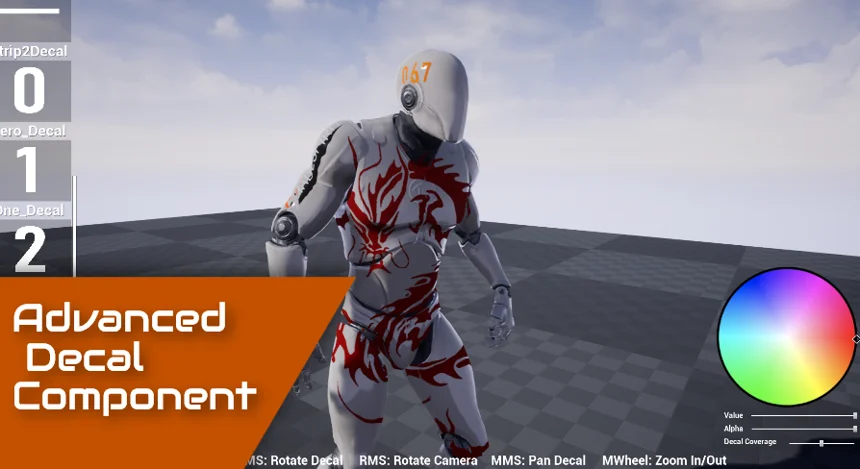
A mesh decal projection tool for painting, layering and editing decals on static or skeletal meshes in the editor or at runtime.

1.Introduction:V3 Update (Memory Optimization, Save & Load Decals, New In-Editor GUI) YOUTUBE LINKV2 Update (PBR Decals, Wraps, Material Brushes) Video: YOUTUBE LINKDemo Video: YOUTUBE LINKAdvanced Decal Component is a StaticMesh/SkeletalMesh UV independent Mesh Decal Projection tool with multi-layer support (add,edit, move up/down and remove). Usable in editor-time as an Actor, and at runtime as a component attached to desired blueprint. The component projects, packs and bakes all decal texture to the mesh UV for optimal performance.By attaching this component to an actor with mesh data (Skeletal Mesh, Static Mesh) you can paint skins and decals on said actor. You have total control over where to project the decal (see section '2.Requirements' below), stack multiple decals on top of each other, edit existing decals, or remove baked decals. It also works on translucent surfaces.An example widget and Actor to manipulate the layers are available. An Actor blueprint with a skeletal mesh component is considered as an example target with added Decal Component to showcase integration of the subsystem with your game.2.Requirements:The mesh should be uniquely UVed (no mirrored UVs) with no overlapping islands and visible seams. (the example mannequin provided is a modified version of UE4 Mannequin that has unique UVs)The target Skeletal or Static Mesh should have its material blended with the provided 'DecalBlendFunc' and expose three TextureObjectParameter (automatically set at runtime to CanvasRenderTarget2D objects) values for the component to store its data in.3.Advantages:These are the advantages over conventional Decal Components in Unreal Engine 4:Doesn't bleed to other actors.Conventional: Bleeds to other actors that have bReceivesDecals On.Projects on a single material index.Conventional: Can't have control by default over what material to projectCan be used to layer decals one on top of others using the same component Conventional: Doesn't blend between decals of…

Available on

Search by image

Upload a reference to find previews with similar colors, contrast, and detail.

Advanced Decal Component

Advanced Decal Component
Fab (Epic)€31.89
Textures
License not indexed
  • i Check the terms on the original listing.
Show full terms

1.Introduction:V3 Update (Memory Optimization, Save & Load Decals, New In-Editor GUI) YOUTUBE LINKV2 Update (PBR Decals, Wraps, Material Brushes) Video: YOUTUBE LINKDemo Video: YOUTUBE LINKAdvanced Decal Component is a StaticMesh/SkeletalMesh UV independent Mesh Decal Projection tool with multi-layer support (add,edit, move up/down and remove). Usable in editor-time as an Actor, and at runtime as a component attached to desired blueprint. The component projects, packs and bakes all decal texture to the mesh UV for optimal performance.By attaching this component to an actor with mesh data (Skeletal Mesh, Static Mesh) you can paint skins and decals on said actor. You have total control over where to project the decal (see section '2.Requirements' below), stack multiple decals on top of each other, edit existing decals, or remove baked decals. It also works on translucent surfaces.An example widget and Actor to manipulate the layers are available. An Actor blueprint with a skeletal mesh component is considered as an example target with added Decal Component to showcase integration of the subsystem with your game.2.Requirements:The mesh should be uniquely UVed (no mirrored UVs) with no overlapping islands and visible seams. (the example mannequin provided is a modified version of UE4 Mannequin that has unique UVs)The target Skeletal or Static Mesh should have its material blended with the provided 'DecalBlendFunc' and expose three TextureObjectParameter (automatically set at runtime to CanvasRenderTarget2D objects) values for the component to store its data in.3.Advantages:These are the advantages over conventional Decal Components in Unreal Engine 4:Doesn't bleed to other actors.Conventional: Bleeds to other actors that have bReceivesDecals On.Projects on a single material index.Conventional: Can't have control by default over what material to projectCan be used to layer decals one on top of others  using the same component       Conventional: Doesn't blend between decals of multiple DecalActor/DecalComponent instancesWorks on translucent surfaces!               Conventional: Doesn't support projection on translucent surfaces by default because it requires depth informationSingle actor for all decals of the same meshConventional: Number of actors/components keeps going up as u add more decals making it hard to manage all the actorsBakes all projections to UV map to optimize performance instead of using active projection on all decalsConventional: Active proje

A mesh decal projection tool for painting, layering and editing decals on static or skeletal meshes in the editor or at runtime.

View original listing