GetAssetPack

Sci-fi Gunship

Sci-fi Gunship
Price
€13.66
Type
3D Models
Dimensions
3D

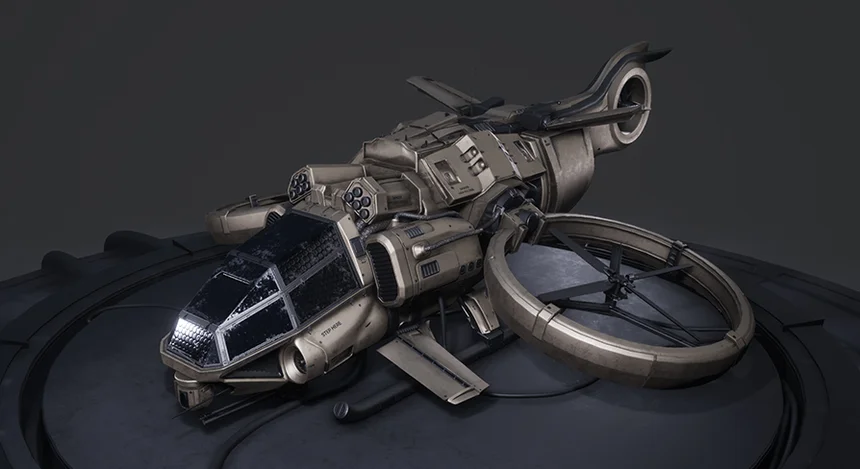
VIDEOHigh detailed sci-fi gunship model with LODs.Features a pawn class with physics based movement.Moving elements are skeletal meshes:-wings movement works with animations and aim offset;-minigun attachment is rigged and with physics simulated swinging gun belt;-scanner is rigged and cycles trough idle animations if pawn is not possessed;-antenna swings with movement;...all elements are also imported as static meshes.All mechanics are in the pawn blueprint so it can be easily possessed and unpossesed.Materials are configurable, you can switch the camo texture with the ones available in the project or imported by you. You can also remove the camo and leave a clean color, configured by color overlay.Basic hit effects from starter content, are played upon impact.Note: In order for input to work in your custom project you have to setup the Axis Mappings. Go to Project Settings>Input>Bindings. From there add several Axis Mappings named:-MoveForward-MoveRight-Turn (for mouse)-LookUp (for mouse)-TurnRate (for gamepads)-LookUpRate (for gamepads)Afterwards, for each Axis Mapping, select Add Axis Mapping to Group and your respective inputExample: For the MoveForward axis I would add 'W' with a scale of 1 and 'S' with a scale of -1 for Keyboard support.And Gamepad Left Thumbstick Y-Axis with a scale of 1, for gamepad support.

Available on

Search by image

Upload a reference to find previews with similar colors, contrast, and detail.

Sci-fi Gunship

Sci-fi Gunship
Fab (Epic)€13.66
3D Models
License not indexed
  • i Check the terms on the original listing.
Show full terms

VIDEOHigh detailed sci-fi gunship model with LODs.Features a pawn class with physics based movement.Moving elements are skeletal meshes:-wings movement works with animations and aim offset;-minigun attachment is rigged and with physics simulated swinging gun belt;-scanner is rigged and cycles trough idle animations if pawn is not possessed;-antenna swings with movement;...all elements are also imported as static meshes.All mechanics are in the pawn blueprint so it can be easily possessed and unpossesed.Materials are configurable, you can switch the camo texture with the ones available in the project or imported by you. You can also remove the camo and leave a clean color, configured by color overlay.Basic hit effects from starter content, are played upon impact.Note: In order for input to work in your custom project you have to setup the Axis Mappings. Go to Project Settings>Input>Bindings. From there add several Axis Mappings named:-MoveForward-MoveRight-Turn (for mouse)-LookUp (for mouse)-TurnRate (for gamepads)-LookUpRate (for gamepads)Afterwards, for each Axis Mapping, select Add Axis Mapping to Group and your respective inputExample: For the MoveForward axis I would add 'W' with a scale of 1 and 'S' with a scale of -1 for Keyboard support.And Gamepad Left Thumbstick Y-Axis with a scale of 1, for gamepad support.

View original listing