GetAssetPack

Female Straight Hair

Female Straight Hair
Price
€18.21
Engine
Blender

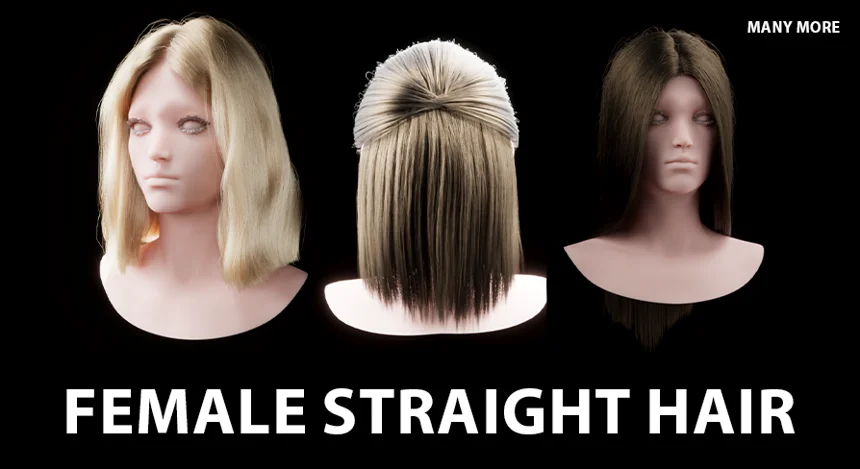
A groom pack with 12 female straight hairstyles, 10 variation files, and 37 hair pieces, including messy and wet versions.

Female Straight Hair is a groom pack inspired by Straight Hair hairstyles (focus on female).The pack has 12 different hairstyles with variations, like messy and wet version of some (10 variations files and 37 hair pieces in total).Some pieces are modular and can be used separated or with others hairstyles.All of them use the groom system.You can apply any hair groom material to change color of the hair. ( There is a hair material with dual color included) How to put on the character?You can put it normally on the character, resizing, rotating, biding and attaching on a head socket.Second way (if 1 is not possible for you):Video tutorial: https://www.youtube.com/watch?v=rtZRz7dzqx8&ab_channel=StudioNinjatoFind the scalp inside the demo folderExport the scalp as fbx or objOpen your character head inside Blender/Maya or 3d software you normally use.Make a scalp for your character by selecting the faces in the shape of a scalp and deleting everything else.Load the scalp from this pack (don't move it or change rotation, scale.)Put the scalp you made in the same place as the pack one.You will need to sculpt the pack scalp to look close as possible to your scalp (blender users https://www.youtube.com/watch?v=B11XBZmIIZc&ab_channel=PIXXO3D)Create a shape key like the video show, the sculpt is very simples since the shape is not complex, i recommend only use the the push/grab option (the simpler the better)After sculpting and creating a shape key (from normal to your scalp shape) send it to unrealInside unreal you can use the biding asset already available or create another oneThe hair will be biding to the pack scalp with the shape key, when you put the scalp on your character you will need to change the value of it so the scalp change to your character head shape.You can create as many shape keys you need, making possible to use the same hair asset in multiple characters with different head shapes.Quick resume to make easy to understand: You will make a shape key (morph)…

Available on

Search by image

Upload a reference to find previews with similar colors, contrast, and detail.

Female Straight Hair

Female Straight Hair
Fab (Epic)€18.21
License not indexed
  • i Check the terms on the original listing.
Show full terms

Female Straight Hair is a groom pack inspired by Straight Hair hairstyles (focus on female).The pack has 12 different hairstyles with variations, like messy and wet version of some (10 variations files and 37 hair pieces in total).Some pieces are modular and can be used separated or with others hairstyles.All of them use the groom system.You can apply any hair groom material to change color of the hair. ( There is a hair material with dual color included) How to put on the character?You can put it normally on the character, resizing, rotating, biding and attaching on a head socket.Second way (if 1 is not possible for you):Video tutorial: https://www.youtube.com/watch?v=rtZRz7dzqx8&ab_channel=StudioNinjatoFind the scalp inside the demo folderExport the scalp as fbx or objOpen your character head inside Blender/Maya or 3d software you normally use.Make a scalp for your character by selecting the faces in the shape of a scalp and deleting everything else.Load the scalp from this pack (don't move it or change rotation, scale.)Put the scalp you made in the same place as the pack one.You will need to sculpt the pack scalp to look close as possible to your scalp (blender users https://www.youtube.com/watch?v=B11XBZmIIZc&ab_channel=PIXXO3D)Create a shape key like the video show, the sculpt is very simples since the shape is not complex, i recommend only use the the push/grab option (the simpler the better)After sculpting and creating a shape key (from normal to your scalp shape) send it to unrealInside unreal you can use the biding asset already available or create another oneThe hair will be biding to the pack scalp with the shape key, when you put the scalp on your character you will need to change the value of it so the scalp change to your character head shape.You can create as many shape keys you need, making possible to use the same hair asset in multiple characters with different head shapes.Quick resume to make easy to understand: You will make a shape key (morph), from the pack scalp shape to your character scalp head shape. Inside unreal, the scalp will morph to your character head shape and the hair will follow along.It will work with Metahuman?Yes, the hair will work with any conventional humanoid character.I bought it, but I wanted a specific type of part and I couldn't find it, what do I do?Updates will be made according to customer needs. Please let us know what you need, as we will be putting it in the pack as soon as possible. (you can say what y

A groom pack with 12 female straight hairstyles, 10 variation files, and 37 hair pieces, including messy and wet versions.

View original listing