Building a 200-piece industrial pixel art pack where every tile edge is identical and every animation loop closes exactly.
There are two kinds of thin tag on itch.io, and telling them apart is the whole of this project.
Show full description...
Before drawing anything I counted. traps and pixel-art together: 39 assets. gems: 52. cursor: 54. Thin, all of them — and in every one, the top results are free. The tag is not thin because nobody has noticed it. It is thin because nobody pays for what is there.
Then the other half of the list. factory and pixel-art: 30 assets, priced between $4 and $20. automation: 36. machines: 15. conveyor: four on the entire site. Same thinness, opposite economics — the sellers there charge real money, and the genre they serve is one indie developers have been building obsessively since Factorio.
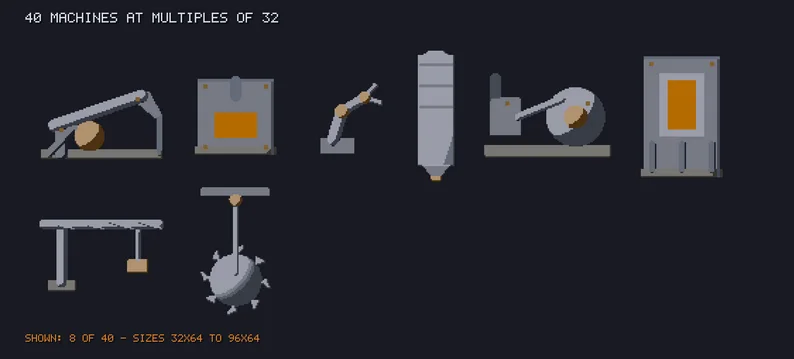
That gap is why Escapement exists: 200 industrial pixel art assets for factory, automation and logistics games. 96 icons at 32×32, a 64-tile conveyor and floor tileset, 40 machines at multiples of 32, and 94 animations.
The number is 200, and 200 is what you can count
Not “200+”. Not “1,300 files”. Two hundred distinct silhouettes — no colour variant counted, no animation frame counted, no item under two names.
This matters because the most common review a big asset pack earns is “only 20% of it is usable”, and that review is almost always earned the same way: a pack advertises 2,900 sprites which turn out to be 560 items in twenty colours. The count was true and the buyer still felt cheated, because they were counting things they could put in a game and the seller was counting files.
Escapement ships around 1,300 files. That number is in the body of the page, where it reads as thoroughness. It is not in the title, where it would read as an accusation waiting to happen.
Holding the line cost me an entire family. The first pass at ores and ingots was four rocks and four bars — recoloured. Eight catalogue entries, two silhouettes. I rebuilt them as eight different shapes: a faceted boulder, a bedded seam, loose shale shards, a crystal cluster; a single bar, an offset pair, a rolled sheet, a leaning stack of plates. Nothing in this pack earns its place by colour.
A gear with twelve teeth loops in eight frames, not ninety-six
A gear with N teeth is unchanged by a turn of 360/N. Twelve teeth means the sprite repeats every 30°, so eight frames at 3.75° each is the entire loop — and the loop closes exactly. Frame 8 is not almost frame 0. It is frame 0, pixel for pixel.
That is not an optimisation I applied afterwards. It set the frame budget for the whole pack, and it comes with a rule most people never think about:
The spoke count divides the symmetry. A 12-tooth gear with 4 spokes repeats at 360/gcd(12,4) = 90°, not 30°. Three times the frames, for a cross in the middle.
Choosing how many spokes to draw is a decision about animation cost disguised as a decision about decoration. Once I knew that, I made the build check it: a gear whose spoke count does not divide its tooth count is refused before it is drawn.
And a trap I walked straight into: the rim. I was approximating each gear's rim as a 32-sided polygon. A 32-gon is only invariant under turns that map a 32-gon onto itself — so a 6-tooth and a 20-tooth gear came back four and eight pixels different after their own turns. The teeth kept their promise and the rim broke it silently. Rim segments are now derived from the tooth count. The same bug reappeared months later in a saw blade, and by then the check caught it.
The seam that matters is not the tile against itself
A tileset has a check everyone knows: does the tile join its own copy? Lay it beside itself, look for the seam.
That check is worth almost nothing, because the seam that matters is the tile against its neighbour. A straight can be perfectly periodic and still meet its own corner one pixel out of register — and nothing looks wrong until somebody assembles a level, by which point the pack is in their hands rather than in my build log.
So every tile in Escapement declares what each of its four edges carries: belt_h, pipe_v, wall_h, or nothing. The build then asserts that every edge in the entire set carrying the same connector has the identical pixel profile, and refuses to ship if any two differ.
It caught something I would never have found by eye: the wall corner's highlight ran along its centre block but not down its arms, so it met a straight wall two pixels out. Invisible on the tile. A broken line the moment two of them sit side by side.
Writing that check took three attempts, and the first two were wrong in ways worth recording:
- I compared palette indices. Those are local to each sprite. Two tiles with identical rails quantise to different index numbers, so I was measuring the quantiser, not the geometry.
- I compared the whole pixel column. A running belt's arrows sit at a different phase at each edge by design — that is what a moving belt is. Column 31 followed by column 0 continues the pattern correctly.
A connector is the structural cross-section: where the rail starts, how deep the channel is, where the shadow line sits. The pack now re-rasterises each tile without anything that moves, and compares that.
Four planes, or it reads as bad work
My first conveyor tile was a grey band between two brown bands. Technically correct, seamless, and it looked like placeholder art — correctly, because both bands sat at the same lightness and there was nothing for the eye to resolve into a near surface and a far one.
What an industrial tileset actually does is stack distinct value planes and mark every boundary:
planerole
lit edge, 2px the lightest thing in the tile
rail face mid steel
recess shadow, 2px the darkest thing, under every overhang
belt surface dark, because it is sunk between the rails
Plus one saturated accent — the orange direction arrows — against an otherwise grey field. One accent is what makes an accent mean something.
Two details cost me a rebuild each. The arrows have to run at exactly 45° and every endpoint has to be snapped to a pixel centre: a free slope lands on a different sub-pixel phase every time the same arrow is redrawn, and four copies of one arrow came back visibly unlike each other. On a tile that is the most obvious defect there is, because the repeat puts them side by side for comparison.
And the rivets vanished entirely — not “rendered poorly”, zero pixels — for a reason that took a partmap dump to find. The renderer assigns each pixel by highest coverage and only falls back to draw order on a tie. A rivet centred on x = 4.0 sits on a pixel boundary, splits itself across two pixels at roughly half each, and loses both to a rail that covers them completely. Small detail has to sit on a pixel centre and be big enough to own one.
An in-plane spin is the wrong motion for most machines
This one I got wrong across a dozen assets before anyone pointed at it.
A sprite is flat, so the obvious way to animate a rotation is to turn it in the picture plane. That is right for a gear, a saw blade, a flywheel. It is wrong for almost everything else, and wrong in a way that looks broken rather than merely imperfect:
- a drill bit does not tumble end over end
- a valve handle does not cartwheel
- a hinge leaf does not orbit its pin
- a crank handle brings itself toward you and takes itself away
All of those rotate about an axis lying in the picture, and what that does to a silhouette is squeeze it toward the axis and back out again. Escapement draws that directly. It comes with one hard-won rule, inherited from a spinning coin: the edge-on frame is floored at a fifth of full width. Let the cosine reach zero and that frame comes back empty — and it is the exact frame the animation gets judged on, because a sprite that vanishes once per cycle is the first thing anyone notices.
Two more failures worth naming:
- Spinning the whole asset. A handwheel bolted to a valve body, a blade in a housing, a mill's rollers in their frame — the wheel turns and the plinth does not. Spun about the middle of the tile, the wheel orbits it. Every rotation now names which parts move and takes its pivot from that part's own bounds.
- A rectangle cannot rotate. The renderer reads a rect as its two corners sorted into an upright box, so turning one moves the corners and then rebuilds a square. The hammer's head was three plates and mid-swing it collapsed into a grey slab while the haft swung out from under it. Anything that turns is now built from capsules, discs and polygons — and the build refuses the combination outright rather than trusting me to remember.
What is in the box
96 icons at 32×32 across ten families: gears and toothed wheels, transmission, fasteners and springs, ore and product, valves and pipes, power and wiring, tools, controls and instruments, containers, hazards.
64 tiles on a 32px grid: conveyors (straights, corners, tees, a crossing, ends, inclines, both directions), pipes, rails, power cables, floors and barriers.
40 machines at 32×64 up to 96×64 — extraction, processing, power, storage, transport, hazards and control.
One palette across all 200, from ten industrial materials: steel, dark iron, brass, copper, rubber, wood, concrete, hazard orange, ember and glass. The shipped .gpl is measured off the finished sprites rather than from the ten seed colours, so it matches the pixels exactly.
Individual indexed PNGs, three spritesheets with Aseprite-format JSON atlases, animation frames, strips with JSON, and GIF previews.
Two things I will say plainly
There is no smoke, no sparks and no flame licks. Those are particles, not rigid transforms, and a pack that advertised them would be advertising something it does not contain. What moves here moves because a shape moved.
No generative AI was used at any stage. Every sprite is drawn by geometry I wrote — shapes, materials and transforms — and every rule above exists because the build stopped and told me I had broken it.
LICENSE You MAY use these assets in commercial and non-commercial projects, in any number of your projects, and modify, recolour or remix them freely. Credit is welcome but not required. You MAY NOT resell or redistribute the assets themselves — modified or not — as an asset pack, bundle or template, and you may not use them to train a machine learning model. The line: shipping them INSIDE a game is fine. Shipping them AS art is not. No generative AI was used to produce any asset in this pack.
 GetAssetPack