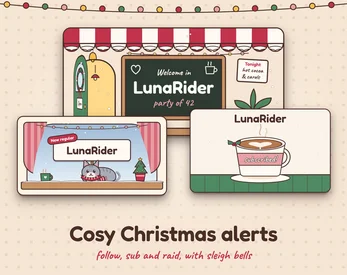
Three hand-drawn Christmas alerts set in a little café, each 7 seconds with its own sleigh bell sound, and the viewer's name shown live.
Show full description...
- Wreath Door (raid): a wreath on the café door, the raider's name on the chalkboard and the party size
Sized to sit comfortably on stream (under half the screen width), and long names up to 25 characters stay big and readable.
What you get
For each alert: paste-in code for StreamElements and Streamlabs (shows the name live), a transparent video with sound, the sound as MP3 and OGG, and a try-it page. Plus a one-page setup guide and the font licences.
Want the matching Christmas tree goal widget too? It's sold separately as Cozy Christmas Tree Goal Widget.
Setup questions
Does it work with OBS? Yes. OBS can't fire an alert by itself: add your free StreamElements or Streamlabs alert box to OBS as one Browser Source at 1920 × 1080, and the alerts play when someone follows, subscribes or raids.
How do I set it up in StreamElements? Open your overlay's AlertBox, pick Follower, Subscriber or Raid, turn on custom CSS, and paste the HTML, CSS and JS files into their tabs. Upload the sound and set the duration to 7 seconds. The guide walks through it on one page.
And in Streamlabs? Alert Box, then Follows, Subscriptions or Raids. Turn on Custom HTML/CSS, paste the three files, set the image to none, upload the sound and set the duration to 7 seconds. For the raid alert, set the message template to party of {count}.
Will long usernames fit? Yes. Names up to 25 characters (the Twitch maximum) stay large and split neatly onto two lines when needed.
Can I try it first? Every alert comes with a try-it page. Open it in Chrome, type a name and press play.
Instant digital download. Made for Twitch, and works on Kick and YouTube where StreamElements or Streamlabs alerts are supported for your account.
 GetAssetPack