GetAssetPack

Advanced Radial Ground Check for Unity
Advanced Radial Ground Check for Unity
Price
Free
Type
3D Models
Creator
MValera Dev
Dimensions
3D
Engine
Unity

A Unity C# ground-check script for character controllers, using configurable concentric ray rings to detect slopes and terrain and provide coyote time for jumping.

Available on

Search by image

Upload a reference to find previews with similar colors, contrast, and detail.

Advanced Radial Ground Check for Unity

Advanced Radial Ground Check for Unity1 / 3
MValera Dev · itch.ioFree
3D Models
License not indexed
  • i Check the terms on the original listing.
Show full terms

A Unity C# ground-check script for character controllers, using configurable concentric ray rings to detect slopes and terrain and provide coyote time for jumping.

View original listing

Description

Advanced Radial Ground Check for Unity (v1.1)

Stop relying on basic sphere casts or single raycasts that glitch on edges, steps, and steep slopes. This optimized C# script uses a highly customizable concentric ray-ring system to calculate perfectly averaged ground normals and impact points, giving your character controller ultimate physical stability.

Show full description...

With v1.1, the workflow has been completely redesigned. We removed clunky, collapsible foldouts in favor of a clean, production-ready inspector layout that integrates flawlessly with Unity's native aesthetics.

🛠️ Key Features

  • Concentric Ray Rings: Configure multiple rings with independent ray counts, radiuses, and vertical offsets to perfectly match your character's collider layout.
  • Performance First (0 bytes GC): Mathematical directions are safely cached and updated only when parameters change (OnValidate), keeping runtime CPU overhead allocation-free.
  • Coyote Time Buffer: Built-in and fully customizable out-of-the-box to make your jumping and platforming feel responsive and professional.
  • Advanced Slope Analytics: Automatically detects terrain angles and prevents the controller from registering steep walls or cliffs as valid ground.
  • Zero External Dependencies: No third-party plugins or paid editor assets required. Just drag, drop, and configure.
  • Clean Code Layout: Fully commented in English and structured under strict Allman.

🎨 New in v1.1: Production-Ready Custom Inspector

The editor script has been overhauled to deliver a professional utility experience:

  • Frictionless UI: No more clicking to open or close dropdown menus. All core settings, slopes, and rings are displayed in fixed, beautifully aligned layout blocks.
  • Real-time Slope Gauge: Features a custom geometric arc visualizer rendered directly inside the inspector window to check your maximum walkable angle constraints at a glance.
  • One-Click Presets: Switch instantly between standard setups: Tight (small 2D/3D platformers), Balanced (standard humanoids), and Wide (large physics bodies or vehicles).
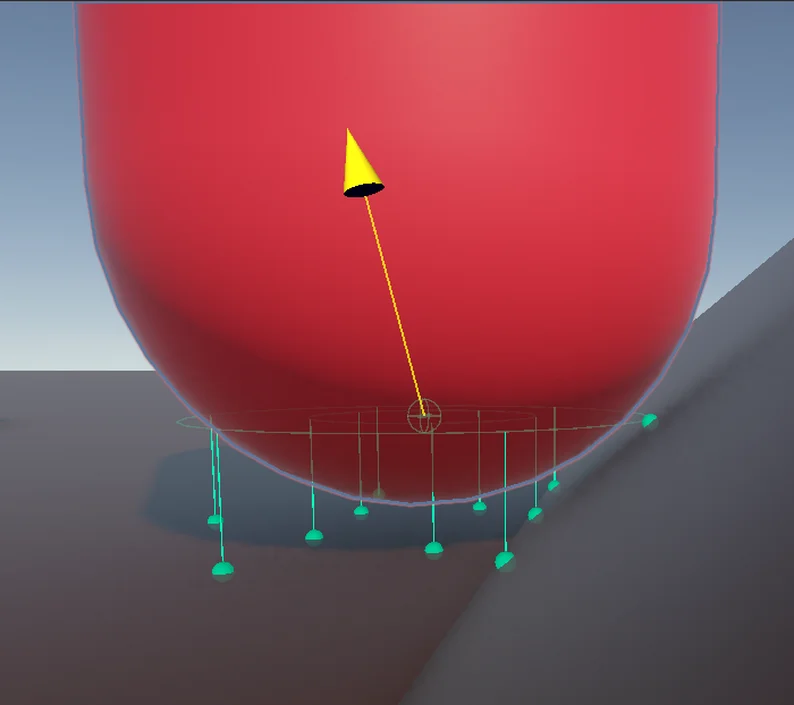
  • Diagnostic Scene Gizmos: Color-coded scene visualization showing active hits, blind spots, and a dynamic handle arrow indicating the exact averaged ground normal vector.

📖 Quick Start

  • Drop GroundCheck.cs into your project scripts folder.
  • Attach the component to your character.
  • Configure your Ground Layers and adjust the Center Offset to fit your collider baseline.
  • Open the included README.md file for a complete API guide!

Tags

3DControllerground-checkIndiePhysicssourcecodeUnityunity3d

Downloads

Name your own price.