GetAssetPack

9-Slice effect for Clickteam Fusion 2.5
9-Slice effect for Clickteam Fusion 2.5
Price
$4.99
Type
Sprites
Creator
NaitorStudios
Dimensions
2D
Style
Pixel art

A 9-slice shader for Clickteam Fusion 2.5 that scales sprites while preserving their edges and corners, for resizable UI and other game graphics.

Turn a single object into a fancy stylized boxes with ease!

Available on

Search by image

Upload a reference to find previews with similar colors, contrast, and detail.

9-Slice effect for Clickteam Fusion 2.5

9-Slice effect for Clickteam Fusion 2.51 / 5
NaitorStudios · itch.io$4.99
2D
Sprites
License not indexed
  • i Check the terms on the original listing.
Show full terms

Turn a single object into a fancy stylized boxes with ease!

A 9-slice shader for Clickteam Fusion 2.5 that scales sprites while preserving their edges and corners, for resizable UI and other game graphics.

View original listing

Description

Transform your game graphics with my custom-built 9-Slice Shader, a unique addition to your Clickteam Fusion 2.5 toolbox. This shader is meticulously designed to enhance the visual appeal of your objects, bringing a new level of professionalism and polish to your projects.

Key Features:

Show full description...
  • Dynamic 9-Slice Scaling: Our shader slices your object's texture into nine distinct segments. The central part of the texture is designed to stretch both horizontally and vertically, ensuring seamless scalability while preserving the integrity of your design.
  • Edge & Corner Preservation: The edges of your textures will stretch in the direction they align with, while the corners remain at their original size. This thoughtful design maintains the visual quality and crispness of your objects, even when scaled.
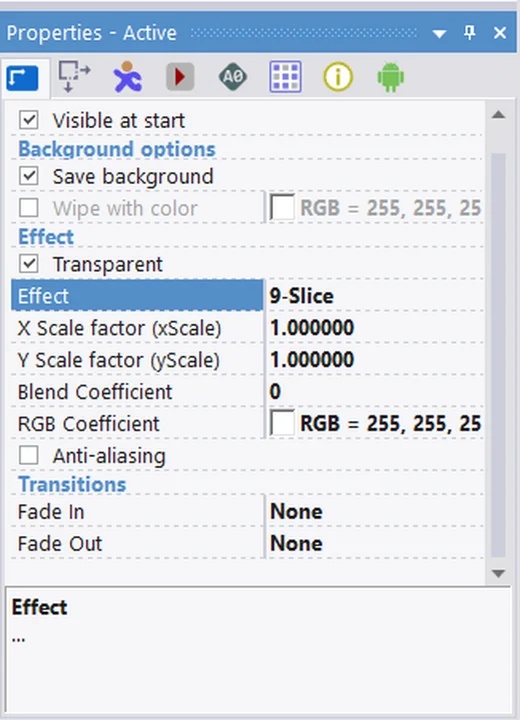
  • Effortless Integration & Control: Applying this shader is a breeze. Simply update the object's scale and adjust the X Scale and Y Scale parameters to suit your needs. These parameters can be fine-tuned to zoom in on your objects, magnifying them while keeping the edges and corners beautifully intact.
  • Versatility for Various Projects: Whether you’re working on a pixel-art retro game or a high-resolution modern title, this shader is versatile enough to adapt to a wide range of graphical styles and requirements.
  • Optimized for Performance: Crafted with performance in mind, our shader ensures that the visual enhancements don’t come at the cost of your game’s smooth operation.
  • Compatibility: The shader is compatible with all runtimes, these being Windows (DX9+), Android, iOS and Mac.

Ideal Use Cases:

  • Creating scalable UI elements that retain their quality at different sizes.
  • Enhancing visual elements in both 2D and 3D projects.
  • Adding a professional touch to resizable game assets.

Easy to Implement: You don't need to be a shader expert to use this. The implementation is straightforward, making it accessible for both beginners and seasoned developers.

Support & Documentation: The shader comes with a comprehensive example, ensuring you have all the information needed to integrate it seamlessly into your projects. Plus, I'm here to answer any questions and provide support if needed.

Sneak peak of a project using it: Here in this video, you can see how you can transform projects making them much more professional looking with the shader. In the beginning of the video, I show one of the few Dialogue Tree Editors for Fusion, then I show my WIP tool for that purpose:

Tags

androidclickteamclickteam-fusion-25Effectsfusion-25Graphical User Interface (GUI)iosmacShaderswindows

Downloads