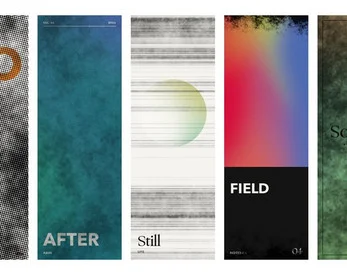
Make clean digital art look printed, copied and handled. Procedural, not AI.
Description
Clean digital art looks too clean. Drop one of these on top and it looks printed, photocopied and handled.
WHAT YOU GET
• 48 print texture overlays - 8 kinds x 6 variations: halftone dots, halftone lines, photocopy grain, dust and fibres, folds, uneven ink, roller streaks and burnt edges
• 4096 x 4096 px grayscale JPG, 300 dpi. White = nothing, black = ink
HOW TO USE
Show full description...
Put a texture above your artwork and set the layer to Multiply, then lower the opacity to taste. Invert it and use Screen for white specks. Works in Photoshop, Affinity, Procreate, Krita, Aseprite exports, and in game engines as an overlay or shader mask.
USE THEM FOR
Title screens, posters, zines, comic panels, UI and retro print looks.
GOOD TO KNOW
Made procedurally with code - not scanned, and not made with generative AI. Use in personal and commercial projects. Do not resell or redistribute the files as they are.
 GetAssetPack