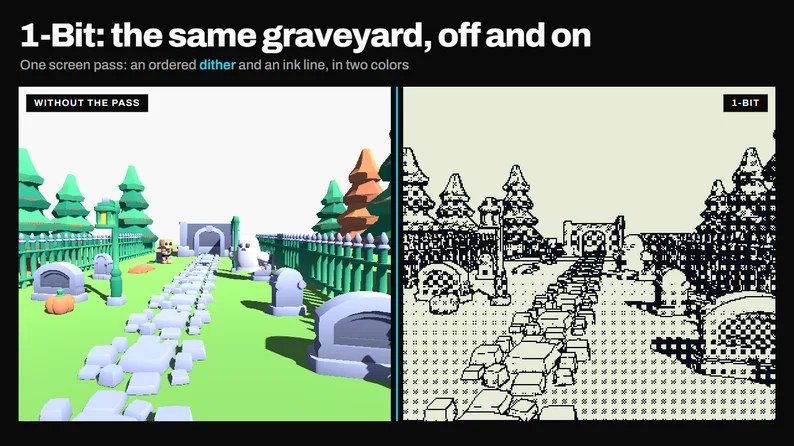
A two-color dithered look for 3D in Godot, done in one screen pass.
Try it in your browser first. The viewer runs the real shader on a small graveyard: drag the sliders, switch between four ready-made looks, and edit the code to see it recompile. When you like it, grab the project.
Compatibility: Godot 4.x. Works in GL Compatibility, Mobile and Forward+. No plugin, no autoload and no global setup.
Show full description...
- shaders/onebit_screen.gdshader: The pass for GL Compatibility. The main file: copy it into your project
- shaders/onebit_screen_vulkan.gdshader: The same pass for Forward+ and Mobile (their depth runs 0 to 1 and their screen is in linear light). Generated, do not edit
- shaders/onebit_screen_forward.gdshader: Forward+ only: the creases come from the normals the engine already rendered. Generated, do not edit
- shaders/onebit_lit.gdshader: A plain lit material (a colour and a picture) to try the pass on a model in the viewer. Not needed in your project
- onebit.gd: OneBit: adds the screen pass to a camera and picks the shader for the running renderer
- main.tscn, demo.gd, looks/, toon_look.gd: The example scene: a graveyard made of nodes, and four looks (Dinn, Phosphor, Amber, Pen) it cycles through
- kenney/: A few models of Kenney's Graveyard Kit (CC0, see kenney/LICENSE.txt) used by the example
Use it in your project
Copy shaders/ and onebit.gd into your project, then:
var pass_material := OneBit.add_screen_pass($Camera3D) pass_material.set_shader_parameter(&"paper_color", Color(0.35, 1.0, 0.45))
The pass is a quad in front of the camera. OneBit.add_screen_pass(camera) adds it and picks the shader for the running renderer. Pass true as the second argument to draw the creases from the engine's own normals: cleaner on curved surfaces, but only Forward+ has them. In another renderer it prints a warning and uses the depth-only pass. Your materials, lights, shadows and environment stay as they are; the pass reads the finished picture. How light the picture is decides how much ink there is, so the same scene can look a little different in each renderer, which light their materials differently.
Colours
ink_color is the dark of the two colours and paper_color the light one. Black and white, green phosphor, amber and a blue pen on cream are in the example.
Light
exposure moves the cut between ink and paper (above 0 more of the picture turns to paper, below 0 to ink) and contrast pushes the light of the picture apart before it is cut.
Dither
pattern picks how the picture is cut: Bayer 4x4 and Bayer 8x8 are regular dots, Noise is the grain of an even noise dither, Lines is pen hatching, Off cuts it hard with no pattern. pixel_size is the size of one dot in screen pixels (the picture is also sampled in blocks of that size, so the whole image takes a chunky look). dither_strength is how strongly the pattern cuts: 1 is full dither, 0 cuts hard at the middle.
anchor lays the pattern on the Screen (fixed to the screen) or on the Surface (stuck to the objects, so it stays put as the camera moves; the dots shrink with distance). surface_cell is the size of a dot in centimetres on the surface and line_angle the angle of the lines of the Lines pattern.
Ink line
lines draws ink wherever the depth jumps (silhouettes) and creases also where the surface bends. line_width is in screen pixels, depth_threshold is how far apart two neighbouring depths must be to draw a silhouette and crease_threshold how sharply the surface must bend to draw a crease.
Example project
Open this folder in Godot 4.x and run it: main.tscn shows a graveyard with a long road and cycles through four looks. The graveyard, the sun and the camera are nodes in the scene tree. A look is a resource in looks/ holding shader parameters, so the whole style is in the inspector.
Prior art and credits
The code of this pack is mine. The ideas are shared knowledge of ordered dithering and screen-space ink lines:
- Bayer matrices are the classic ordered dither, and interleaved gradient noise is Jorge Jimenez's cheap even noise.
- Godot StarRail Shader Demo by evident0 (MIT): the ink line as a screen pass that reads depth and normals.
- The look is in the spirit of 1-bit games such as Return of the Obra Dinn. This is an independent shader, not affiliated with that game.
Models: Kenney's Graveyard Kit (CC0).
License
CC0 (public domain): see LICENSE.txt in the download. Credit is appreciated, not required.
More assets by me: https://fcidade.itch.io
More from fcidade
 GetAssetPack