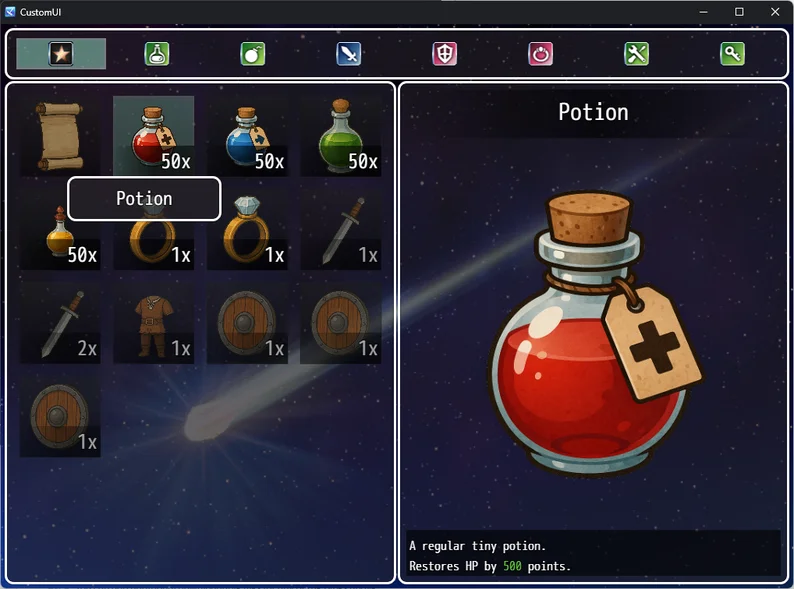
An RPG Maker MV and MZ item-menu plugin with customizable window layouts, item inspection and detail windows, grid inventory, and category controls for JRPG interfaces.
Description
Unlike many other Plugins that allow you to customize your game's item menu, this one comes packed with a UI tool that lets you see your changes instantly!
This plugin is compatible with RPG Maker MV & MZ.
This plugin requires https://aerosys.itch.io/custom-ui (free) to work.
(Item Images are A.I.-generated, only for demonstration purposes)
Before you buy
This plugin is part of this bundle - save your money!
Features
Show full description...
- More than 10 pre-made window layout configurations
- ...or arrange all windows as you wish
- A new item inspection window to show your custom-made images for your items!
- A grid-style inventory list (if you wish)
- Define item categories according to your rules (e.g., Materials, Battle Items, Accessoires, etc.)
- ...or remove the category selection at all (MZ only)
Item Detail Window
You already have a dozen of custom-made graphics for your items but don't know how to add them to your game? Now, you can with the new item detail window!
Arrange the item's name, image, and description just how you want them!
Grid Style
Change to Grid Style with just one click!
Put Categories to the side, allowing more space!
Re-arrange, add, and remove Categories!
How it works
- Include this plugin in your game
- Start your game and open the item menu
- Press F9 (debug key) to open the new toolbox
Which engine(s) are supported?
This plugin supports RPG Maker MZ and RPG Maker MV.
Limitations when using MV
- "Remove Category Window" is not supported
Requirements
This plugin requires https://aerosys.itch.io/custom-ui (free) to work.
Compatibility
This plugin was tested with the free Visustella plugins.
This plugin only changes window positions or adds content to your game. The risk of breaking is relatively low. Otherwise, contact me!
Refund Policy
A refund is possible if you encounter an error or incompatibility that we cannot resolve.
Please send a message to [email protected].
 GetAssetPack