Description
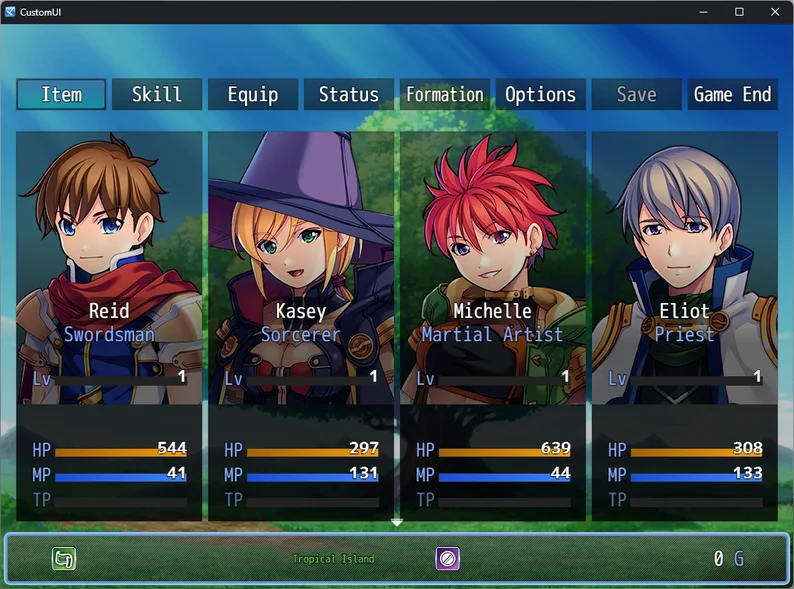
Unlike other Plugins that allow you to customize your game's main menu, this one comes packed with a UI tool that lets you see your changes instantly!
This Plugin is available for free!
Features
- More than 6 premade layout configurations
- ...or arrange all windows as you wish
- Choose how your Actors should be rendered: Face, SV Battler, Map Sprite, custom Portrait
Show full description...
- Choose how your Windows should be rendered: Default window, dimmed, custom image, or no background
- Choose a custom image instead for the background to replace the Map sprite
- Reposition Texts, set Font Sizes and Text Colors
- Gauge Colors
- Disable Touch UI entirely
- Disable RPG elements like level, class, or just everything — useful when making a horror or story game!
Reposition Texts, set Font Sizes and Text Colors!
Define the Gold Window's text to whatever you need, including the Map Name and Game Variables!
Re-arrange, add, and remove Command Buttons!
How it works
- Include this plugin in your game
- Start your game and open the main menu
- Press F9 (debug key) to open the new toolbox
Which engine(s) are supported?
This plugin supports RPG Maker MZ and RPG Maker MV. The MV code is still new, so it may contain errors and support fewer features than MZ.
I have a wish or suggestion
The best is when you make a draft of what it should look like in the game and how it should be represented in the tool.
Rules
- This plugin is available for free!
- Don't claim it as your own, and don't redistribute it. Just link to this page.
- Feel free to customize it to your needs, but rule 2 still applies.
 GetAssetPack