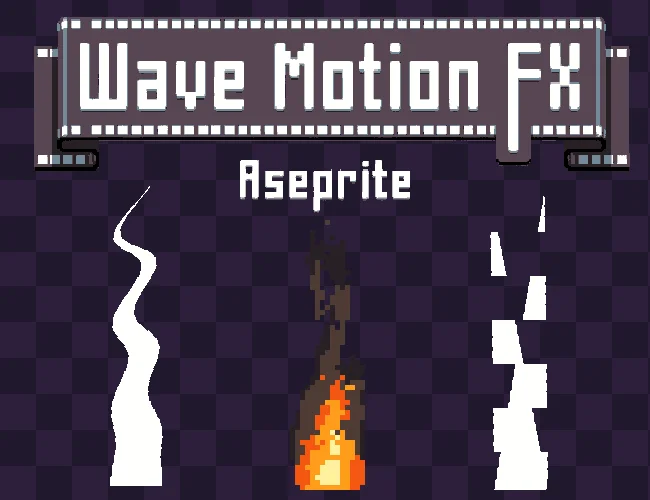
Wave Motion FX is a powerful Aseprite extension for creating procedural wave-based animations with advanced motion styles, edge controls, dynamic lighting, interactive preview, and automatic frame generation.
Show full description...
Designed for pixel artists and animators who want more control than a simple sine-wave distortion, Wave Motion FX lets you transform static artwork into waves, ripples, wobbling objects, heat distortion, energy effects, glitches, fabric motion, shockwaves, magical effects, and more.
With 26 procedural motion styles, 18 deformation patterns, customizable animation controls, lighting effects, presets, and a fully interactive preview canvas, you can experiment with complex motion directly inside Aseprite before generating the final animation.
✨ Key Features
🎛️ 26 Procedural Motion Styles
Choose from a wide variety of motion behaviors, including:
🎯 18 Edge Lock Modes
Anchor motion to:
- Specific edges (top, bottom, sides)
- Center or corners
- Radial and ring modes
- Diagonals
- Checker patterns
- Border-only deformation
- And advanced cross & alternating systems
🎬 Real-Time Animation Preview
Preview your animation directly inside the plugin before generating the final frames.
- ️ Live Preview playback
- Adjustable playback speed
- Start-frame / offset control
- Custom frame count
- Reverse motion
- Automatic preview updates while editing
🖱️ Interactive Preview Canvas
The built-in preview gives you a dedicated workspace for inspecting the effect.
- 🔍 Zoom in
- 🔎 Zoom out
- 🎯 Fit / Center view
- 🖱️ Drag to pan
- Automatic preview scaling for large sprites
- Preview of multiple visible layers
This makes it much easier to inspect the deformation without constantly generating animation frames.
💡 Dynamic Lighting & Shading
Wave Motion FX can automatically generate lighting based on the slope of the deformation, helping the motion feel more dimensional.
Options include:
- 💡 Dynamic lighting
- Soft shading
- Sharp / pixel-friendly shading
- Adjustable highlight intensity
- Adjustable lowlight intensity
- Optional smooth edge interpolation
The lighting can be enabled independently when you want the deformation to create a stronger sense of depth.
🎛️ Ready-to-Use Presets
Get started quickly with built-in presets for common effects:
- 💧 Water Ripple
- 🚩 Flag Wave
- 🔥 Heat Haze
- 🍮 Jelly Wobble
- ⚡ Electric Glitch
- 🎛️ Custom / Manual
Presets can be used as a starting point and then customized to fit your artwork.
✨ CREATE ANIMATION
The plugin generates the required animation frames directly in Aseprite.
🔧 How to Use
- Open Aseprite
- Go to Edit > FX > Wave Motion FX
- Select one or more image layers
- Choose a Motion Style or start from a preset
- Adjust Strength, Spacing, Direction, and Edge Lock
- Open the Animation tab and configure the frame count, start offset, and playback speed
- Optionally enable Lighting and adjust the shading
- Use Live Preview to preview the motion
- Zoom and pan the preview to inspect the result
- Click ✨ CREATE ANIMATION
⚙️ Performance Notes
Wave Motion FX automatically adapts its preview quality based on sprite size.
Large sprites may use a lower-resolution preview or reduced sampling to keep the interface responsive. This optimization applies only to the interactive preview.
The final animation is generated using the full processing path.
✅ Compatibility
Requires Aseprite 1.3 or newer.
Latest stable version recommended.
⭐ Enjoying Wave Motion FX?
If Wave Motion FX improves your animation workflow, please consider leaving a rating or review.
It really helps support the project and future development. 🌊
🎮 Perfect For
- Pixel artists who work in Aseprite
- Indie developers and game jams
- Fast effects without frame-by-frame animation
- Any 2D engine, including Unity, Godot and GameMaker
📜 License
You may use these assets in personal and commercial projects. Modification is allowed. You may NOT resell, redistribute, or include these assets in other asset packs or marketplaces. Credit is appreciated but not required.
📦 Multi-Layer & Group Support
Wave Motion FX works with multiple selected image layers and layer groups.
You can:
- Apply different parameters to different layers
- Select multiple layers at once
- Process image layers inside groups
- Preserve individual effect settings per layer
- Preview the combined result
🧠 Per-Layer Effect Settings
Each layer can maintain its own Wave Motion FX configuration.
This allows different elements of the same scene to have independent:
- Motion styles
- Strength
- Spacing
- Direction
- Edge behavior
- Animation settings
- Lighting settings
This is especially useful for complex scenes containing multiple animated elements.
⚡ Smart Performance Optimization
The plugin includes several systems designed to keep the interactive preview responsive:
- Automatic preview quality adjustment for large sprites
- Preview throttling
- Internal preview caching
- Reduced preview sampling for very large images
- Delayed preview updates during rapid parameter changes
Preview quality may be reduced automatically for large sprites, but this does not reduce the quality of the final generated animation.
🎞️ Automatic Animation Generation
Once you are happy with the result, Wave Motion FX can generate the complete animation automatically.
Set your desired:
- Frame count
- Starting offset
- Motion speed
- Direction
- Motion style
🎞 Automatic Frame Generation Generate full animation sequences instantly based on your chosen frame count.
If you create something interesting with Wave Motion FX, I'd love to see it!
Feel free to share your work, feedback, suggestions, or ideas for new procedural motion styles.
Your feedback helps guide future updates and improvements.
🔥 Want the whole set? Get all the Aseprite tools and generators in one bundle and save more than buying them one by one.
Enjoying this pack? Follow me for new releases, add this pack to your collection, and leave a rating if it was useful — it really helps a small studio like mine. 💛
 GetAssetPack