GetAssetPack

Datamosh Effect Unreal Engine
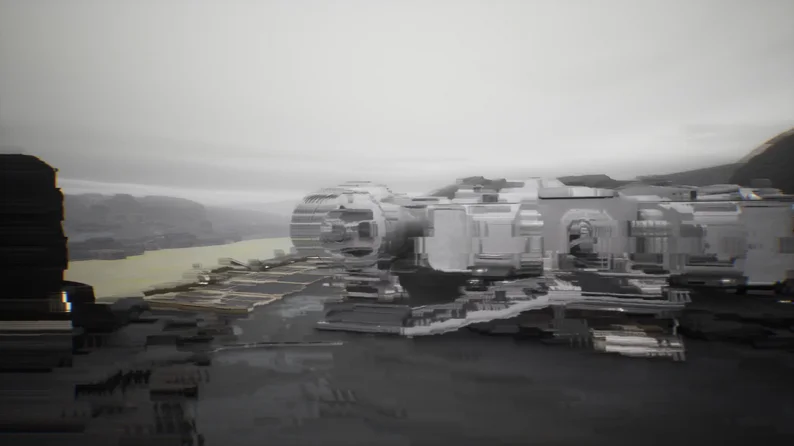
Datamosh Effect Unreal Engine
Price
$19.99
Type
Shaders & VFX
Creator
Petyu
Engine
Unreal

An Unreal Engine post-process shader plugin that blends frames for a glitchy datamosh effect, with render-target and screen modes, a controller actor and blueprint functions.

Post-process shader that simulates video compression artifacts and creates 'glitchy' visual effects.

Available on

Search by image

Upload a reference to find previews with similar colors, contrast, and detail.

Datamosh Effect Unreal Engine

Datamosh Effect Unreal Engine1 / 9
Petyu · itch.io$19.99
Shaders & VFX
License not indexed
  • i Check the terms on the original listing.
Show full terms

Post-process shader that simulates video compression artifacts and creates 'glitchy' visual effects.

An Unreal Engine post-process shader plugin that blends frames for a glitchy datamosh effect, with render-target and screen modes, a controller actor and blueprint functions.

View original listing

Description

Datamosh is a post process shader that creates a frames blending effect by simulating a video editing technique in which the footage is manipulated to look 'trippy' or 'glitchy,' usually by manual compression.

Demo

Jam2go's video about datamoshing in Unreal

Epic Marketplace (FAB)

Documentation

Discord

Show full description...

Using engine classes, plugin injects the shader into the rendering pipeline, ensuring it is compatible with most post process effects after the default installation.

Technical details:

  • Built-in post-process material example,
  • Two rendering modes (Render Target and Screen),
  • Controller Actor included,
  • Automatically applies on viewport in Screen Rendering mode,
  • Preview mode,
  • Project settings and built-in blueprint functions,
  • Debug console commands,
  • Compatible with most post process effects,
  • Small performance cost.

Important details:

  • Due to engine limitations, control over some of the built-in features of the effect is only possible on the game thread (on the blueprint side). Therefore, please use the Datamosh Controller Actor provided by the plugin to control shader values. The details is described in the documentation.
  • If you can't find the post-process material asset, enable the display of plugin folders in the content browser by clicking the gear icon in the top-right corner of the settings.
  • For full effect usage with Stencil, enable Custom Depth - Enabled with Stencil in the project settings.

Performance

GPUAverage, ms

3060TIScreen Rendering mode - 0.11ms

Render Target mode - 0.16ms

Supported Development Platforms: Win64, Mac

Supported Target Build Platforms: Win64, Mac

Network Replicated: No

Current Version: 1.0.1

Changelog:

0.1:

  • Early access.

0.2:

  • Full code refactoring.
  • Fixed an issue with artifacts appearing in the output texture, when using two or more active viewports simultaneously.
  • Added common shader file for easier use in the future.
  • Overall optimization of the effect calculations on the CPP side.
  • Added new blueprints to control new feature settings.
  • Redesigned the noise generation function in the shader.
  • Added new effect features: effect motion, render buffer selection, draw distance for the depth buffer, new noise presets.
  • Expanded effect monitoring capabilities using stat gpu and Unreal Insight.
  • Extended version support.

0.2.2:

  • Fix for potential crashes in engine version 5.4.4.

0.3:

  • Refined depth handling in the shader for both scene depth and custom depth.
  • Added ability to use Stencil with custom depth via the r.Datamosh.SetStencil command and blueprint.
  • Introduced a feature to exclude objects from the effect in both custom and depth rendering passes using the exclude option r.Datamosh.ExcludeCustomDepth.
  • Expanded the motion functionality to allow adjustments for both X and Y axis movement.
  • Added the ability to change the noise "grain size" with the r.Datamosh.Noise.PerBlockSize command.
  • Updated the Blueprint library to support new shader features and enhance ease of use.

0.4 (dev only)

0.5.0:

  • A significant part of the code has been reworked, with the addition of 4 new classes, structures, shaders, and assets in the plugin's content folder.
  • Two separate rendering modes have been added.
  • Added new mask shader.
  • Two render target assets for the effect and mask have been added, along with a material asset featuring a basic setup for utilizing the effect.
  • Plugin settings have been added under Plugins - Datamosh Effect in the Project Settings.
  • Several shader features have been introduced, accessible via the Blueprint library.
  • A UDatamoshWorldSubsystem class has been added for advanced rendering control of the effect, tailored to both gameplay and editor worlds.
  • A parameter structure, along with two enumerators for the plugin mode and mask shader mode, has been introduced.
  • Basic preview functionality (editor-only) has been added for effect visualization in Screen Rendering mode.
  • An enhanced logging and validation system has been implemented to ensure proper functionality of the effect.
  • Crashes when previewing the temporal buffer texture via the Vis command have been fixed.
  • Rendering the effect across multiple viewports simultaneously has been fixed (see point 7).
  • Shader code and integration with DatamoshCommon.ush in the .cpp section have been improved.
  • Most console commands and parameter management through them have been removed. Shader parameter control has been moved on the blueprint side.
  • 1.0 Release
  • Added Datamosh Controller Actor for effect management
  • Added sharpness setting in PPM_Datamosh
  • Added the ability to configure the Stencil value used by the effect
  • Added parameter control for preview mode
  • Added control over engine PreExposure override
  • Fixed temporal buffer reset during contextual actions
  • Fixed incorrect mask texture scaling in the effect shader
  • Fixed the influence of eye adaptation on the effect's temporal texture
  • Various minor shader fixes

Tags

EffectspluginReal-TimeShadersUnreal Enginevisual-glitch

Downloads