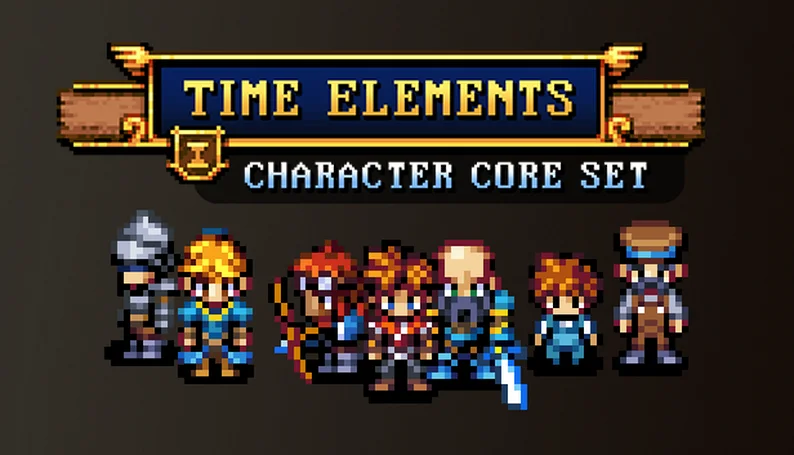
Build your own characters! The TIME ELEMENTS series is all about modular pieces, so you can customize your own RPG sprites. Swap outfits, hairstyles, armor, weapons, and more. The characters are fully animated: take your gameplay to the next level with four-directional action combat! And all with a high-quality pixel art style like the your favorite RPG classics.
Show full description...
With the Time Elements Character Core Set, you can create more characters than you will need to fill an entire game world!
Content:
- Over 64 unique pieces that can create hundreds of characters
- Includes 5 premade heroes and 16 premade NPC sprites
- Build your own sprites with the included Character Generator!
- Animations in all four directions: walk, crouch, jump, attack, and others
- Export for general engine use as well as RPG Maker (VX, MV, MZ)
- 27-page PDF guide
- Bonus: Emotion Popup Animations
- Bonus: Now includes special format for use in Top Down Sprite Maker
More of the Time Elements asset series:
- Character Expansion 1
- Character Expansion 2
- Hometown Tile Set
- Caves and Mines
- Castle and Catacombs
Need monsters?
FAQ:
- Video Tutorial for using the included Character Generator (thanks Baz!)
- What is the size of these character sprites?
The characters are designed to work with a 16x16 tile grid. The actual character sprites are slightly taller than a single tile-- they generally fit into a 16x32 space (two tiles high). This is the style of characters that were popular in SNES RPG games. They should work nicely with most tilesets designed around 16x16 tiles.
- Are these characters compatible with your Time Fantasy assets?
Yes and no. Both styles use the same 16x16 tilebase, so Elements sprites will generally work fine with Time Fantasy tilesets. The sizes are compatible. However, Time Fantasy uses a unique desaturated color palette with a muted feel that will clash with characters in the Elements style. If you want to use both styles together, then it’s recommended to re-color the Time Fantasy tilesets to have a greater range of colors. That way the Elements characters will not look out of place.
- Can I sell a game that I make with these?
Yes! You are welcome to use these assets in any commercial project. As long as you aren't redistributing the sprites or assets, there are no restrictions on how you use them within your game. I hope that your project is successful!
- The Generator doesn't work on Mac!
Here's a solution from a patron:
I've been able to use the character generator on an Apple Silicon with Rosetta - you just have to specify x86_64 with the arch command and then it'll open nicely. Once you set up Rosetta, it will launch without issue from that point on. Hope that helps!
Thanks to Britty Kilgannon for helping solve the Mac issue.
- The characters are aligned wrong in RPG Maker?
The character sprites have extra space around them to allow for weapon animations; which can cause problems with collision in RPGMaker. This is easily solved with a plugin, which is included in the pack and also as a free download below.
Once the plugin is activated, add ")" to the beginning of a sprite's filename to signify that it should be re-aligned, and ensure that it's not in any subfolders, and then RPGMaker will display the character centered on the correct tile.
- How can I make characters in a generator?
This asset pack comes with a free character generator. This generator will help you quickly turn these assets into characters and export them into consistent sprite sheets. (It was created as a bonus by my friend who is making RPG-Architect).There's detailed information in the included documentation.
Additionally, the Time Elements character style now comes with full compatibility for Top Down Sprite Maker, which will be appealing for designers who want more advanced control. You can access the TDSM package from the downloads, and start with the video tutorial on Youtube.
You're also welcome to use any other generator that supports the PNG files-- or use them directly with image-editing software or by building the character-generator into your own game project!
- Will there be future updates or expansions with more pieces?
Yes! In fact, I’ve already designed nearly twice as many pieces as the ones you can find in this set. But it takes a long time to animate them, so if we included them all, this release would have been delayed for another half a year and cost twice as much. You can be sure that I am looking forward to releasing more Elements content that you can use to create new characters.
Update: So far, one additional expansion pack has been released. There are more planned!
- Will there be new tilesets to match these character sprites?
Yes! I plan to build up this style with a series of future asset packs and expansions, including tilesets for a variety of settings.
Stay tuned for more content!
This release wouldn't be possible without the support from Patrons. Sign up for more assets like this, including requests and access hundreds of releases in the archive!
- Website: http://finalbossblues.com
- Subscribe: https://www.patreon.com/finalbossblues
- Twitter: https://twitter.com/finalbossblues/
Note: I've attached some sample files below (in the download demo section).
The purpose of these samples are so you can test the character in context, to check that the size and style are right for your project. It is a single character with only the basic walking animations.
Another Note: The original release was missing the "palettes" folder (and the palette files therein), which is mentioned in the guide. I've uploaded it here as a free separate download to make it easy to access if you need it.
 GetAssetPack