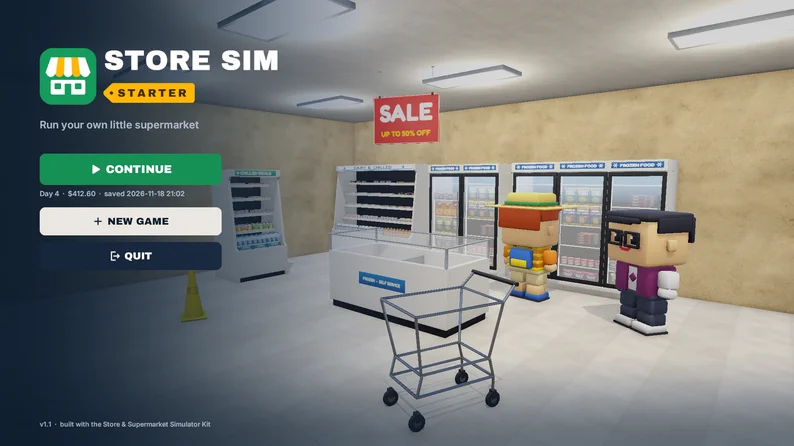
Hi! This is the store sim template I wish I'd had when I started prototyping supermarket games.
Show full description...
It's a small, complete first-person loop. You order stock on the office computer, carry the boxes in from the pallet by the door and fill the shelves one item at a time. Then you flip the sign to OPEN, scan what customers put on the counter and take their card or count back their change. At closing time you get the day's receipt. Earn enough and you can buy upgrades: more shelves, a faster checkout, and a second room full of freezers.
Everything is plain C#, commented, in one namespace, with no third-party plugins. I kept the systems small on purpose so you can read them in an evening and then make the game your own.
New in v1.1: a new interface that you can restyle from one asset. Every colour, font and sprite of the UI lives in a single theme asset. Change the green to your brand colour, drop in your own font or logo, and the HUD, the Store Manager app, the cash drawer, the day receipt and both menus follow, live in the editor. Three themes are included (the default, a dark one and a violet one) so you can see how far it goes.
The full Store & Supermarket Simulator Kit is included. That's all 526 prefabs of v3.01, with URP materials and colliders. The demo store is built only from those models.
What's in it
- First-person controller: walk, sprint, mouse look, a crosshair interaction ray. You can carry boxes, put them down and drop them. The thing you look at glows softly, and on shelves the row you are about to stock lights up.
- Ordering: a "Store Manager" app with product cards and a cart. Boxes arrive on a pallet at the entrance after a short delivery delay.
- Stocking: boxes open as you use them and show their contents. Click or hold to fill a shelf row, right-click to take items back. Every shelf row works out its own capacity from the product's size, so any kit product fits any shelf.
- Products as ScriptableObjects: price, box cost, units per box, unlock level, shelf zone (ambient, chilled or frozen) and popularity. 13 products are set up.
- One-click shelf setup: put the Shelf component on any fixture and run *Auto-detect rows*. It finds the boards in the mesh for you.
- Customers on a NavMesh: they walk in, look for products that are in stock, pick them up, queue, pay and leave. If the shelves are empty, they leave empty-handed and the summary counts them as lost. More customers come as your store level grows.
- Checkout: customers put their items on the counter and you click each one to scan it, with a running total on screen. Card payers need a click on the terminal. Cash payers hand you a note and you count the change with notes and coins from the drawer.
- Day cycle: prepare, open, closing time (the last customers still get served), then an end-of-day receipt: revenue, cost of the goods sold, sales profit, stock bought that day, customers served and lost, and items sold.
- 3 upgrades: Extra Shelves, Express Checkout (unloading twice as fast, plus one scan rings up every item of the same kind) and Store Expansion (unlocks a second room). Upgrades are data too: an id list of scene objects to show or hide, plus a few numbers.
- Save and load to JSON: money, XP, day, upgrades, every shelf row, boxes on the floor and pending deliveries.
- Themeable UI: one theme asset with 22 colour roles, 3 font slots, 62 sprites and the motion timings. HUD with a "what to do next" hint, toasts, a main menu over a little animated 3D store, a pause menu with mouse sensitivity, volume and save. 40 icons and the logo are included as PNG, and 13 small sound effects.
- Small touches: windows pop in and out, money counts up, buttons react to hover and press, the day receipt prints line by line and gets stamped.
- Docs: a README and a QUICKSTART that walk you through adding a product, a shelf and an upgrade, and restyling the UI, step by step.
- An automated playtest you can run yourself (Tools > Store Sim Starter > Run Automated Playtest). A bot plays a full day through the real systems and writes a pass/fail report.
How I tested it
I ran the automated playtest on the final build, in the editor and in the Windows player. In each run the bot ordered 7 boxes, stocked all 108 units, and served at least 10 customers with both card and cash payments. Money went up with every sale. The run closed the day, bought all 3 upgrades (the test grants itself the XP and money for this step), then saved, reloaded the scene and compared the save data: the round trip matched. The run also traced every customer's position 10 times per second. In those traces customers never crossed a wall or a glass pane, never overlapped a fixture, and never left the NavMesh. The template's code logged 0 errors in the final runs, and the Windows player logged no errors at all. There were 0 missing (pink) materials. A second bot aimed a pointer at every button, slider and scrollbar of every window through Unity's event system (34 controls, none covered by anything) and clicked 15 of them to check that they do what they say. I also looked at every UI screen at 1080p and at 720p for cut-off or overlapping text.
Please read before buying
- Built and tested with Unity 6000.3.23f1 and URP 17.3 only. Older Unity versions were not tested.
- Unity's own Search indexer may log an ArgumentOutOfRangeException in the editor at batch-mode startup. That message is not from the template.
- Windows desktop, mouse and keyboard. There are no mobile or touch controls.
- The project uses the legacy Input Manager. The code also has an Input System branch, but it was not compiled or tested.
- The UI is built with Unity's uGUI and its built-in Text component (not TextMeshPro). The theme changes colours, fonts and sprites; sizes and positions are normal uGUI layout in the two scenes.
- The customers are 8 characters from our Blocky Characters pack: chunky, toy-like people with idle, walk, pick-up and look-around animations. They're simple to swap for your own models.
- The kit's price tags and category boards have their own printed prices and names. They don't change with your product prices.
- Planned, not included yet: staff hiring and price setting.
- If you customised the v1.0 UI: the UI objects in both scenes were rebuilt for v1.1, so keep your own scenes and copy over what you need.
What you download
- StoreSimStarter-v1.1-UnityProject.zip: the full Unity project. Open it in Unity Hub with Unity 6.3 and press Play in the MainMenu scene. This is the recommended download.
- StoreSimStarter-v1.1.unitypackage: the same assets as a package, if you'd rather add them to an existing URP project. In that case, assign StoreSimStarter/Settings/StoreSim_URP.asset as your render pipeline and add the two scenes to Build Settings.
- StoreSimStarter-v1.1-WindowsDemo.zip: a playable Windows build of the demo, so you can try it before you open Unity.
License
You can use the code, scenes, data, UI art and logo parts in your own commercial and non-commercial games. Please don't resell or share the template or the kit as an asset. The fonts are Archivo Black and Inter (both SIL Open Font License), and the sound effects were generated procedurally for this template.
Code and models were made with AI assistance (procedural generation and AI-written C#). The UI icons, shapes and the logo were drawn with code too. No AI image or 3D generators were used.
Thanks for looking, and if you build something with it, I'd love to see it!
Using Godot instead? Store Sim Starter for Godot 4: https://vuena.itch.io/store-sim-starter-godot
Vuena is the asset brand of Popyca Studio; the kit and character licences inside come from the same owner.
 GetAssetPack