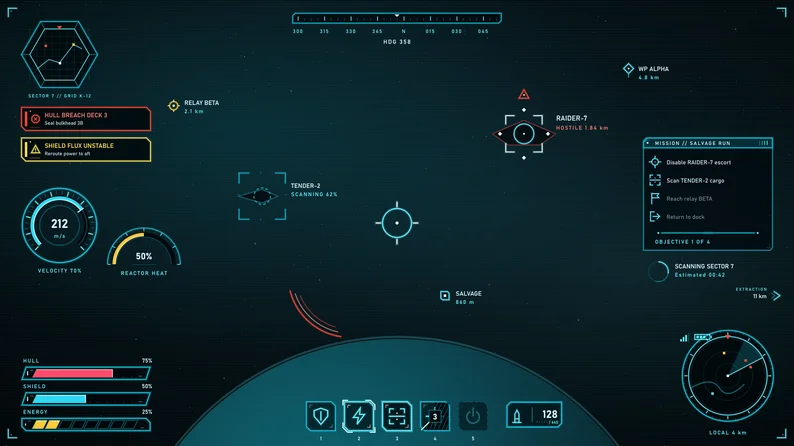
Sci-Fi Holo Interface is a game UI kit in a thin-line, outline-only holographic style: angular cut-corner frames, translucent near-black panels, fine tick marks, ring buttons and angled bars. Everything is vector SVG with PNG exports at 1x, 2x and 3x, in four colour themes: cyan, amber, green and red.
Show full description...
What you get
- Frames and panels: window frame (and an active-window version), inner panel, header strip, sidebar, tooltip with tail, four notification toasts (info, success, warning, alert; each has its own mark: circle, tick, triangle, octagon) and the four marks as stand-alone files, modal with title band, three dividers, four corner brackets, a scan-line overlay tile and a grid tile.
- Buttons (five states each): wide and narrow cut-corner buttons, icon button, round ring button, tab and close button.
- Controls: checkbox, radio and toggle (off and on), slider track, fill and grabber, stepper (minus, value field, plus), dropdown field and list row, text input, scrollbars.
- Bars and gauges: angled smooth and segmented bars for health, shield and energy (frame, track and fill on one shared canvas, with five level steps), a radial gauge ring with eleven fill steps, an arc meter, two loading spinners, signal and battery level indicators.
- HUD: 8 reticles, 3 target-lock brackets, 5 waypoint and objective markers, a compass strip and a scrolling tick tile, round and hex minimap frames, ability and ammo slots (five states) with 9 cooldown overlay steps and a radial source, 3 damage-direction arcs.
- 24 thin-line icons in one 2 px weight: settings, map, inventory, comms, shield, energy, ammo, target, scan, warning, lock, unlock, power, data, signal, wrench, medkit, speed, radar, objective, save, exit, sound, pause.
All states: every interactive element (23 groups) has normal, hover, pressed, disabled and focused. Pressed is a strong filled body and focused adds bright corner marks outside the frame, so the five read clearly apart.
By the numbers: 278 elements per theme, 1,112 SVG and 3,336 PNG in total, 25 9-slice entries with documented margins (JSON and README table), canvases on an 8 px grid, a 2 px core line, whole-pixel coordinates on straight edges.
Status colours you can tell apart: every theme has four notification colours (info, success, warning, alert) chosen to stay clearly different from each other and from the theme colour, and each one also has its own shape (circle, tick, triangle, octagon), so colour is never the only cue. The recolour tool keeps four distinct status colours for your own themes.
Glow without filters: the glow is layered strokes under the line, so the SVGs contain no filters, gradients or embedded images. It is a tight halo of about 3 px, not a wide bloom; add your own blur in your engine if you want one. The kit is made for dark and mid-dark backgrounds.
Four themes and a recolour tool: colours live in one palette.json; node tools/recolor.mjs --png regenerates every SVG and PNG, or builds a new theme from one accent colour (PNG export needs the sharp package; SVG export needs only Node 18 or newer).
Godot demo project: a HUD scene (animated bars, gauge ring and arc meter, reticle, markers, minimap, focusable ability slots with radial cooldowns, a theme switch button) and a menu scene (tabs, sliders, toggles, check boxes, radio buttons, a stepper, a dropdown, a text field, a slot grid and a scroll list).
Previews: two filled 1920 x 1080 example screens per theme (a ship HUD and a menu and loadout screen) built only from the kit's PNGs, a contents grid of every element, a preview sheet per theme and Godot screenshots. The text, example names and values, starfield and planet, hangar backdrop, map pictures and ship silhouettes in the previews are props and are not in the kit files.
Compatibility and limits
- Tested in Godot 4.7.2 only. The PNG and SVG files are plain image files for any engine. Import steps for Godot, Unity and web (CSS border-image) are in the README.
- Bars, gauges, slots, reticles and icons are fixed-size art (scale in whole multiples).
- Wide and narrow buttons, the header strip, toasts, the dropdown field, dividers and scrollbars stretch in one direction only (3-slice).
- Pressed states are filled bodies, so use light text.
- No text, logos or real-world symbols are drawn into any file, so you can use your own font.
Free sample (one button in five states, one bar, one gauge, two reticles, cyan): https://stationsupply.itch.io/sci-fi-holo-interface-free-sample
License: commercial use in your own games and apps is fine, any number of projects. No resale or redistribution of the assets, no training of machine-learning models.
AI disclosure: All graphics are hand-coded SVG vectors; no AI image generation was used. The SVG code was written with an AI assistant.
Update log
- v1.0 (2026-10-13): first release: 278 elements per theme in four colour themes, recolour tool, Godot 4 demo.
- v1.0.1 (2026-10-18): preview images tidied (hotbar numbers under their slots, tooltip beside the hardpoint grid, clearer sheet captions); the Godot menu demo now fills its Display and Loadout tabs. No kit element changed.
 GetAssetPack