Show full description...
- Improved the stability and reliability of the old save conversion process
- Fixed a couple of alignment issues in the Quest Details window
Fixed some text settings that could not previously be left empty
- Terms such as “Status”, “Ongoing”, and “Area” can now be removed completely
- Improved the stability and reliability of the old save conversion process
- Fixed a couple of alignment issues in the Quest Details window
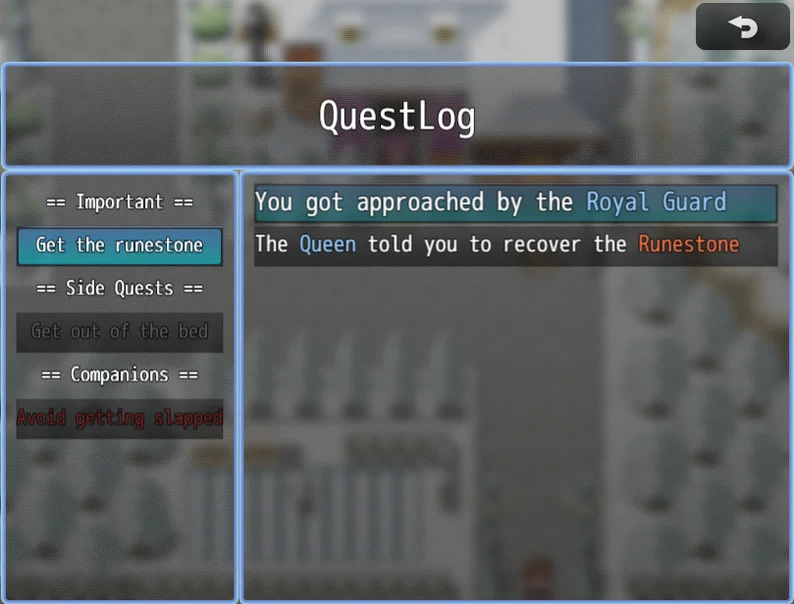
A simple and flexible Quest Journal system for RPG Maker MZ.
Create, update and complete quests with ease using plugin commands — no complex setup required.
🔹 What you can do
✔ Add quests to your game at any time
✔ Update objectives and descriptions dynamically
✔ Mark quests as completed or failed
✔ Organize quests into categories
✔ Show detailed quest info (description, objectives, rewards, etc.)
✔ Fully integrate quests into your game flow (events, choices, rewards)
🔹 How it works
- Create a quest with a Plugin Command
- Update it as the story progresses
- Let the player track everything in a clean Quest Log menu
That’s it. No database setup, no complicated configs.
🔹 Why QuestLog?
Most quest systems are powerful… but complex.
QuestLog focuses on simplicity and control:
- Easy to use, even for beginners
- Fully event-driven
- Clean and lightweight
- Designed to fit any type of RPG
🔹 Example use cases
- 🧭 “Talk to the village chief” → updates after dialogue
- 🐺 “Kill 5 wolves” → progress tracked via events
- 📦 “Deliver the package” → completes on item delivery
- 🏆 Side quests, main quests, hidden quests… all supported
QuestLog is free and fully usable.
If it helps your project, you can support WinterDream on Ko-Fi or check the subscription for premium plugins.
Terms of use
Please refer to the Terms of Use. By using this plugin you accept WinterDream terms
------------------------
Works Great With
• Conditional Choices → Show or hide dialogue options depending on quest progress
• Factions → Gain or lose reputation with factions when completing quests
• Stats & Skills → Add skill checks to quests and dialogue
• Achievements → Reward players when quests are completed
More Plugins by WinterDream
• MultiCrafting → Advanced and customizable crafting system
• Items Choice→ Let players select what item to use with events
• Prequel Saves Import → Import old games saves to know the world state
Explore all WinterDream plugins:
https://winterdreamgamescreator.itch.io/
Follow WinterDream
Follow the page to stay updated on new RPG Maker plugins and systems.
Need help or want to share your project?
Join the WinterDream Discord:
----------------------------------
Version, bugs and further development
VERSION 1.0:
VERSION 1.1:
- Added new plugin command to edit an existing quest description by ID or Quest Name
- Added new Plugin Command to change FontSize
VERSION 1.2:
- Merged "Set Completion by ID / by Name" and "Remove Quest by ID / by Name"
- Changed font size for the Quest List and Quest Description, you can change them via Plugin Parameters or Plugin Command
- Changed the alignemnt con Quest List from "left" to "Center", can be changed via Plugin Parameter
- Created a command that checks if a quest is completed and stores the result in a Switch of your choice (ON for Complete, OFF for Ongoing)
- Created a plugin command to change the Quest Icon searching it by ID or Name
VERSION 1.2.1:
- Fixed an issue reported by Grillmonger where QuestList would wipe if game was closed entirely and then reloaded. Upon further investigation the fix was extended to the other Plugin Parameters too (Such as Title Font, etc..) that would not carry over the changes if done via Plugin Command
VERSION 1.2.2:
- Hotfix for changes made in 1.2.1 as Plugin Parameters from Plugin Manager where not correctly loaded (Report by Grillmonger)
VERSION 1.3:
- Updated the code to a newer version with, but not limited to, tweaks to the save and load functionality.
- Added the "Failed" status to the Quests with the needed changes to "Add Quest", "Set Completion" and "Check Completion". Added bits of code to allow retrocompatibility with the older versions.
- Added the option to Autoset the Description Font Size, the plugin will range from a font size of 100 to a font size of 10, trying to fit the text both in width and height. You still need to break the lines with \n as before. The autosize text is only left aligned due to a limitation of the DrawTextEx feature used. (On the positive side, it should accept the usual RMMZ text code like \I for icons, didn't tried it)
- Added the possibility to add a longer title that will be displayed in the Quest Informations window (while the short name will be used for the quest list on the left). If you don't need it just leave blank the field.
- Minor fix on a bug that could cause the menu button to change name due to a conflict with the Quest List items
VERSION 1.3.1:
- Hotfix for a small bug that would turn the menu command name to "true", thanks to ryf for the report!
VERSION 1.3.2:
- Fixed an old part of the code creating two problems: A black layer under the scene and no centering if the Game UI was changed from the System 2 tab as reported from ryf and Puppet Knight
VERSION 1.4:
- Added the setting to show or hide the title in the QuestLog
- Added the possibility to switch the quest list / quest info layout
- Added the option to use 100% of the graphic box (standard setting for this plugin) or 90% (standard RPG Maker MZ scene compatible with cancel touch button)
- Added the possibility to hide the cancel touch button (useful for 100% size, but make sure the player has access to non touch controls)
- Added the possibility to change the windows skin for the QuestLog only, also you can change the colors tone (by re-selecting the default skin you can apply different color tones to it)
- Added a new plugin command to change all the above mid-game
VERSION 1.5:
- Fixed an unexpected behaviour in the Auto Size description text that resets the font size after correctly finding the fitting value
- Added a padding value to the text to have the desired look to the text graphic
- Added a full support for RMMZ text codes while keeping the alignment options
- Minor tweaks to the Plugin Parameters
- Now the plugin will automatically support compatibility with v1.1 or lower without having to choose different files
VERSION 1.6:
- Fixed a bug were the old quest files would be deleted if any quest action (like accepting a quest) would be done after reloading a save and before opening the questlog. (Thanks to TewiInaba for the report)
- Fixed a minor bug in the "Complete Quest" command
- Changed the Icon selection parameters from a number to an icon selector
- Added an external script call to check quest completion, see help
VERSION 1.6.1:
- Changed the Quest Title from DrawText to DrawTextEx. The text will still be centered but now you can add the standard RMMZ commands such as \I for Icons or \C for colours
VERSION 2.0:
- Code rebuilt and updated but kept compatible with older versions
- Updated the Discord invite link in the help file that was invalid, embarassing!
- Added translations managed via WD_Core
- Dynamic Resize has been moved to WD_Core, plus a new text management option has been added: AutoWrap. Just write your sentence (supports RMMZ text codes) and the code will automatically wrap the text in the designed area. No need to manually use the \n code (but you still can if you want to force a new line). If the text is still too big, the AutoWrap will try to shrink the font size to the minimum required.
- Added the optional rule to display an expanded data log if the player clicks on the quest
- Added the optional rule to activate a small Quest List on the map scene (either managed by the player or by the dev)
- Added Quest Categories to group quests together
VERSION 2.0.1:
- The plugin wasn't saving correctly the quests! Thanks to kricu for the report, now it's all correct. NOTE: Old savefiles won't work, sadly, only work with new saves.
- The tracking system now correctly saves the tracking preference and loads them when the player loads a savefile
VERSION 2.0.2:
- Corrected a typo that would block the "Edit Quest Descriptor" command, thanks to tinribs26 for the report!
- Also correct a misplaced code line that would crash the above command when launched
VERSION 2.1:
- Fixed a nasty memory bug that would "remember" the quests when exiting an existing game and starting a new one without exiting the executable
- Added a command to check if a quest already exist (useful if you want to add a quest from different sources)
VERSION 2.2:
- Changed the quest window refresh method to adapt it to Android deployments (Thanks to Stevynn for the report)
- Fixed incorrect font variable used in manual text mode
- Fixed description text drawing area calculation
VERSION 2.3:
- The Language control has been moved to WinterDream Core (you will need v1.3 or higher). QuestLog loses the parameters "Default Language" and AutoDetect language, now controller by the central plugin
VERSION 2.4:
- Added the option to hide/show a quest
- Added the option to show the quest title in the tracking HUD
- Now you can mass store quests undere ID driven storages, this will make it super easy to switch between different characters or parties
- Tracked quests will now automatically be removed when they are set to Completed or Failed
- Fixed a bug in the conversion of old Quests to the new format
- Fixed a bug in logs activation / deactivation
- Fixed a bug in the Export Quest Completion functionality
VERSION 2.4.1:
- Now Categories names and Quest Titles accept RMMZ text commands, especially useful for colours
- Thanks to Tails for this two reports
- Fixed a bug on the "Add or Remove Quest Tracking" flag parameter that was a string instead of a boolean
- Fixed the "Change tracking text" plugin command that wouldn't refresh the HUD informations
VERSION 2.4.2:
- Thanks to tinribs26 for those two reports!
- Fixed a bug in the new Quest Containers functionality that would break the savegames load. It's now patched with retrocompatibility for old broken saves.
- Fixed a font reset problem during category and quest titles display
VERSION 2.4.3:
- Fixed some text settings that could not previously be left empty
- Terms such as “Status”, “Ongoing”, and “Area” can now be removed completely
- Improved the stability and reliability of the old save conversion process
- Fixed a couple of alignment issues in the Quest Details window
VERSION 2.4.4:
- In the layout setting added the options to select UI Box (standard) or Screen Size (new) as reference for the QuestLog Window (Suggestion by Tails)
- Now the Tracking HUD offset can be set to negative (Suggestion by Tails)
- Added a compatibility patch with EliMZ MessageActions plugin, thanks to Succubus Nirriti for the report!
Further developments will include: TBA
 GetAssetPack