If you like this plugin, you can buy me a Ko-Fi! You can also find all the pay plugins for a cheaper subscription!
Let your players customize controls in RPG Maker MZ.
Add a full key binding system directly in the Options menu — simple to use, powerful in practice.
Show full description...
✔ Prevent invalid configurations (no missing keys allowed)
✔ Customize action names and interface text
✔ Improve accessibility and player comfort
🔹 How it works
- Open the Key Binding menu from Options
- Select an action
- Press the new key
The plugin handles conflicts, validation and saving automatically.
🔹 Why Key Binding?
Default RPG Maker controls are fixed.
With this plugin, your game feels:
- 🎮 More professional
- ⚙️ More accessible
- 🧩 More customizable
Small feature, big impact on player experience.
🔹 Advanced features
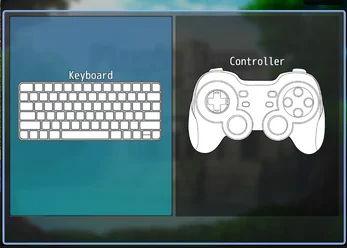
✔ Support for both Keyboard and Gamepad
✔ Optional visual layouts (keyboard/gamepad images)
✔ Gamepad layout switch (visual reference for different controllers)
✔ Up to 109 keyboard keys supported
✔ Safe system: prevents saving incomplete layouts
🔹 Important Notes
⚠️ Key bindings are saved permanently (even in playtest)
Before releasing your game: → Reset to default if needed
⚠️ This plugin does not extend controller compatibility
→ It works with standard RPG Maker supported controllers
------------------------
Works Great With
• MultiCrafting→ Improve usability of crafting menus
• Stats & Skills → Adjust skill navigation
More Plugins by WinterDream
• Achievements→ Add a steam like achievement mamager
• Items Choice→ Let players select what item to use with events
• Prequel Saves Import → Import old games saves to know the world state
Explore all WinterDream plugins:
https://winterdreamgamescreator.itch.io/
Terms of use
Please refer to the Terms of Use. By using this plugin you accept WinterDream terms
Version, bugs and further development
VERSION 1.0:
Future released will aim to:
- Make the gamepad layout selection permanent (as for v1.0 the user need to set it every time it changes the gamepad bindings)
- Introduce the option to add multiple language translations, having the plugin detect the local language and adapt the language (if available)
Follow WinterDream
Follow the page to stay updated on new RPG Maker plugins and systems.
Need help or want to share your project?
Join the WinterDream Discord:
 GetAssetPack