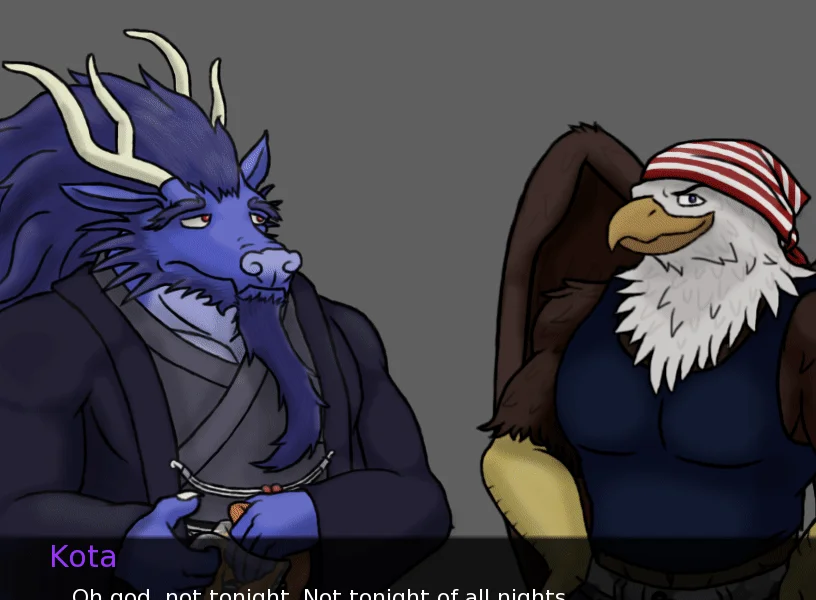
This project is made to demonstrate an effect I'm calling, Auto Highlight. Its primary purpose is to allow you to subtly change sprites based on who is speaking in the dialogue, drawing attention to the speaker's sprite. All handled automatically, saving you from having to write ATL on every line of the script. The default implementation of this I've provided makes use of a small zoom and darkening of the sprite. But can easily be expanded to make use of other ATL properties based on the desired effect.
Show full description...
The main file of interest is the 00auto-highlight.rpy. It provides several comments to explain how it works and what you'll need to do to get it running. Be sure to read the setup comments near the top to know what you have to do to implement it.
Originally this was a minor effect that I created for Where the Demons Lurk. But it ended up being useful for both Beyond the Harbor: r and Burrows. As a result, I began to consider that it might be useful for other projects as well. So, I decided to release it so everyone has access to it.
Default implementation makes use of the matrixcolor ATL property, which is only available on Renpy 7.4 and above. But can be modified to work with earlier versions if you desire.
The code for this project is provided under the MIT license.
Credits:
Luke and Kota sprites used with permission from https://minoh.itch.io/minotaur-hotel-sfw I do not claim ownership of the sprites. The sprites belong to their respective owners.
Demo script written by members of FVN in a voice call: https://discord.gg/GFjSPkh - FVN is an 18+ discord server. Do not join if you are a minor.
Beyond the Harbor: r Example from: https://harmoyena.itch.io/beyond-the-harbor - BtH:r is an 18+ VN with strong themes that are inappropriate for children
Burrows Example is from: https://itch.io/search?q=Burrows - Burrows is an 18+ VN with strong themes that are inappropriate for children
 GetAssetPack