GetAssetPack

PSX Textures Vol. 3: Marble, Terrazzo and Travertine
PSX Textures Vol. 3: Marble, Terrazzo and Travertine
Price
Free
Type
Textures
Creator
Francisco Cidade
Formats
PNG
Dimensions
3D
Style
PSX, Pixel art, Low poly
Engine
Godot, Unity

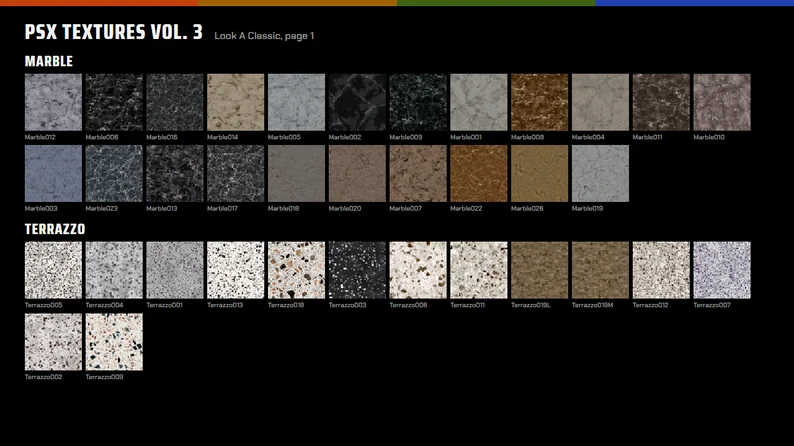
Seamless marble, terrazzo, travertine and onyx textures in five retro PS1 styles, from 32 to 128 pixels, with limited palettes and optional dithering. Suited to low-poly 3D games.

25 free seamless PS1-style textures in 5 looks. Pro has all 50 and Godot 4 materials.

Available on

Search by image

Upload a reference to find previews with similar colors, contrast, and detail.

PSX Textures Vol. 3: Marble, Terrazzo and Travertine

PSX Textures Vol. 3: Marble, Terrazzo and Travertine1 / 3
Francisco Cidade · itch.ioFree
3D
Textures
License not indexed
  • i Check the terms on the original listing.
Show full terms
FormatPNG

25 free seamless PS1-style textures in 5 looks. Pro has all 50 and Godot 4 materials.

Seamless marble, terrazzo, travertine and onyx textures in five retro PS1 styles, from 32 to 128 pixels, with limited palettes and optional dithering. Suited to low-poly 3D games.

View original listing

Description

Seamless textures of marble, terrazzo, travertine and onyx, each one converted to five PS1 looks. 25 textures are free to download. Pro has all 50 (250 small PNG files) and a Godot 4 project with a ready material for every texture.

What is in the pack

Show full description...

Every texture comes in five looks, one folder per look. Pick the one you prefer.

  • A Classic: 64 px, 16 colors, PS1 dither
  • B Flat: 64 px, 16 colors, no dither
  • C Soft: 128 px, 32 colors, light dither
  • D Murky: 64 px, 24 colors, dark and grimy
  • E Chunky: 32 px, 16 colors, PS1 dither

Free and Pro

Free: 25 of the 50 textures, in all five looks.

Pro (US$ 3): all 50 textures in all five looks, plus the Godot 4 project.

Godot

Pro includes a Godot 4 project: a material (.tres) for every PNG and a small demo room.

Using the PNGs

Set texture filtering to Nearest (Point) and turn mipmaps off, or the pixels blur. In Godot: Filter = Nearest in the material and Repeat = Enabled. In Unity: Filter Mode = Point, Generate Mip Maps off, Compression = None. File names are the ambientCG material ids, see CREDITS.txt.

License

One license covers you and the people working with you on your projects. Use the textures in personal and commercial projects, as many as you want, no royalties. You cannot resell or redistribute the texture files, or put them in a public repository. A built game that uses them can be public. The full text is in LICENSE.txt.

More from me

Tags

3DGodotLow-polyPixel Artps1PSX (PlayStation)RetroSeamlessTexturesUnity

Downloads

Name your own price.