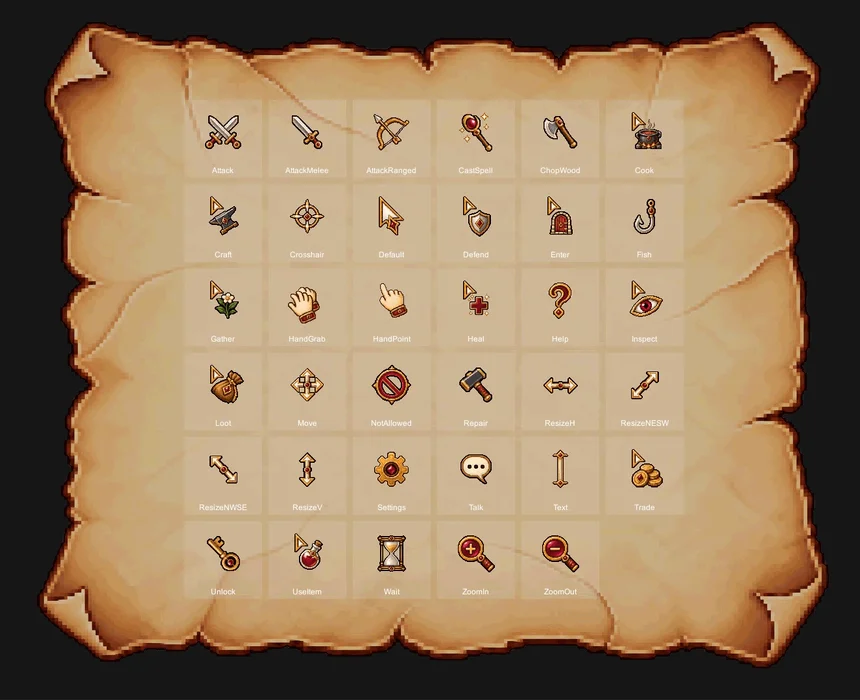
A pixel art cursor pack covering everything from standard game UI to combat, dialogue, gathering, crafting, and other RPG interactions. Every cursor shares a consistent visual style and is available in two color sets and two resolutions.
Show full description...
- 25 pressed states — darker variants for click feedback
- 4 animated cursors — Wait (4 frames), HandGrab, Talk, and Enter (3 frames each)
- Pre-measured hotspot coordinates — provided for all 35 cursors in both sizes
- Available as a Resource Pack or Unity Ready Version
Included Cursors
- 15 System cursors — Default pointer, text, wait, move, resize, help, settings, zoom, and more
- 2 Hand cursors — HandPoint and HandGrab
- 18 RPG Action cursors — Attack, AttackMelee, AttackRanged, Defend, CastSpell, Heal, Talk, Trade, Inspect, Loot, UseItem, Unlock, Gather, ChopWood, Fish, Cook, Craft, and Repair
The set covers combat and character interactions as well as activities such as fishing, cooking, gathering, woodcutting, and crafting.
Two Color Sets and Two Sizes
- Red set — Gold & Burgundy
- Green set — Gold & Deep Teal
- The complete set of 35 cursors is included in both colors
- Each color folder is self-contained, so you can import only the set you need
- 35 designs × 2 colors — 70 color variations
- Every cursor is available in 32 px and 64 px
- Each size has been individually refined to preserve clear shapes and crisp pixel details
Use the 32 px set for standard displays and compact interfaces, or the 64 px set for high-DPI displays and larger interfaces.
Pressed States, Animations, and Hotspots
- 25 pressed states — click variants displayed while the mouse button is held
- 4 animated cursors — Wait (4 frames), HandGrab, Talk, and Enter (3 frames each)
- Hotspots for every cursor — 35 cursors × 2 sizes, for a total of 70 prepared click points
- The Resource Pack includes a hotspot reference table for both 32 px and 64 px
- The Unity Ready Version stores each hotspot directly in its CursorData asset
- Pressed states and animations are handled automatically in the Unity version
Resource Pack — $5.99
An engine-independent PNG pack that can be used with Unity, Godot, GameMaker, web projects, and custom engines.
- 276 PNG files
- 35 cursor types
- 2 complete color sets
- 32 px and 64 px versions
- 25 pressed states
- All animation frames included
- RGBA PNGs with hard-edged alpha
- No DPI metadata
- No atlas extraction required
- Organized by color, size, and cursor category
- Consistent file naming
- Hotspot reference table for both sizes
- Usage examples for Unity, Godot, and GameMaker
Import only the folders you need and use the PNG files directly in your preferred engine.
Unity Ready Version — $14.99
Includes the complete PNG collection, a ready-to-use Unity cursor system, editor tools, and a demo scene.
You can also easily add cursor PNGs you have created. Place the files in the designated folder and run the tool to create the CursorData assets and automatically connect their animation frames, Pressed states, and hotspots.
- CursorManager — centrally manages the default cursor, active cursor, size selection, and animation
- CursorTrigger — attach it to a UI element or Collider and assign a cursor for automatic hover switching
- Automatic pressed states — displays the matching Pressed variant while the mouse button is held
- Built-in animation playback — automatically plays Wait, HandGrab, Talk, and Enter
- Unscaled Time support — animations continue during loading screens and paused gameplay
- Pixel-exact software cursor — displays each cursor at its original texture size
- Auto Size By DPI — automatically selects the 32 px or 64 px set based on display scaling
- Multi-monitor support — updates the cursor size within 0.5 seconds when the game window moves between monitors with different scaling
- Cursor Preview — preview every cursor at up to 8× zoom, switch between sizes, and view animations in the Editor
- Hotspot crosshair — visually verify exactly where each cursor clicks
- Generate From Folder — automatically creates CursorData assets from your own PNG files
- Automatic grouping — connects numbered animation frames and matching Pressed files
- Reference-safe updates — existing assets are updated in place so scene references remain intact
- Setup Triggers On Selection — quickly configures cursor triggers under the selected UI object
- Demo scene included — test all 35 cursors directly with your mouse
Unity Compatibility
- Unity 2020.3 or newer
- Built-in Render Pipeline / URP / HDRP
- Legacy Input Manager / New Input System
- Windows / macOS / Linux standalone builds
Free Lite Pack
Try both a static RPG cursor and an animated cursor before purchasing the complete pack.
- Attack — crossed swords, Red color set, 32 px and 64 px
- Wait — 4-frame hourglass animation, Red color set, 32 px and 64 px
- Total — 2 cursor types and 10 PNG files
Import the Lite Pack into your project to check the pixel size, visual quality, and animation before choosing the full version.
License
- Use in unlimited personal and commercial game projects
- Modify and adapt the assets to fit your project
- Credit is appreciated but not required
- Reselling or redistributing the original or modified asset files is not permitted
Give every action in your game a clear and consistent pixel art cursor.
ㅡㅡㅡㅡㅡㅡㅡㅡㅡㅡㅡㅡㅡㅡㅡㅡㅡㅡㅡㅡㅡㅡㅡㅡㅡㅡㅡㅡㅡㅡㅡㅡㅡㅡㅡㅡㅡㅡㅡㅡ
Also Included in the 6-in-1 Mega Bundle
The Resource Pack edition of Pixel RPG Cursors is also included in the Pixel RPG UI Mega Pack: 6-in-1.
If you also need fantasy HUDs, dialogue UI, skill icons, and book-style interfaces, the Mega Bundle brings all six packs together at a better value.
- Includes the complete Pixel RPG Cursors PNG Resource Pack
- Unity runtime scripts and editor tools are not included
- Existing Mega Bundle owners receive this update at no additional cost
 GetAssetPack