GetAssetPack

Voxel Skeleton

Voxel Skeleton
Price
Free
Type
3D Models
Creator
skeletonlord123
License
CC0
Formats
BLEND, OBJ, PNG
Dimensions
3D
Style
Voxel
Genre
RPG
Setting
Fantasy
Engine
Blender

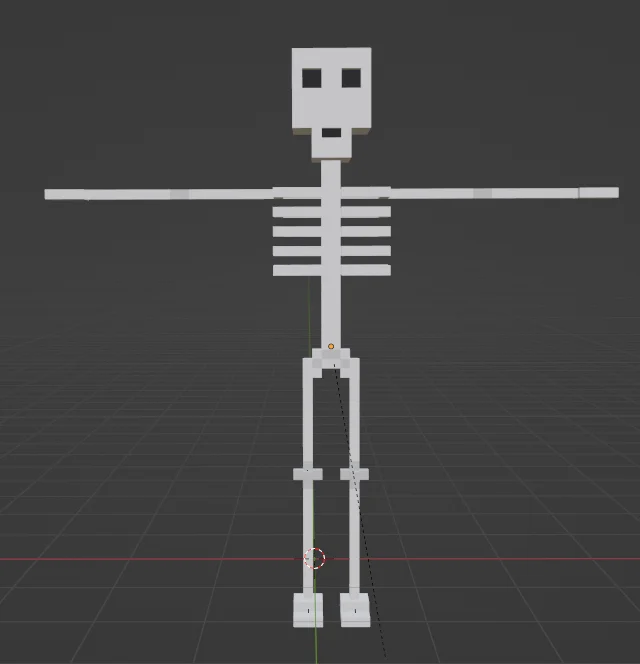
Its a silly skellington! Everything should be fully rigged, each bone should move individually without any stretching, the only exception being the spine-> chest bone, but that is probably easily fixed. Importing the obj file into mixamo WILL cause major amounts of stretching and it...doesn't look good. I figured i'd still upload my obj file though Exporting it as FBX SHOULD work great with Mixamo. If the skelly decides to be animated backwards, you can just flip the skeleton around and it'll import into it. That should be fixed already, though. Apply the material001 base color file I included as the skeleton material and the grey/black should appear in the right spot. This is my first time using both blender and magicavoxel, so bare with me if its not perfect. I am using it in my project right now, though, and everything is working fine. CC0 but if you want to credit me, feel free! Also please let me know so i can give it a look!

Available on

Search by image

Upload a reference to find previews with similar colors, contrast, and detail.

Voxel Skeleton

Voxel Skeleton1 / 2
skeletonlord123 · OpenGameArtFree
3D Models
CC0 · Public domain dedication
  • ✓ Commercial use, edits and redistribution
  • ✓ Attribution is optional
  • i Trademark and privacy rights still apply
Show full terms
FormatsBLEND, OBJ, PNG

Its a silly skellington! Everything should be fully rigged, each bone should move individually without any stretching, the only exception being the spine-> chest bone, but that is probably easily fixed. Importing the obj file into mixamo WILL cause major amounts of stretching and it...doesn't look good. I figured i'd still upload my obj file though Exporting it as FBX SHOULD work great with Mixamo. If the skelly decides to be animated backwards, you can just flip the skeleton around and it'll import into it. That should be fixed already, though. Apply the material001 base color file I included as the skeleton material and the grey/black should appear in the right spot. This is my first time using both blender and magicavoxel, so bare with me if its not perfect. I am using it in my project right now, though, and everything is working fine. CC0 but if you want to credit me, feel free! Also please let me know so i can give it a look!

View original listing

Tags

skeletonFantasyEnemymonsterRPGblenderMagicaVoxel