GetAssetPack

Mythic Bastionland ProCreate Realm Sheet Templates
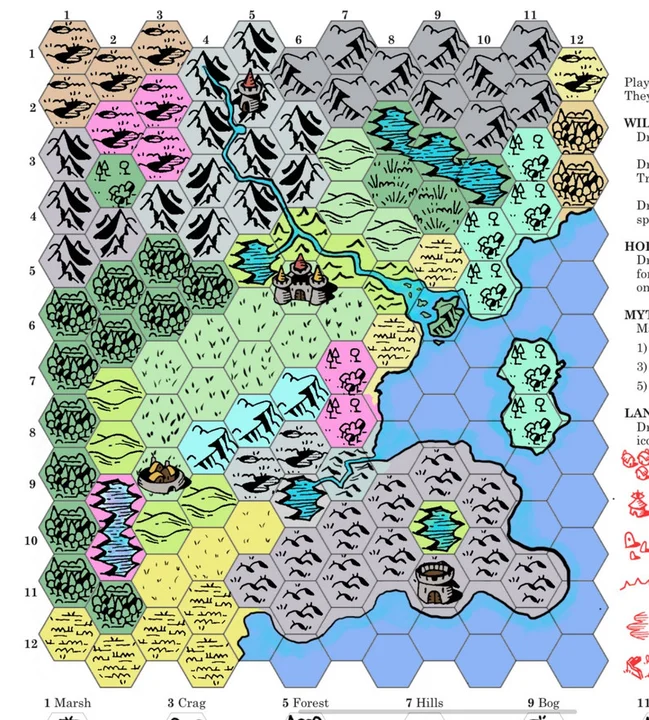
Mythic Bastionland ProCreate Realm Sheet Templates
Price
Free
Type
Textures
Creator
edmo
Genre
RPG
Setting
Fantasy

Layered Procreate realm sheet templates for Mythic Bastionland, with hex grids and referee and player-facing layers for hand-drawn maps.

Chris McDowall's Realm Sheets for Mythic Bastionland, converted into muti-layered ProCreate templates.

Available on

Search by image

Upload a reference to find previews with similar colors, contrast, and detail.

Mythic Bastionland ProCreate Realm Sheet Templates

Mythic Bastionland ProCreate Realm Sheet Templates1 / 2
edmo · itch.ioFree
Textures
License not indexed
  • i Check the terms on the original listing.
Show full terms

Chris McDowall's Realm Sheets for Mythic Bastionland, converted into muti-layered ProCreate templates.

Layered Procreate realm sheet templates for Mythic Bastionland, with hex grids and referee and player-facing layers for hand-drawn maps.

View original listing

Description

For use with Mythic Bastionland:

https://chrismcdee.itch.io/mythic-bastionland

Credit to Chris McDowall for the original design of the Realm Sheets (and for making a great game).

Show full description...

While working on my own Realm for Mythic Bastionland, I took the liberty of breaking apart the content of the Realm Sheets PDF provided with Mythic Bastionland into distinct layers within ProCreate, then structuring them in a way that should be easy for Referees to use and reuse.

Hopefully these templates can save you some time in your process, if you're looking for a fun hand-drawn (digital) alternative to hex mapping software.

UPDATE: I highly recommend copying the hex-grid layer, moving the copied layer below the colouring layers, then using Auto-Select tool and Fill to quickly colour your landscape hexes as you generate your Realm; then use invert-select and the eraser to clear away the superfluous grid lines. An additional template (including coloured icons for the player-facing and ref-facing layers) has been added to assist with this.

Instructions:

  • Import the .procreate files into your iPad's ProCreate app.
  • Use the Referee's Realm Template to draw and colour your realm:
  • Follow the Realm Creation Procedure from Mythic Bastionland.
  • Draw on the various layers named *-Draw.
  • (optional:) Select and copy Landscape, Holdings or Landmark icon layers from their respective Layer Groups and then merge down onto the appropriate *-Draw layer when you're happy with their placement.
  • Add colour to your Realm on the layers named *-Colour.
  • Adjust the opacity of the HexGrid layer to your preference.
  • Print or export, as desired.
  • Select and copy the layers containing player-facing information, then open the Players/Travel Template and paste the copied content over the space occupied by existing hex grid, and transform/resize to suit. Hide or delete the original hex layer before printing or exporting.

Tags

bastionlandmythic-bastionlandplay-sheetsprocreaterealmrealm-sheetsProject templateTabletop role-playing game

Downloads