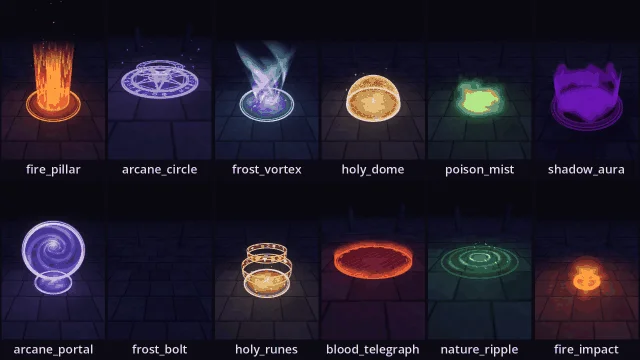
96 3D spell effects for Godot 4 and Unity, one line of code each. Magic circles, portals, auras, rings of runes, strike warnings, pillars of light, vortices, wards, ripples and mist, and bolts that fly to their target and burst there, in fire, frost, poison, holy, shadow, arcane, nature and blood. Shaders, meshes and particles alone: no textures to import, no particle setup.
Show full description...
Try it first: click Run asset pack above and cast every kind in every element round a ring of standing stones, in your browser.
MagicArea.add(self, "fire_circle") var ward := MagicArea.add(self, "holy_dome", {position = Vector3(2, 0, 0), radius = 2.0}) MagicArea.add(self, "frost_pillar", {one_shot = true}) # forms, holds, fades, frees itself MagicArea.add(self, "blood_telegraph", {one_shot = true, appear = 1.2}) # a 1.2 s wind-up MagicArea.add(self, "fire_bolt", {position = hand}).launch(enemy) # flies there and bursts ward.stop(1.0)
Unity too: a second download holds the Unity 6.3 package, for any render pipeline: the same 96 effects, settings and demo, with MagicArea.Add("fire_circle") in C#. Import the .unitypackage from the magic-circles-3d-unity.zip download with Assets > Import Package > Custom Package in Unity. All eight elements are available in the inspector.
Free Sample
Try 16 of the 96 effects free: the magic circles and ripples in all eight elements. It's the Free Sample download below, with a Unity package beside it, no purchase needed.
What's inside
12 kinds:
- On the ground: a magic circle (rings, a band of runes turning one way and a star the other, a smaller ring of runes hovering over it), a ripple of rings spreading out, a pool of mist rolling out in billows, and a strike warning: a pulsing rim and a low wall of light that fills from the middle over its wind-up, for a boss's area attack.
- Rising: a pillar of light, a spiral vortex, a ward of hexagonal cells with blows ringing out across it, and an aura of licking tongues round a character.
- Standing and floating: a portal whose spiral arms wind down a funnel that falls away behind it as you walk round, opening from the middle, and two rings of runes floating round, turning opposite ways.
- In flight: a bolt, its head flaring in the element's star and a streaming trail behind it, shedding particles as it goes. launch() sends it at a point or after a moving node; where it hits it sets off an impact: a flash, a shockwave across the ground, a plume and a burst of particles. Or set off an impact on its own.
8 elements, each with its colours, its star (fire's triangle to holy's eight points, blood's pentagram), how much it writhes, its particles (embers, snowflakes, bubbles, sparkles, smoke, motes, falling leaves, drops of blood) and its light. Shadow's light takes light away.
- They form and fade: circles and runes draw themselves round, pillars, domes and auras rise, portals open, ripples spread out. Loop them, or one_shot for a spell that forms, holds and cleans up after itself.
- Any colour, radius, height, speed and intensity; light and particles switch off.
- Three ways to draw them: smooth, dithered (the PS1's ordered dither, for PSX-style games) or cut out. Per effect, or MagicArea.default_transparency once for the whole game.
- They bloom under an Environment with glow.
- Drop a MagicArea node in a scene and it plays in the editor as you set it up.
- Demo: a ring of standing stones at night, lit by what you cast: pick the kind and the element, click the ground to cast, or to fire a bolt there. Right here in the browser.
Compatibility
- Godot 4.3 to 4.7.
- Forward+, Mobile and Compatibility renderers: desktop, mobile and web.
- GDScript and shaders only: no plugin to enable, no C#, no GDExtension.
Install
Copy addons/magic_circles/ into your project. Open addons/magic_circles/demo/demo.tscn to try every effect.
For lightning and wind, see Storm & Wind 3D.
License
Use in unlimited commercial and non-commercial games. No attribution required. Don't resell or redistribute the shaders or scripts themselves as an asset.
Related Packs
- Magic Circles 3D Free - Spell VFX Sampler
- Fantasy UI SFX - 323 RPG UI Sounds
- Medieval Combat SFX - 267 Sword, Bow & Siege Sounds
- PS1 RPG Menu Kit - Gradient Windows, Battle & Field Menus in 4 Themes
- PSX Look - PS1 Graphics Kit, 6 Shaders & 13 Presets
 GetAssetPack