GetAssetPack

200+ Free Low Poly Assets

200+ Free Low Poly Assets
Price
Free
Type
3D Models
Creator
FlakDeau
License
CC0
Formats
PNG, FBX
Dimensions
3D
Style
Low poly, PSX, Flat
Setting
Modern
Engine
Blender

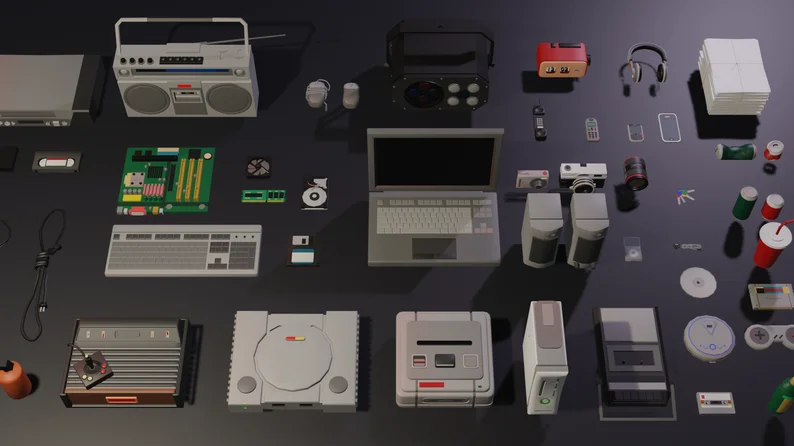
Over 200 flat-shaded low-poly props, including furniture, street, venue, storage, and technology items, using a consistent 32×32 texture.

Simple low poly models with block colour textures.

Available on

Search by image

Upload a reference to find previews with similar colors, contrast, and detail.

200+ Free Low Poly Assets

200+ Free Low Poly Assets1 / 6
FlakDeau · itch.ioFree
3D Models
CC0 · Public domain dedication
  • ✓ Commercial use, edits and redistribution
  • ✓ Attribution is optional
  • i Trademark and privacy rights still apply
Show full terms
FormatsPNG, FBX

Simple low poly models with block colour textures.

Over 200 flat-shaded low-poly props, including furniture, street, venue, storage, and technology items, using a consistent 32×32 texture.

View original listing

Description

Overview

This asset consists of a single Blender file with just over 200 free props. All assets are flat shaded with in a consistent art style.

NEW UPDATE

Reorangised the folders, added an extra 100 props and FBX files for all meshes.

Premium Version: 450+ assets (click image below)

Contents

A zip file containing:

Show full description...
  • Computer Props
  • Game Consoles
  • Audio Equipment
  • Misc Technology Props
  • Trolleys
  • Venue Equipment
  • Storage Crates

Texturing - Diffuse Map Only

All the props are made in a consistent art style and use the same 32x32px Texture. Each colour on the texture map is 1 pixel and as a result all the meshes are unwrapped using Cube Projection and scaled down to fit. Due to the tiny size of the textures and UVs, texture detail is achieved by adding geomtry detail to the meshes and moving UV faces around the Texture map to the desire colour. Please see the Texture Map Workflow image for a quick breakdown.

Notes

Created in Blender 4.0

Missing Textures

If the textures are missing in Blender, please reference the location of the Texture Map on your computer. In Blender go to:

  • Go to Material Properties tab - if you don't have a material, create one
  • Surface > Base Colour - Click the dot next to it and choose Image Texture
  • Navigate to where you have saved this asset and find the TextureMap folder, open it and select MasterMaterial1px PNG.
  • This should fix it!

Blurry Textures in Game Engines

The texture map in this asset is very small so double check things like mipmaps / filter mode that your material is using.

License

CC0 1.0 Universal

Tags

3DBlenderflat-shadingLow-polyps1PSX (PlayStation)RetroSimple

Downloads

Name your own price.